8-Gravel
January 13, 2025
Solved

Using PTC CREO distributed batch to run mapkey on multiple prt files

  • January 13, 2025
  • 3 replies
  • 4642 views

Hello,

I have been trying to debug this for a while and cannot figure it out. Was hoping someone here could help me.

Creo parametric version: 10.0.4

Creo Distributed batch version: 10.0.4


What I am trying to do: 

I have many part files with different names that are 2D curves. I want to export those part files to dxf without opening the files one by one and saving them.


What I have done so far:

I could not get the proper export of the part files to dxf without opening the part as a drawing first. I created a mapkey that opens the current part as a drawing template with the correct view and scale, then saves that drawing as a dxf. The mapkey works when run manually and does save me time.

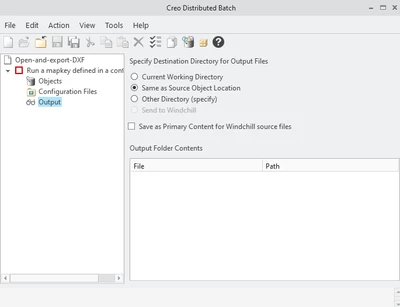
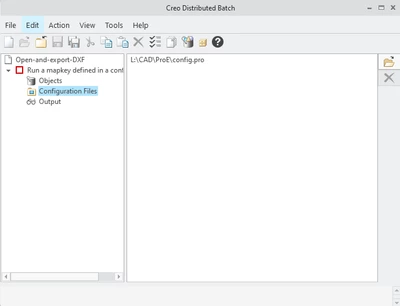
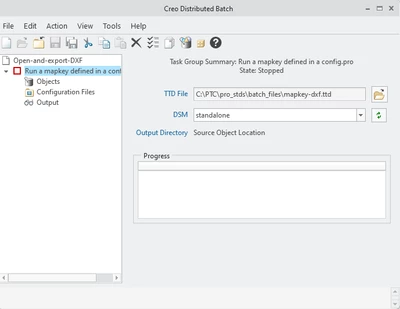
However, I wanted to speed up the process further by using Creo distributed batch to run that mapkey on all the parts. I have found a way to do this in theory using the mapkey.TTD option in Creo distributed batch. I opened the TTD as text and modified it accordingly so it would run my mapkey (-dxf), then renamed the TTD to mapkey-dxf. I have configured Creo distributed batch to use my config file which contains my mapkey, and selected the mapkey-dxf.TTD as the task group.


My problem:

I can add all my parts to the "objects" section in the distributed batch window, and when I start the task they all go from "unsubmitted" to "working", but they never complete or fail. It simply stays "working" forever.


I have very limited experience with Creo distributed batch, so I might be doing something wrong / have a setting wrong. Maybe my mapkey needs to be modified since it works when the part is already open, but the batch process is different. I hope someone can point me in the right direction.


Here are some images for additional information. I have also attached text files with the code for my mapkey and dxc file. I added the code for the TTD file because I could not figure out how to attach it here (even when changed to txt it wouldn't let me post?)
NM_8932441_0-1736785249353.png

NM_8932441_1-1736785268426.png

NM_8932441_2-1736785301730.png

TTD file code:

<?xml version="1.0" encoding="UTF-8"?>
<!-- 05-Oct-09 L-05-10 CHI  $$1  Submitted -->
<!-- 07-Jan-10 L-05-14 CHI  $$2  Remove out-of-date comment -->
<!-- 17-Feb-15 P-30-03 mtch $$3  Added group -->
<!-- 15-Jun-15 P-30-11 mtch $$4  Added save_model -->
<!-- 13-Oct-15 P-30-18 mtch $$5  Added drw to FILTER_FILE_TYPES -->
 
<TTD version="1.0" created_by="PTC">
        <DESCRIPTION>Run a mapkey defined in a config.pro</DESCRIPTION>
        <GROUP>Misc</GROUP>
        <DETAILS>Will be run on any file type; user is responsible for choosing types that mapkey will operate on correctly.</DETAILS>
        <SERVICE name="dbatchs"/>
<FILTER_FILE_TYPES type=".prt .asm .drw .sldprt .sldasm .catpart .catproduct .cgr"/>
<!-- Replace "F1" with chosen mapkey when customizing file -->
        <TKFUNC func="ProMapkeyRun" mapkey_key_sequence="-dxf">
          <save_model>false</save_model>
        </TKFUNC>
</TTD>


Best answer by Chris3

Below is your mapkey. Everything after "mapkey(continued) saves as dxf;@MAPKEY_LABELExport to dxf;\" is what you want to repeat with the updated file paths. You could ask ChatGPT something like this:


Write a VBS script that finds all of the .prt files in folder C:\my folder path and then copies and pastes the text below only for each time it makes a copy of the text, it updates the K:\\Myfilepath\\ file paths in the copied text with the file path for each .prt filename that is found in the C:\myfolder folder


mapkey(continued) ~ Command `ProCmdSessionChangeDir` ;\
mapkey(continued) ~ Trail `` `` `DLG_PREVIEW_POST` `file_open`;\
mapkey(continued) ~ LButtonArm `file_open` `tb_EMBED_BROWSER_TB_SAB_LAYOUT` 3 322 15 0;\
mapkey(continued) ~ LButtonDisarm `file_open` `tb_EMBED_BROWSER_TB_SAB_LAYOUT` 3 322 15 0;\
mapkey(continued) ~ LButtonActivate `file_open` `tb_EMBED_BROWSER_TB_SAB_LAYOUT` 3 322 15 0;\
mapkey(continued) ~ Input `file_open` `opt_EMBED_BROWSER_TB_SAB_LAYOUT` \
mapkey(continued) `K:\\MY\\FILE\\PATH`;\
mapkey(continued) ~ Update `file_open` `opt_EMBED_BROWSER_TB_SAB_LAYOUT` \
mapkey(continued) `K:\\MY\\FILE\\PATH`;~ Activate `file_open` `opt_EMBED_BROWSER_TB_SAB_LAYOUT`;\
mapkey(continued) ~ Command `ProFileSelPushOpen@context_dlg_open_cmd` ;\
mapkey(continued) ~ Command `ProCmdModelOpen` ;~ Trail `` `` `DLG_PREVIEW_POST` `file_open`;\
mapkey(continued) ~ Activate `file_open` `Current Dir`;\
mapkey(continued) ~ Trail `` `` `PREVIEW_POPUP_TIMER` `file_open:Ph_list.Filelist:<NULL>`;\
mapkey(continued) ~ Select `file_open` `Ph_list.Filelist` 1 `MYPARTNAME.prt`;\
mapkey(continued) ~ Activate `file_open` `Ph_list.Filelist` 1 `MYPARTNAME.prt`;\
mapkey(continued) ~ Activate `main_dlg_cur` \
mapkey(continued) `igToolbar_AncestorIGT_IGT_GRP_inh396938342.proe_win|.mcs29658718_mp|select_\
mapkey(continued) all_check` 1;\
mapkey(continued) ~ Activate `main_dlg_cur` \
mapkey(continued) `igToolbar_AncestorIGT_IGT_GRP_inh396938342.proe_win|.mcs29658718_mp|select_\
mapkey(continued) all_check` 0;~ Command `ProCmdViewSpinCntr` 0;\
mapkey(continued) ~ Command `ProCmdEnvCsysDisp` 1;\
mapkey(continued) ~ Select `new` `Type` 1 `Drawing`;~ Activate `new` `chk_eponymous_drawing` 1;\
mapkey(continued) ~ Activate `new` `OK`;~ Select `dwg_create` `rad_format` 1 `1`;\
mapkey(continued) ~ Update `dwg_create` `inp_template_name` `export-to-dxf`;\
mapkey(continued) ~ Activate `dwg_create` `psh_ok`;~ Command `ProCmdMdlTreeSearch` ;\
mapkey(continued) ~ Open `selspecdlg0` `SelOptionRadio`;~ Close `selspecdlg0` `SelOptionRadio`;\
mapkey(continued) ~ Select `selspecdlg0` `SelOptionRadio` 1 `Note`;\
mapkey(continued) ~ Select `selspecdlg0` `RuleTab` 1 `Attributes`;\
mapkey(continued) ~ Select `selspecdlg0` `RuleTab` 1 `Misc`;\
mapkey(continued) ~ Activate `selspecdlg0` `EvaluateBtn`;~ Activate `selspecdlg0` `ApplyBtn`;\
mapkey(continued) ~ Activate `selspecdlg0` `CancelButton`;\
mapkey(continued) ~ Key `main_dlg_cur` `proe_win` 9 1205 451 196608 512 1566 774 1920 1080 \
mapkey(continued) 6010006 `Del`;~ Command `ProCmdEditDelete` ;\
mapkey(continued) ~ Close `main_dlg_cur` `appl_casc`;~ Command `ProCmdModelSaveAs` ;\
mapkey(continued) ~ Activate `file_saveas` `Current Dir`;~ Open `file_saveas` `type_option`;\
mapkey(continued) ~ Close `file_saveas` `type_option`;\
mapkey(continued) ~ Select `file_saveas` `type_option` 1 `db_137`;\
mapkey(continued) ~ Activate `file_saveas` `OK`;~ Activate `export_2d_dlg` `OK_Button`;\
mapkey(continued) ~ Command `ProCmdWinClose`;\


Add the header back in at the beginning of the mapkey:


mapkey -dxcustom @MAPKEY_NAMEused for auto export to dxf with trail file playback \
mapkey(continued) saves as dxf;@MAPKEY_LABELExport to dxf;\


and remove the last \ at the end so the mapkey stops.


I didn't test the ChatGPT prompt but I am sure you can figure it out if it doesn't work on the first try.

3 replies

KenFarley
21-Topaz II
January 13, 2025

My guess is something in your mapkey macro is trying to display something, but since you're running batch it can't?


Also, you can probably trim the macro a bit, maybe delete all the Input 'dwg_create'... lines and just have the Update 'dwg_create'... line That's typically what I have in my macros, they just have a Select line and then an Update line.


Here's a similar inquiry from the past:

https://community.ptc.com/t5/System-Administration/Distributed-Batch-in-graphics-mode/td-p/546645 

8-Gravel
January 13, 2025

Thank you for the reply. 


You are right about my mapkey, I have removed the extra lines like you said, and it still works perfectly. 


As for the display from the mapkey, my operation does open dialogue boxes, but the mapkey itself does not require user input once it is started.

Would the batch file still be interrupted if the mapkey is able to run without user input? I do not know how I could open my file as a drawing and save it without opening the "new drawing file" box and the "save as" box.

24-Ruby III
January 14, 2025

Hi,

I would try different method ... using trail file.

Suggestion:

  • start Creo session
  • execute one export to DXF action
  • end Creo session
  • send me trail file generated by Creo session ... rename it to mytrail.txt before uploading it
  • I will try to suggest you how to generate trail file containing code for executing multiple export to DXF actions


8-Gravel
January 14, 2025

Hello Martin,


Here is the trail file attached with the dxf export like mentioned. I have use a mapkey to perform the export, let me know if this causes an issue.


In the trail file, I have only performed the export on a specific file, (template-pattern-hw03-r02.prt) but the export would have to be done on many files with different names and in different folders. This could be done using different trail files obviously, a single trail file per folder exported.


For example, the folder PX contains 40 parts with different names that I would like to open as drawing and export to dxf. Then I have many other folders with various amount of files and file names (PX2 with 30 files, ect).


Is there a way I can edit my trail files quickly to include all the files in a specific folder?


Thank you for your help.

Nicolas

24-Ruby III
January 15, 2025

@NM_8932441 wrote:

Hello Martin,


Here is the trail file attached with the dxf export like mentioned. I have use a mapkey to perform the export, let me know if this causes an issue.


In the trail file, I have only performed the export on a specific file, (template-pattern-hw03-r02.prt) but the export would have to be done on many files with different names and in different folders. This could be done using different trail files obviously, a single trail file per folder exported.


For example, the folder PX contains 40 parts with different names that I would like to open as drawing and export to dxf. Then I have many other folders with various amount of files and file names (PX2 with 30 files, ect).


Is there a way I can edit my trail files quickly to include all the files in a specific folder?


Thank you for your help.

Nicolas


Hi,

inside _trail_generator_2025-01-15.zip you can find my version of trail file generator. Please unzip it and read _trail_generator_info.docx document.


Chris3
21-Topaz I
January 14, 2025

If it were me, I would include the file open command in the mapkey and paste in the full path to the .prt file so it gets recorded in the mapkey. Same thing with saving it depending on where you want it to go.


Then write a .vbs script (or use ChatGpt, etc) to find all of the paths to your .prt files in the folders that you want to look in.


Then you have the script copy and paste the mapkey block only changing out the line with the path to the .prt files. Note that you need to include a / on every line except the last one.


Once the script has generated a mapkey that has all of the part paths in it then import that and run it.

8-Gravel
January 14, 2025

Hello Chris,


I am open to trying your method!


I have updated my mapkey to set my file path as the working directory and open my file. Then it proceeds as normal to open as drawing and save as dxf.

If I wanted to use this mapkey for multiple files within my directory, what would the code look like? I am not familiar with vbs scripting but like you said I could try to figure something out with chapgpt.


My original intent was to keep the mapkey more general to be able to apply it to any part file using distributed batch, but it seems that option might not be viable.


Thank you for your help,

Nicolas

Chris3
Chris321-Topaz IAnswer
21-Topaz I
January 14, 2025

Below is your mapkey. Everything after "mapkey(continued) saves as dxf;@MAPKEY_LABELExport to dxf;\" is what you want to repeat with the updated file paths. You could ask ChatGPT something like this:


Write a VBS script that finds all of the .prt files in folder C:\my folder path and then copies and pastes the text below only for each time it makes a copy of the text, it updates the K:\\Myfilepath\\ file paths in the copied text with the file path for each .prt filename that is found in the C:\myfolder folder


mapkey(continued) ~ Command `ProCmdSessionChangeDir` ;\
mapkey(continued) ~ Trail `` `` `DLG_PREVIEW_POST` `file_open`;\
mapkey(continued) ~ LButtonArm `file_open` `tb_EMBED_BROWSER_TB_SAB_LAYOUT` 3 322 15 0;\
mapkey(continued) ~ LButtonDisarm `file_open` `tb_EMBED_BROWSER_TB_SAB_LAYOUT` 3 322 15 0;\
mapkey(continued) ~ LButtonActivate `file_open` `tb_EMBED_BROWSER_TB_SAB_LAYOUT` 3 322 15 0;\
mapkey(continued) ~ Input `file_open` `opt_EMBED_BROWSER_TB_SAB_LAYOUT` \
mapkey(continued) `K:\\MY\\FILE\\PATH`;\
mapkey(continued) ~ Update `file_open` `opt_EMBED_BROWSER_TB_SAB_LAYOUT` \
mapkey(continued) `K:\\MY\\FILE\\PATH`;~ Activate `file_open` `opt_EMBED_BROWSER_TB_SAB_LAYOUT`;\
mapkey(continued) ~ Command `ProFileSelPushOpen@context_dlg_open_cmd` ;\
mapkey(continued) ~ Command `ProCmdModelOpen` ;~ Trail `` `` `DLG_PREVIEW_POST` `file_open`;\
mapkey(continued) ~ Activate `file_open` `Current Dir`;\
mapkey(continued) ~ Trail `` `` `PREVIEW_POPUP_TIMER` `file_open:Ph_list.Filelist:<NULL>`;\
mapkey(continued) ~ Select `file_open` `Ph_list.Filelist` 1 `MYPARTNAME.prt`;\
mapkey(continued) ~ Activate `file_open` `Ph_list.Filelist` 1 `MYPARTNAME.prt`;\
mapkey(continued) ~ Activate `main_dlg_cur` \
mapkey(continued) `igToolbar_AncestorIGT_IGT_GRP_inh396938342.proe_win|.mcs29658718_mp|select_\
mapkey(continued) all_check` 1;\
mapkey(continued) ~ Activate `main_dlg_cur` \
mapkey(continued) `igToolbar_AncestorIGT_IGT_GRP_inh396938342.proe_win|.mcs29658718_mp|select_\
mapkey(continued) all_check` 0;~ Command `ProCmdViewSpinCntr` 0;\
mapkey(continued) ~ Command `ProCmdEnvCsysDisp` 1;\
mapkey(continued) ~ Select `new` `Type` 1 `Drawing`;~ Activate `new` `chk_eponymous_drawing` 1;\
mapkey(continued) ~ Activate `new` `OK`;~ Select `dwg_create` `rad_format` 1 `1`;\
mapkey(continued) ~ Update `dwg_create` `inp_template_name` `export-to-dxf`;\
mapkey(continued) ~ Activate `dwg_create` `psh_ok`;~ Command `ProCmdMdlTreeSearch` ;\
mapkey(continued) ~ Open `selspecdlg0` `SelOptionRadio`;~ Close `selspecdlg0` `SelOptionRadio`;\
mapkey(continued) ~ Select `selspecdlg0` `SelOptionRadio` 1 `Note`;\
mapkey(continued) ~ Select `selspecdlg0` `RuleTab` 1 `Attributes`;\
mapkey(continued) ~ Select `selspecdlg0` `RuleTab` 1 `Misc`;\
mapkey(continued) ~ Activate `selspecdlg0` `EvaluateBtn`;~ Activate `selspecdlg0` `ApplyBtn`;\
mapkey(continued) ~ Activate `selspecdlg0` `CancelButton`;\
mapkey(continued) ~ Key `main_dlg_cur` `proe_win` 9 1205 451 196608 512 1566 774 1920 1080 \
mapkey(continued) 6010006 `Del`;~ Command `ProCmdEditDelete` ;\
mapkey(continued) ~ Close `main_dlg_cur` `appl_casc`;~ Command `ProCmdModelSaveAs` ;\
mapkey(continued) ~ Activate `file_saveas` `Current Dir`;~ Open `file_saveas` `type_option`;\
mapkey(continued) ~ Close `file_saveas` `type_option`;\
mapkey(continued) ~ Select `file_saveas` `type_option` 1 `db_137`;\
mapkey(continued) ~ Activate `file_saveas` `OK`;~ Activate `export_2d_dlg` `OK_Button`;\
mapkey(continued) ~ Command `ProCmdWinClose`;\


Add the header back in at the beginning of the mapkey:


mapkey -dxcustom @MAPKEY_NAMEused for auto export to dxf with trail file playback \
mapkey(continued) saves as dxf;@MAPKEY_LABELExport to dxf;\


and remove the last \ at the end so the mapkey stops.


I didn't test the ChatGPT prompt but I am sure you can figure it out if it doesn't work on the first try.