8-Gravel
January 10, 2026
Solved

How to fix "{A12535] Empty top level index term heading; entire index term will be ignored."

  • January 10, 2026
  • 2 replies
  • 63 views

(First time poster, I apologize for any missteps in my post. 🙂


When opening my (inherited from someone who retired) ~800 page document in Arbortext Editor or in Arbortext Styler, I am receiving the following message exactly 4 times:

    {A12535] Empty top level index term heading; entire index term will be ignored.


I have searched my document for empty index terms and find none.  I have done a lot of checks of my index entries (not every one, but there are many thousands throughout and I do not know what I should be searching for).  I did look at all the entries in the prolog of the document, that are setting up id's for "index reference" tags in the body of the document to use, and removed all of those that were not in fact being referenced.


There was also some info online that said maybe it might be an empty index header (like no entries that started with "Q", for example), but I created fake index entries for all the letters that had no entries, the resulting index did have entries for all 26 characters, but I still got exactly 4 [A12535]s on open.  Also, I have other documents that do not have entries for all 26 characters, and they do not get any [A12535]s.


Our system does have conditional processing set up, so there are many index entries that appear in the source but that will not be processed at Publish time.  But once again, all my other documents have the same sort of thing, so it seems unlikely that this is the cause.  Although who knows, maybe there is some specific use of conditional index entries here that is different, although I have not seen it.


As far as I can tell, these 4 errors are not adversely affecting the published output, but the errors are just sort of driving me crazy!  Part of my personal process when publishing documents is to make sure there are no errors being reported, either at open or publish time, or when using the "Check Completeness" tool.


I am using Arbortext 8.0.2.0.


Any help would be much appreciated!

Best answer by bfriesen

I asked this question a few years ago. See this support topic https://www.ptc.com/en/support/article/CS109701?source=search.


  • In ArbortextInstallPath\custom\init create an ACL document, like showprelimuserules.acl
    • The content of showprelimuserules.acl should be
    • set showprelimuserules=on
  • Open the document in Arbortext Editor, then select Edit > Edit Resolved Document > For Styling (RDS)
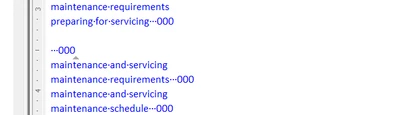
  • Scroll almost to the bottom to find the index links
  • Double-click on the zeroes that follow that blank line
    • This action will place the cursor in the <indexterm> that is empty
  • Fix the empty indexterms in the particular documents
    • Note: you cannot fix them in the RDS, because that document is read-only

bfriesen_1-1768316907702.png


bfriesen_0-1768316864263.png


Thanks


Bryon

2 replies

bfriesen18-OpalAnswer
18-Opal
January 13, 2026

I asked this question a few years ago. See this support topic https://www.ptc.com/en/support/article/CS109701?source=search.


  • In ArbortextInstallPath\custom\init create an ACL document, like showprelimuserules.acl
    • The content of showprelimuserules.acl should be
    • set showprelimuserules=on
  • Open the document in Arbortext Editor, then select Edit > Edit Resolved Document > For Styling (RDS)
  • Scroll almost to the bottom to find the index links
  • Double-click on the zeroes that follow that blank line
    • This action will place the cursor in the <indexterm> that is empty
  • Fix the empty indexterms in the particular documents
    • Note: you cannot fix them in the RDS, because that document is read-only

bfriesen_1-1768316907702.png


bfriesen_0-1768316864263.png


Thanks


Bryon

dcarney8-GravelAuthor
8-Gravel
January 16, 2026

Thank you very much, Bryon!


I was able to fix my problem with your information, although it didn't quite work as you described.  That support topic you sent was for Arbortext Editor versions 5.4-6.0, and I am on 8.0.2.0, where there does not appear to be an "Edit Resolved Document" menu item anymore (I do have "Full Menus" set to on).  Also, the creation of the .acl file did not get showprelimuserules set to on for me, but I was able to get it set to on by going to Tools>Preferences, Advanced, where the showprelimuserules setting can be set.


Once I set that, shut down Arbortext, then reopened Arbortext and the document, lines like the blue lines you show in your post did show up at the very bottom of the document.  In my case, there were blank lines, as you say, but they did not have a next line that was zeroes.  But I was able to click on the zeroes right before the blank line, which took me to the index entry that was right before the one that was causing the error and thus helped me pinpoint the specific index tags at fault.  (Note that those blue lines were somewhat intermittent.  Sometimes they would show up on open, sometimes they wouldn't, and even when they did, they would disappear at some point.  But I was able to get them to show up enough to get things fixed.)


Of my 4 errors:

- 1 was due to using an id for a higher-level index that was instead an id of a division (<d>).

- The other 3 were due to conditional processing; index entries that would not have been processed at publish time were causing these errors to be reported at open time.  Not sure why it was these 3 when there were other similar tags...


I did not have any actual empty index terms.


Dennis

18-Opal
January 14, 2026

It depends on your doctype, but you should be able to search for empty index items to find them more easily. The simplest way to do this would be to use the standard Find->Find/Replace... menu option, and in the search field, type the markup for an empty top-level index term. For example, in Docbook, an index entry with an empty top level would look like this;

<indexterm><primary></primary><secondary>Foo</secondary></indexterm>


so the search would look something like this:

ClayHelberg_0-1768429736437.png

Make sure the "Match Markup" checkbox is checked. This will bring you to any index items that have an empty primary term, which would cause that error.


If you're using a different doctype, you will have to work out what an index entry with an empty top-level term would look like, and make your search include that markup.

dcarney8-GravelAuthor
8-Gravel
January 16, 2026

Thank you for your post, Clay.  It is great to know that knowledgeable people are around to help.


As it turns out, I had already done the type of search you mention before posting.  But I am guessing that your post could be useful for others who might find this topic.


Dennis