
1-Visitor
November 10, 2015
Question

Sum of columns of matrices

  • November 10, 2015
  • 4 replies
  • 14585 views

Hello,

I just started using MathCAD Prime 3.0 and stumbled upon a problem. I can't find a solution to that online.
Problem.PNG

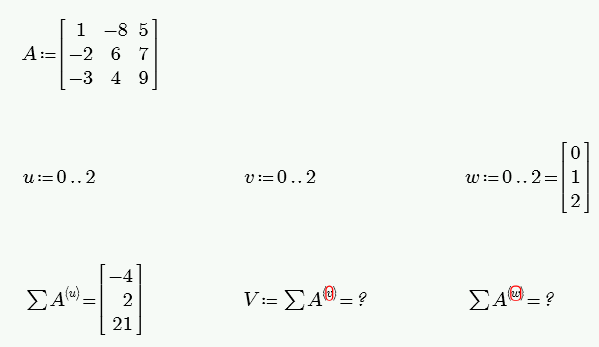
I have a question about this screenshot:

Why appending a result to a variable makes the operation impossible (1st and 2nd columns)?

Why showing the value of a variable makes the next operation impossible (1st and 3rd columns)?

Thank you. (I hope this post is in compliance with the policy)

4 replies

24-Ruby IV
November 10, 2015

sumcol-1.png

1-Visitor
November 10, 2015

Have a look below at two alternatives.

The summation operator is implicitly looping through the columns of A. When the summation operator is assigned to a variable to have to explicitly tell Mathcad to loop through the columns.

Mike

1-Visitor
November 10, 2015

Bilel,

In your second column, you need to add a matrix index "v" to your variable "V".

In your third column, I'm not sure what the problem is.  Perhaps you have an incorrect label assigned to "w".  Or perhaps there's something different between your version of Prime and mine (Prime 1.0 on this computer).

23-Emerald V
November 10, 2015

Bilel Meziane wrote:

Hello,

I just started using MathCAD Prime 3.0 and stumbled upon a problem. I can't find a solution to that online.

I have a question about this screenshot:

Why appending a result to a variable makes the operation impossible (1st and 2nd columns)?

Why showing the value of a variable makes the next operation impossible (1st and 3rd columns)?

Thank you. (I hope this post is in compliance with the policy)

I've attached a worksheet that hopefully should give you a little more insight into what's going on, but I'll highlight a bit of it here:

Critical point to note: Range Variables are not Vectors!

Ranges and vectors are different data types, as are strings, functions and arrays, and each has it own set of rules.

u and v are range variables; that is, they both hold a range data type that specifies a set of values that Mathcad should generate when it has to evaluate u and v.  Think of a range variable as an implied for loop range rather than as a set of actual values. The actual values implied by a range variable don't exist until Mathcad evaluates the range variable and they only exist one at at time during the evaluation.

On the other hand, w (for reasons explained in the worksheet) is a vector.  That is, each of its values exists in memory; there is nothing "implied" about the values!

In your first expression, Mathcad evaluates the sum by generating each value of u (0,1 & 2) in turn, evaluating the sum of the corresponding column and then creates a vector from the individual elements.  It does not, as it might appear to do, evaluate the whole of the left hand side to create a vector and then display the vector result.  You can see this more clearly if you make the sum the argument to the IsArray or IsScalar function.

The second expression raises an error because, if you're going to use a range variable to do assignment, it must occur on the left hand side (lhs) of the definition operator, otherwise Mathcad will not evaluate the range variable.  As you don't have u on the lhs of the definition, Mathcad tries to get column u and fails because the column operator needs an integer argument and u's data type is a range not an integer.  So you get an error.  On the other hand, if you make u an index of V on the lhs, Mathcad will happily iterate over the range, producing 0, 1 and 2 in turn, all of which are valid arguments for the column operator.

The third expression doesn't work because w isn't, despite appearances, a range variable.  It is a vector (or, rather, it holds a vector).  The reason for this is subtle.  It appears as though the evaluation operator (=) gets evaluated before the definition operator (:=).  Consequently, Mathcad evaluates "0..2 =" to produce the vector [0 1 2] (see explanation for first expression). It then assigns this vector to w.

This means that the argument to the column operator is a vector,not an integer, so Mathcad raises an error.

Stuart

1-Visitor
November 11, 2015

Nice work as usual Stuart.

StuartBruff wrote:

The third expression doesn't work because w isn't, despite appearances, a range variable.  It is a vector (or, rather, it holds a vector).  The reason for this is subtle.  It appears as though the evaluation operator (=) gets evaluated before the definition operator (:=).  Consequently, Mathcad evaluates "0..2 =" to produce the vector [0 1 2] (see explanation for first expression). It then assigns this vector to w.

This means that the argument to the column operator is a vector,not an integer, so Mathcad raises an error.

Stuart

I have regularly used this feature (being the lazy *** I am) to covert a range definitions into a vectors. Interesting to know that you think the un-documented feature works because the evaluation operator has higher precedence than the definition operator.

Mike

23-Emerald V
November 11, 2015

Mike Armstrong wrote:

Nice work as usual Stuart.

StuartBruff wrote:

The third expression doesn't work because w isn't, despite appearances, a range variable.  It is a vector (or, rather, it holds a vector).  The reason for this is subtle.  It appears as though the evaluation operator (=) gets evaluated before the definition operator (:=).  Consequently, Mathcad evaluates "0..2 =" to produce the vector [0 1 2] (see explanation for first expression). It then assigns this vector to w.

This means that the argument to the column operator is a vector,not an integer, so Mathcad raises an error.

Stuart

I have regularly used this feature (being the lazy *** I am) to covert a range definitions into a vectors. Interesting to know that you think the un-documented feature works because the evaluation operator has higher precedence than the definition operator.

Mike

Thanks, Mike.   I first thought this when looking at what happens when you apply the symbolic processor to something that's had inline evaluation done.

I suspect that there is a downside to using inline evaluation, though (apart from having to resize the result table).  I wondered if Mathcad would have two copies of the resulting vector, one in the variable and the other as the = result itself.  I did a quick experiment in Prime, whilst looking at Task Manager.

I set n:=2, N:=2^n, k:0..N and then generated a vector x by x[k:=k.  This gave me a baseline memory size of about 400 MiB.  I then changed n to 8, which should have given something in the order of 0.8 GiB (~8 * 10^8 bytes for 64 bit scalars).   I got 1200 MiB, which is about right.  I then added the "=" evaluation operator and the memory jumped up to 1950 MiB, again about right.   I changed n back to 2 and Prime then went beserk for about 5 minutes whilst it tried to do whatever it does under the hood - it looks like memory reclamation is very slow and resource intensive.

I changed tack and, with n still = 2, I defined x:=k.   This time I had a baseline memory of about 350 MiB.  I then changed n to 8 and, by the time Prime had finished calculating, the memory had jumped to 2780 MiB! 

I then dropped my vec function and this jumped to over 2 GiB, then dropped back down to just 1 GiB when it had finished processing.

I repeated the inline evaluation and got inconsistent results.  I saw the same leap to over 2 GiB, then Prime kept dropping to 1 GiB, then back up to 2 GiB, and never really seemed to stabilize - plenty of CPU activity shown.  I stared at Task Manager for about 5 minutes, then helped my wife debug her bread-making machine, and then went for a 20 minute.  Stared at Task Manager for a few minutes.  Got bored with this and tried to stop the calculations.  Prime wasn't having any of this and hung.  I turned down Windows' kind offer to stop the process and decided to wait and see what Prime did.  It is still chuntering along as I write ... rapidly climbing from 1200 MiB to 1900 GiB.

Stuart