19-Tanzanite
April 10, 2023
Solved

Symbolic Calculation of Determinant

  • April 10, 2023
  • 3 replies
  • 6319 views

Hello,


CornelBejan_0-1681108431874.png

CornelBejan_1-1681108439076.png


CornelBejan_2-1681108470915.png

CornelBejan_3-1681108489320.png

CornelBejan_4-1681108938946.png


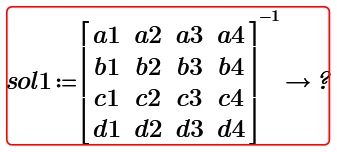
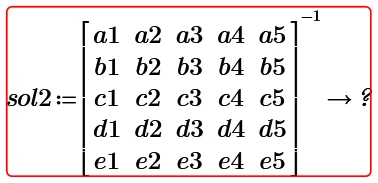
I think that I reached the full capability of Mathcad Prime 8 regarding the symbolic calculation. Or I am wrong?


Can somebody run this sol2 determinant in Mathcad Prime 9 to see the result?


Mathcad Prime 8 file attached.


Best answer by Werner_E

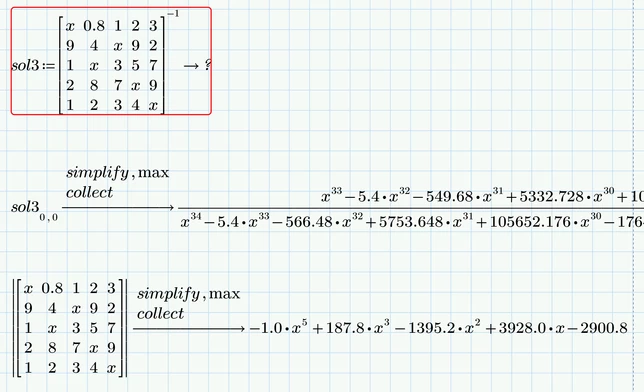
Here is what I see in Prime 9 when I recalculate your sheet.
As you can see the result for the determinant is much nicer, the one for the inverse seems to be as ugly than what you got in P8.
Werner_E_1-1681131340502.png


Using 0.8 forces the symbolics in some sort of numeric/floating point mode (unfortunately).

If possible its always worth a try to change float numbers to fractions with integers.
You may use the "float" modifier yourself if appropriate
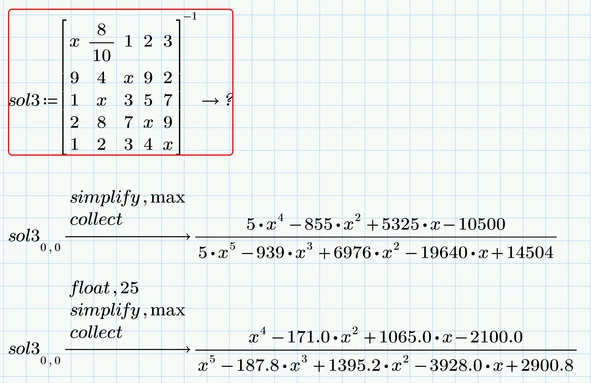
Werner_E_2-1681131486799.png

Experimenting with the number of significant digits in "float" can give unexpected results

Werner_E_3-1681131617545.png

Not sure where the factors 1.0 stem from. Most of them go away if we omit the "collect" modifier - strange!


Werner_E_4-1681132294515.png


3 replies

24-Ruby IV
April 10, 2023

My Mathcad

ValeryOchkov_0-1681110652338.png


Cornel19-TanzaniteAuthor
19-Tanzanite
April 10, 2023

Uh, I do not understand Russian language, but I think it is the same result that my above result, right? And your Mathcad is Mathcad Prime 9?

25-Diamond I
April 10, 2023


Can somebody run this sol2 determinant in Mathcad Prime 9 to see the result?


Very same effect in Prime 9, too.

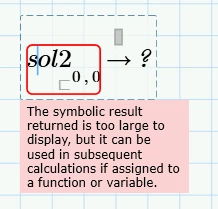
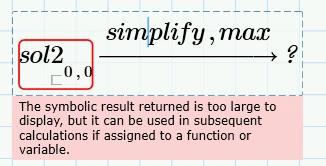
Prime allows to display the numerator of the first element, but the denominator is too large in the opinion of Prime.

Actually its not a limitation of the symbolics itself as you get a result which you could assign a function (with 25 arguments) which then could be used for further calculations.
Its just an artificial display limitation as the developers thought that it would not make much sense to see an expression that huge and decided to save the memory which would otherwise needed for displaying the result.

Werner_E_1-1681125937316.png


Here with less typing efforts:

Werner_E_0-1681125684222.png


You may also use this for a more compact display (up to a 9x9 matrix)

Werner_E_2-1681126495446.png


Cornel19-TanzaniteAuthor
19-Tanzanite
April 10, 2023

I am wondering: what is the possible solutions to this thing? Some workarounds exist?

25-Diamond I
April 10, 2023

@Cornel wrote:

I am wondering: what is the possible solutions to this thing? Some workarounds exist?


For me its not a problem which needs a solution.

If its a problem for you, you may contact PTC support and open a support case. Tell them why its a problem and talk them into modifying Prime so that larger results could be displayed  on screen (maybe like it could be done in Mathcad 11 by using a registry entry).


As I see it you have four options

  1. Wait for Prime to be modified accordingly (I won't hold my breath)
  2. Get somehow access to an older version of Mathcad (version 11) and use it
  3. Use a different program with more capable symbolic and display options (not sure if Maple, Mathematica, MatLab, ... could fulfill your needs)
  4. Think about what the benefit of seeing such huge expressions displayed on screen actually would be and maybe come to the conclusion, that its not worth bothering anyway ;-).


21-Topaz II
April 10, 2023

Hi,

I think that I reached the full capability of Mathcad Prime 8 regarding the symbolic calculation. Or I am wrong?

Answer is Prime will do a larger matrix, but why reinvent the wheel.  You can just use the inbuilt function in Prime that can handle any matrix size!

Capture.JPG

25-Diamond I
April 10, 2023

The definition of the function sol2 as well as its symbolic evaluation is rather useless with this approach, isn't it? The last region in your screen should would be all thats needed. But your function shows what I tried to explained in my previous answer - its not a limitation of the symbolics itself as it returns a valid result which can be assigned a function and used numerically.


I, too, don't understand why @Cornel  insists on displaying such huge expressions but obviously, for reasons unknown to us, the goal of his attempts is to get the general symbolic result displayed on screen, not a numeric one. I guess he knows that he always can get a numeric result for much larger matrices if needed.

Cornel19-TanzaniteAuthor
19-Tanzanite
April 10, 2023

@Werner_E wrote:

I guess he knows that he always can get a numeric result for much larger matrices if needed.


Yes, I know that, but here the problem is how to calculate symbolically the DETERMINANT and INVERSE of the matrix, not how to calculate numerically the DETERMINANT and numerically INVERSE of a matrix.


For example, look:

CornelBejan_1-1681128298511.png

CornelBejan_2-1681128319190.png

CornelBejan_4-1681128647875.png

CornelBejan_7-1681129223576.png


Result of the determinat with Wolfram Mathematica:

1.png


Result of the inverse of that matrix with Wolfram Mathematica:

338411098_753057369832504_3961857906462980355_n.png


Do you see the differences? The results of the two (determinant and inverse of matrix) from the two software are not displayed the same.  


My question here: is it possible to see also in Mathcad Prime the same results of the determinant and inverse as it is shown in Wolfram Mathematica?

These results in Mathcad Prime with those great powers in calculation of the determinant (x^17 at numerator and x^12 at denominator) and inverse of matrix (x^33 at numerator and x^34 at denominator) seems strange...and I do not know why it looks like this and why Mathcad Prime gives the results in this manner.