
4-Participant
March 26, 2023
Solved

This Value Must be A Real Number When Plotting Functions

  • March 26, 2023
  • 2 replies
  • 5497 views

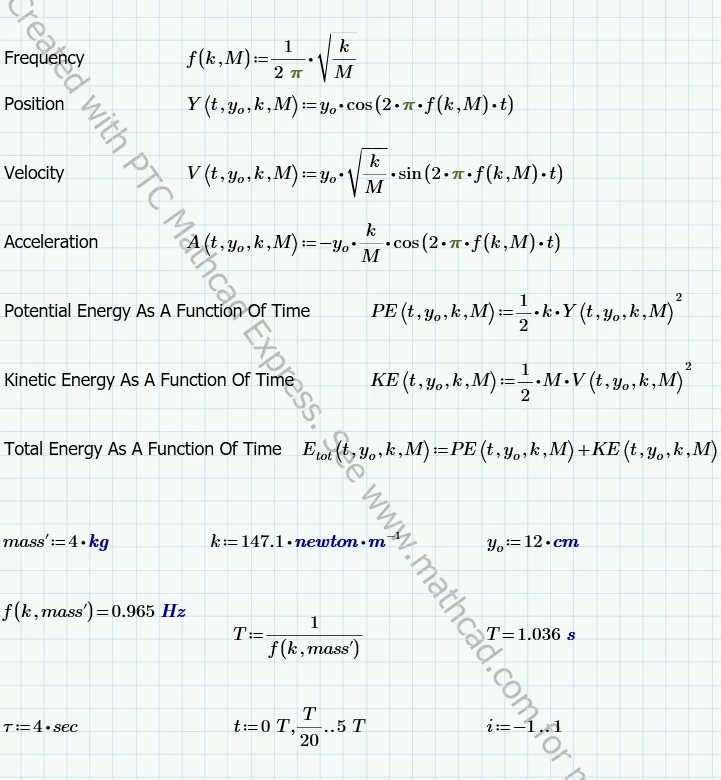
I am working on a simple harmonics lab where I need to produce four graphs. I am attempting to graph position as a function of time, acceleration as a function of time, velocity as a function of time, and total energy as a function of time. I have inputted the formulas into Mathcad, as well as inserted the plots.
 

Capture.PNG


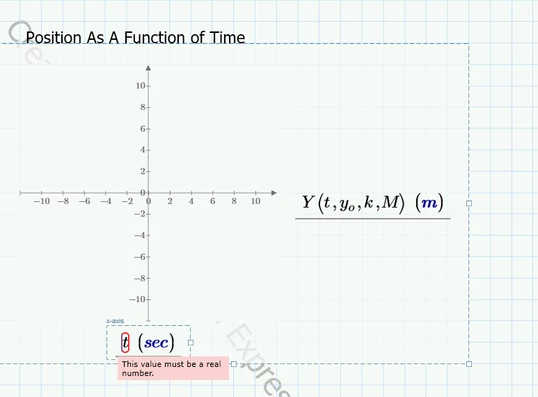
When attempting to plot the functions, Mathcad produces an error stating that the value on the x-axis must be a real number. (The error is on all four plots)  
 

Capture 2.PNG  


I have attempted to fix the error by changing the values for t, switching the x and y axis, using T and solving T/20 and 5*T and then inputting those values in for t, as well as working with a few different tutors, but all attempts have not corrected the issue. 


Any assistance would be greatly appreciated.  

 

Best answer by Werner_E

If possible always attach the worksheet, not just a picture showing part of it


Chances are that you did not define "M" which you use in the plot expression. Doing so would throw exact the very same error message shown in your picture.

Maybe you intended to use "mass'" instead of "M".


EDIT: Terry's reply was not shown when I started mine.
IMHO the range t is NOT the problem. There should be no need to turn it into a vector as suggested by Terry even though it would do no harm in case of your functions (they would all be vectorized implicitely automatically as far as I see).
Best guess still is that you wanted to use "mass'" and not "M" when you call the function "Y" in your plot.


And, yes, the error message sure is misleading, not helpful and flags the wrong position. We may call this a bug in Prime.
Flagging the "M" in the function call with a "Variable is not defined" message would be the correct way to handle this problem.

2 replies

21-Topaz II
March 26, 2023

Hi can you upload your worksheet.

The problem is "t" is a range variable not a real.

It may be as simple as adding an equal sign after definition of t

Capture.JPG

I notice M is not defined.

Cheers

Terry

21-Topaz II
March 26, 2023

Hi,

Putting an equal sign after definition of "t" turns it into a real column vector with units.

Energy equation has terms t^2 that will perplex Prime as squaring two column vectors is not possible.

It is required to define element by element calculation by vectorizing either in the definition of the energy function or on the graph.

Cheers

Terry


Werner_E25-Diamond IAnswer
25-Diamond I
March 26, 2023

If possible always attach the worksheet, not just a picture showing part of it


Chances are that you did not define "M" which you use in the plot expression. Doing so would throw exact the very same error message shown in your picture.

Maybe you intended to use "mass'" instead of "M".


EDIT: Terry's reply was not shown when I started mine.
IMHO the range t is NOT the problem. There should be no need to turn it into a vector as suggested by Terry even though it would do no harm in case of your functions (they would all be vectorized implicitely automatically as far as I see).
Best guess still is that you wanted to use "mass'" and not "M" when you call the function "Y" in your plot.


And, yes, the error message sure is misleading, not helpful and flags the wrong position. We may call this a bug in Prime.
Flagging the "M" in the function call with a "Variable is not defined" message would be the correct way to handle this problem.

4-Participant
March 26, 2023

Changing mass' to M solved the issue. I also have another question: tau is intended to produce a symbol (e.x. a diamond) on each plot at its defined position, (4 sec), and the symbol is also supposed to change each time the value for tau is changed. How would I add this to each plot? I have also attached the full worksheet. The problem in question is problem two, problem one is a separate problem.   

25-Diamond I
March 26, 2023

Looking for something like this?

Werner_E_0-1679804198632.png

You may also make it look like this by using the stem plot and adding horizontal and vertical lines

Werner_E_1-1679804588240.png