
1-Visitor
November 26, 2013
Question

Having a difficult time trying to check in CAD and move to Windchill Folder

  • November 26, 2013
  • 4 replies
  • 20530 views

Hello to all,

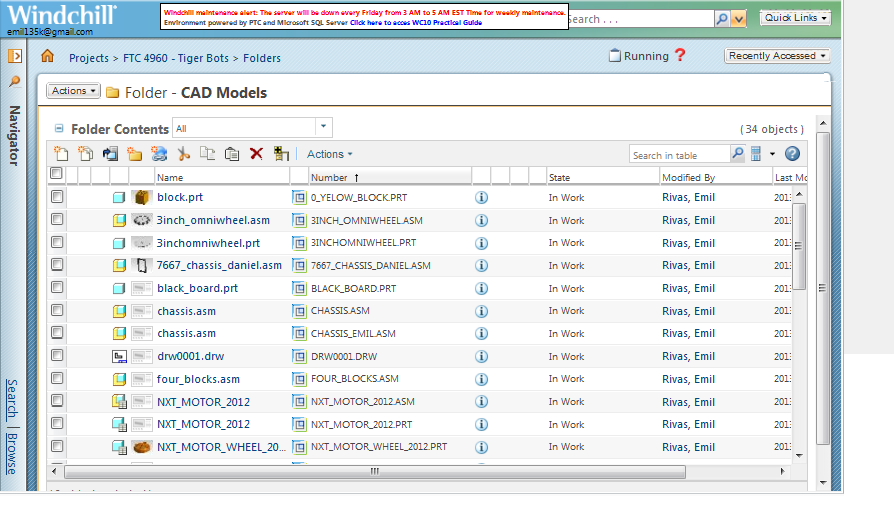
Trying to check in and move the Tetrix KOP library from the workspace to the CAD Models folder...
Folder_CAD_Models.png

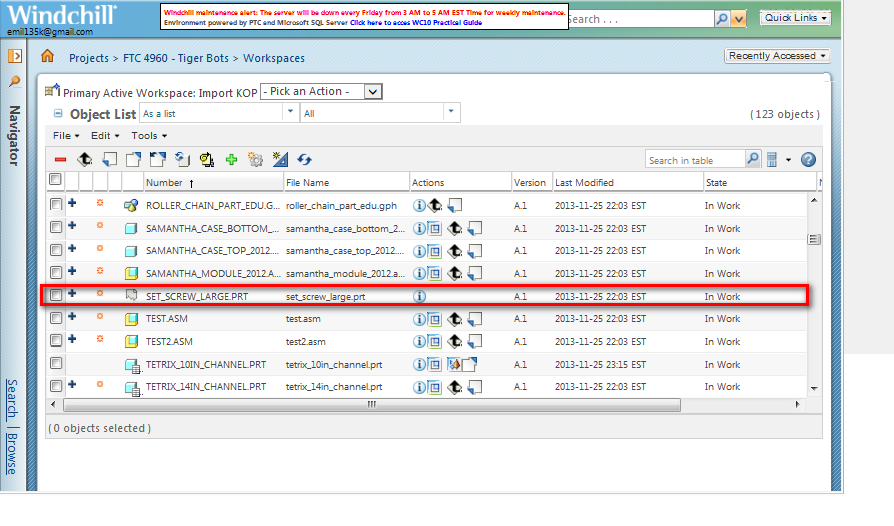
that includes assemblies created by our team. One particular part hangs up the entire process...
set_screw_hell.png

Message states...

"Cannot check in place holder document CAD Part - set_screw_large.prt, A.1."

Even when deselecting "set_screw_large.prt" Creo/Windchill still tries to push it up and it fails the whole batch process. Even when trying to delete the component and it tells me that...

"A referential integrity violation occurred for this operation:"

What a nightmare its a catch 22 situation, where one corrupt file hangs ups the whole process. It seems to be a single point of failure at its worst. Any chance I could share access to the Windchill workspace to have someone at PTC figure out this corruption issue? Are there any "Plan B Zapinator" functions for this wretched file?

Just as I was getting pumped up and excited about using Windchill after viewing the recent Robotalk Webinar on Windchill, I have been shot down in flames at the first step of the process!

Guess we have a case of a set screw jammed in the cogs here and has brought everything to an abrupt halt :-)!!!

Please take note that, I am brand new in these CAD/PLM issues as well.

Best Regards,

Emil


    4 replies

    1-Visitor
    November 26, 2013

    I have felt your frustration. Please, read on.

    The simplest approach is to create the missing part and save that to the workspace. The ghost object may be the result of an unverified family table - find the assembly that uses the part, find the family the part is in, verify the table and save the Generic and away you go.

    Also, try moving a few parts, then assemblies. While WC can handle more than you can likely create to throw at it, it is less frustrating to work through the operations that work and then develop the debugging skills required on the few that remain.

    It's been a while since I've seen these Ghost parts - I think there are settings in the Windchill interface to deal with them automatically, but I think you're using WC10, which I've not gotten to.

    This frustrating thing about WC is, in particular, a good thing. WC is designed to only work if everything is correctly referenced. Which makes sense for the billion-dollar companies that depend on it. The result is that WC has a large number of checks to preclude bad data from getting in - where it is much harder to deal with.

    To most users, though, this comes across as an unexpected pie in the face. A concrete pie. Because not only will WC sometimes give no response, and sometimes gives a useless response, it never gives a suggestion as to how to fix it.

    For example. I have copied a family table to a workspace with entries for all the members. To make sure there is no accidental change to items I don't want changed, I set their workspace status to locked. When it becomes necessary to make a change I open the Generic, unlock it, and it quietly refuses to change anything. I check it out - OK - still no changes. Because the instances are still locked. No error, no hint, just refuses to change anything. It's not the behaviour I would like it to have. Unlocking the Generic should unlock all the instances, just as checking out the Generic should check out the instances.

    The reason for locking? Some instances have features that force them to regenerate when they are retrieved, which marks them as modified, which means they get saved with the assemblies they are in. I don't want to bump the version of the items that I don't meaningfully change, so I would have to undo the checkout on the instances (based on a preference to check out things ProE/Creo thinks need checking out) which takes time. Locking them prevents the modification and the checkout.

    erivas1-VisitorAuthor
    1-Visitor
    November 26, 2013

    Hi David,

    Thanks for your feedback. In reference to...

    The simplest approach is to create the missing part and save that to the workspace. The ghost object may be the result of an unverified family table - find the assembly that uses the part, find the family the part is in, verify the table and save the Generic and away you go.

    How would I find the assembly or part that uses it? Is there a tool for it or is it by hunt and peck? See there are alot of parts since I am collecting the entire Tetrix Kit of Parts. Are there some is there some query tool that can work backwards from the rogue part to the assemblies it thinks it belongs to?

    I like Josh'es clean and simple suggestion, but the problem is that Windchill won't allow me to remove the object :-(.

    Regards,

    Emil

    1-Visitor
    November 26, 2013

    The icon that has an "i" in a circle on the same line with an item is the information button for that item. Pick that and it brings up a detailed information screen.Under "General" is "Where used" which will tell you what assembly uses it. Under "Related Objects" is "Family" which will tell you about its Generic and other family table members.

    If it hasn't got a family, then just create a part by the same name as the Ghost object and save it to the Workspace. It doesn't need any geometry - just be a part file. If it is in a family table, open the Generic and then Tools/Family Table/Tools/Verify -OK, and then save.

    1-Visitor
    November 26, 2013

    Hi Emil,

    Sorry to hear you are having problems.

    David makes some excellent points.

    The ghost files (grey, torn sheet of paper icon), are created when a part or assembly references something that no longer exists. Usually this is just a mistake made by a designer, but sometimes it's due to a renamed file and there is a residual reference that keeps creating the ghost part.

    The easiest way to handle this is to first delete all ghost files. You can sort by the column with the ghost part icon by hitting the grey box on top of the column, so all the ghost files are together, then just select them all and hit delete.

    Next, select your files and hit "check-in".

    Set the appropriate folder, then hit "next".

    In the last stage of check-in, you will check the box for "Auto resolve incomplete Objects".

    Finally, select "Update with object on server, then Ignore", and then "Finish".

    This should kill all ghost parts and they "shouldn't" come back.

    AutoResolve.jpg

    erivas1-VisitorAuthor
    1-Visitor
    November 26, 2013

    Josh,

    Is there some special way of deleting the ghost file other than using the delete object from within Windchill? I tried that and it won't delete it.

    Regards,

    erivas1-VisitorAuthor
    1-Visitor
    November 27, 2013

    Fun times are blooming, I should have started this effort on Holloween :-). Here I am selecting the complement

    files that are not in the CAD Files directory

    selecting+files+for+upload+excluding+the+ones+already+on+destination+folder.png

    Even though I purposely deselected these files preprocessor is telling me that I cannot upload these previously unchecked files and ignored the ones I selected!

    stating+the+obvious+preprocessing+files+I+did+not+select+for+upload+and+bombing+out.png

    Here its adding salt to the injury telling me I have not selected anything for check in.

    telling+me+nothing+was+selected+for+check+in+when+it+really+was.png

    I up the ante, and say, "ok if you can't do partials I'll just wipe out all the files in the CAD folder and do a mass upload". Great idea on paper, but I get shot down again...

    overseer+does+not+let+me+delete+or+purge+them.png

    I understand conservative thinking, but tying me up and saying "NO" to purging and deleting to start clean is pretty painful.

    It is CRAZY to think that all I am trying to do is to copy or mirror my Google Drive CAD folder into Windchill and it is giving me the third degree all over the place. This process should be seamless! BTW, that rogue part was not a part of the original file list that I was uploading to the workspace! Windchill just pulled it of somewhere while preprocessing.

    It must have fallen out (in the virtual sense) of one of the assemblies when trying to upload them to the workspace! This is crazy reality :-). Notice no set screw in original Google Drive folder...

    no+set+screw+part.png

    No set screw while importing to Windchill

    no+set+screw+while+importing+into+workspace.png

    Magical screw appears out of thin air "SET_SCREW_LARGE.PRT"

    Voila+set+screw+now+magically+appeared.png

    Why should I have to know the structures and dependencies of all the assemblies and parts in order for me to upload them to Windchill???? Why should screws fall out of assemblies while uploading!

    Thanks for your persistence and dedication to explain all this to me. Our current Google Drive depository is looking much less painful at the moment. It would be nice if PTC could make a "friendly mode" Windchill for freelance efforts like FTC and FRC.

    Best Regards,

    -Emil

    1-Visitor
    November 27, 2013

    You noticed correctly that the set screw was not one of the original files. That is why the error exists. Windchill looks through each file to determine what is required to build it. There must be matching files - either directly or by being part of a family table that is within a file. Some assembly or drawing requires the set screw, but there is no matching file.

    Creating a part file with that name and saving it in the Google drive before trying to import it would fill the gap for Windchill. When the referencing item is opened there would still be a placement or other reference error, but the existance of the part would be accounted for.

    Many people do get along with only a folder to work from, but if a file is deleted or even renamed, assemblies and drawings may no longer be retrievable because what they depend on is not available.

    Going back to the billion-dollar company - if you contracted with an outside firm to provide an assembly model and they sent a folder of files, wouldn't you want an automated solution to stand in the way of accepting incomplete data? As a comparison - would a bank accept a $100 deposit request with only $85 attached to it?

    It is a mistake, by their own admission, that PTC did not validate the KOP. On the other hand, it is a real-life occurance that data is missed and demonstrates why tools like Windchill are used.

    erivas1-VisitorAuthor
    1-Visitor
    November 27, 2013

    Hi David,

    Thanks again. I completely understand your explanations of why things are not working the way I thought they would or should. I get the criticality of a incorrectly placed or missing from a rocket and the criticality of data of billion dollar companies, like Boeing, Lockheed Martin, Honeywell, Raytheon, and $100 deposits, etc. I fly considerably and I would hate the thought of a missing critical set screw somewhere in the plane, so I get that. I occassionally skydive, so I understand the price of failure modes and missing things.

    Aside from Scott Morris helping us in the effort of fixing the ghost issues in the KOP (his effort and dedication to FIRST greatly admired and appreciated), is there a way I can clear the slate in Windchill and upload the KOP as it stands from scratch? Even if I need to walk on fire and kneel on glass to get there, I'd be willing to learn the nitty gritty of it. My original hope was to get our team to promote the use of Creo, Mathcad, and Windchill as part of our outreach efforts.

    Right now I am stuck between modes, like an elevator stuck between floors :-). Some parts are in the CAD folder like I intended them to be, but some are in the /default (whatever that means??), there are some components in "EPM Master (whatever that means??) and I can't move forward or backwards. Could I be having issues with deleting or purging due to limited access and permissions to do so? Is there a "super user mode" that could allow me to purge and start from scratch?

    David, I know I am stuck in the tree, and you have done an excellent job in explaining why and how I got stuck in it. Would you have any tips on how to get down from the tree that could help me? In earnest this is rather funny at the moment, as we all know we need to have much patience, persistence and an odd twist of sense a of humor to deal all this cool techy stuff.

    HELP!!! I'M STUCK AND I CAN"T GET DOWN (As I laugh at myself while up in the tree as you rather eloquently describe why and how I got there)

    Cheers,

    -Emil

    PS, David, thanks alot for your VERY PROACTIVE ENGAGEMENT.

    erivas1-VisitorAuthor
    1-Visitor
    November 27, 2013

    All previous details aside, how can I clear everything out in Windchill and copy my Google Drive CAD files into the CAD folder in Windchill? This is a simple and rudimentary task that would be required for FTCers and FRCers to start using Windchill for their CAD files assuming they want to use the KOP. It seems like some parts are in a default folder somewhere and the remnants are in the CAD Folder, can't delete them, can't move them.

    I used this article as a reference...

    http://ptc.hosted.jivesoftware.com/docs/DOC-4660

    I am getting this message now when trying to copy or upload files to the CAD folder in Windchill...

    EPM+message.png

    1-Visitor
    November 27, 2013

    Emil,

    This error is on PTC. I just tried importing the Textrix KOP and have 7 ghost objects that need to be fixed. I will try to get this done ASAP and post the update on the Community until we can have it uploaded on the KOP site next week. Sorry about the mix up. We should have validated this before releasing the KOP.

    ghosts.png

    erivas1-VisitorAuthor
    1-Visitor
    November 27, 2013

    Hi Scott,

    Thank you so much for your intervention and help with this challenge I have run into. I became rather passionate and determined about implementing Windchill right after your Robotalk 2013 Windchill Webinar. Your presentation style, your faith and your confidence in Windchill gave me the final impetus to begin my journey into Windchill.

    An another more important note, Happy Thanksgiving to all of the PTC employees dedicated to helping FIRST and presenting and promoting STEM to our future leaders. Also, Happy Thanksgiving also to all the members of this PTC Community as well they are so passionate about your incredibly powerful products.

    It is rather refreshing to see such a high caliber of SUPER SMART people in PTC's Community that are truly dedicated to your products. It is also readily apparent their level loyalty and faith in your corporate culture by how quickly people in this community are willing to engage and help in an incredibly short notice. Plain out good will is obvious.


    Best Regards,

    -Emil