Custom Data Utility Multiline Text Display Issue After Upgrade
Version: Windchill 13.0
Use Case: Custom Data Utility Multiline Text Display Issue After Upgrade
Description:
Hi there,
I'm experiencing an issue with the display of multiline text from a custom Data Utility after upgrading our Windchill environment from version 11.2 to 13.0.
I've developed a custom Data Utility which is used to display specific text information, retrieved from an attached Excel document, on the Attributes-Structure tab of WTParts( Thanks to
This text data is structured to include multiple lines for readability (e.g., containing section headers and descriptions).
In Windchill 11.2, this Data Utility successfully displayed the text with proper line breaks, effectively creating a multiline output within the UI field/cell where the Data Utility is rendered.
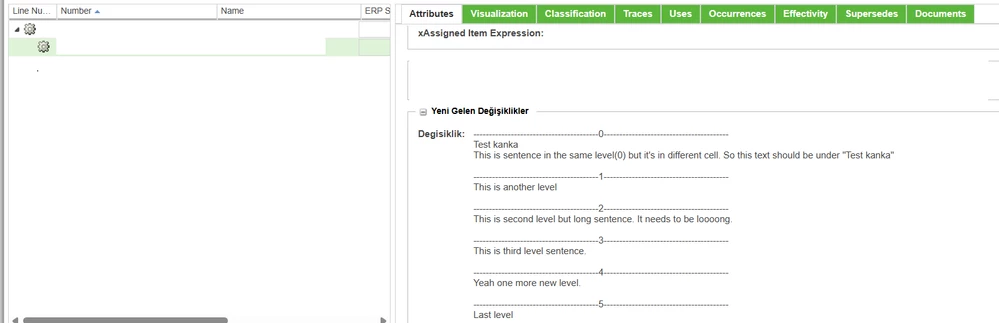
However, after upgrading to Windchill 13.0, the exact same Data Utility code now displays all the text as a single continuous line. The intended line breaks are ignored, making the displayed information difficult to read and interpret.

Steps Taken (Troubleshooting):
I confirmed that the Data Utility logic correctly reads the data from the Excel file and builds the output string with standard newline characters (\n) at the intended break points.
Based on the observation that \n characters were not being interpreted as line breaks in 13.0, we modified the Data Utility code to explicitly replace the newline characters (\n) with HTML <br> tags before setting the value to the TextDisplayComponent.
Upon viewing the modified Data Utility output in Windchill 13.0, we observed that the <br> tags themselves are displayed as literal text within the UI, rather than being interpreted as HTML line breaks. This indicates that the output of the TextDisplayComponent is being escaped and treated as plain text by the rendering mechanism in Windchill 13.0, despite our attempts to insert HTML.
Expected Behavior:
We expect the custom Data Utility to display the text with proper line breaks, as it did in Windchill 11.2, for improved readability.
Thank you for your time and assistance.
Btw here my code snippet for set value for textcomponent:
// Seviye değiştiyse veya ilk seviye ise
 	if (level != null && !level.equals(currentLevel)) {
 	currentLevel = level;

 	if (combinedValues.length() > 0) {
 	combinedValues.append("\n");
 	}
 	combinedValues.append("----------------------------------------").append(currentLevel).append("----------------------------------------").append("\n");
 	}
 	if (text != null && !text.isEmpty()) {
 	combinedValues.append(text).append("\n");
 	}
 	}

 	if (combinedValues.length() > 0) {
 	return combinedValues.toString();
 	}
 	} catch (Exception e) {
 	System.out.println("Error processing Excel file for document: " + latestDoc.getNumber());
 	e.printStackTrace();
 	}
 	}
 	}
 	} catch (Exception e) {
 	System.out.println("Error in getCombinedColumnAValues for part: " + part.getNumber());
 	e.printStackTrace();
 	}
 	return null;
 	}
 private TextDisplayComponent createTextDisplayComponent(String componentId, String value) {
 TextDisplayComponent textComp = new TextDisplayComponent(null);

 textComp.setId(componentId);
 textComp.setValue(value);
 textComp.setLongTextDisplayMode(true);
 textComp.disableMoreLink();
 // textComp.setTruncationLength(4000);
 textComp.setCheckXSS(false);

 return textComp;
 }
Anil.