It is always best to do something before trying to give advice on how to do it 
I had the opportunity to try this and the results were good.
The best part of the attached assembly is that it remains parametric; the worst part of the attached assembly is that it remains parametric.
What that means to say is that you have levels of dependency where any one failure will fail everything. Nothing new here.
Note that the plastic part here is 50mm x 50mm x 20mm. This is important to know when relative accuracy becomes an issue.
At 10um (0.01mm), the offset and merge worked fine. At 5um (0.005mm), the relative accuracy required an adjustment to .0001 (something less than .0012 default).
If I change the plastic part, the clad models change with it, as long as the offsets and cut-outs (merge) features remain viable.
Attached is a full version Creo 2.0 assembly to explore.
Note the feature order explained below the image.
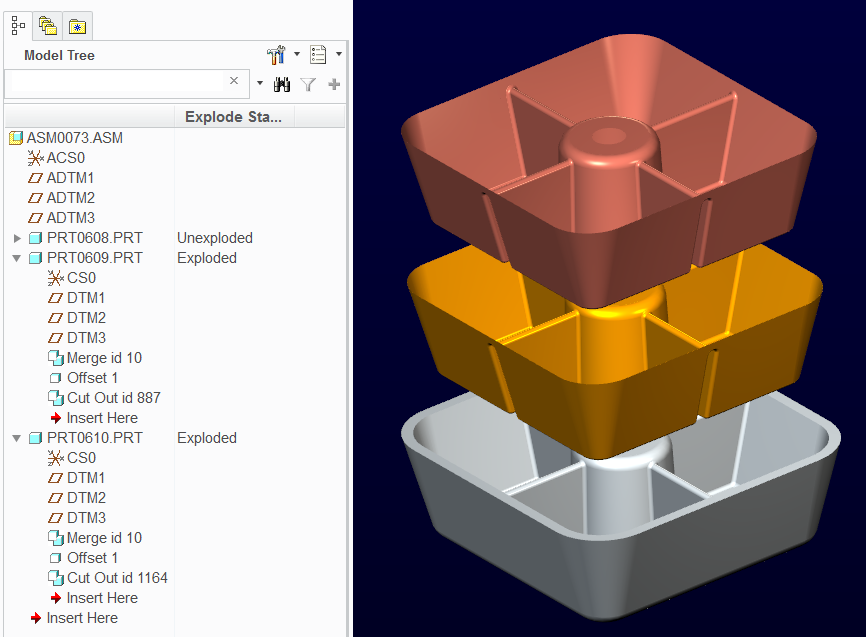
The assembly has the master plastic part assembled.
PRT0609 was added with just CS0 and the default datums (model set to MM)
PRT0609 was Activated and under the Get Data drop-down, you have Merge/Inheritance active. Select this feature.
Select PRT0608 to merge into PRT0609
Open PRT0609 and create a solid offset to the inner surfaces. This takes some knowing, but use the filter (geometry) and select through until you get the "intent surface". Pick all applicable surfaces.
Use offset, and select the non-tapered solid offset option.
Go back to the assembly and activate PRT0609 again.
Again merge PRT0608 but this time use the "remove material" option in the merge dialog.
What remains is the clad solid.
Do the same with PRT0610 only use PRT0609 instead of the plastic master, PRT0608.
Hint: to make offset selection easier for PRT0610, use a larger offset in PRT0609 for the time being. I used 0.5 so I could tell what I was selecting; inside or outside. Once you are done, you can set PRT0609 back to 0.01 and PRT0610 will follow on a regen.


