
1-Visitor
June 6, 2013
Question

Creating perfect circular dimple (cut) on a circular surface (ring)

  • June 6, 2013
  • 3 replies
  • 15405 views

I have a ring and on the surface of that ring I am trying to create a perfect cicle dimple cut. The problem is that since the surface I'm trying to cut into is circular the round dimple turns into an oval. Is there any way to make this feature so that looking down on the ring, this dimple looks like a perfect circle? Here is a picture of the ovular dimple on the ring.
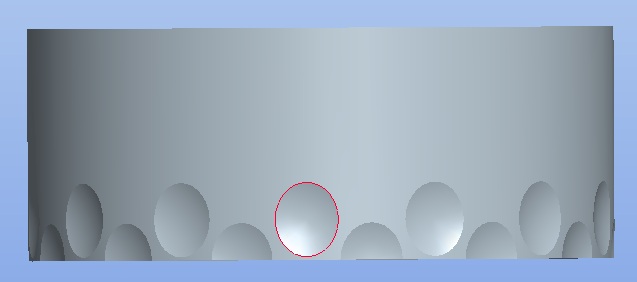
example1.jpg

Hopefully I've explained myself.

Thanks


This thread is inactive and closed by the PTC Community Management Team. If you would like to provide a reply and re-open this thread, please notify the moderator and reference the thread. You may also use "Start a topic" button to ask a new question. Please be sure to include what version of the PTC product you are using so another community member knowledgeable about your version may be able to assist.

3 replies

23-Emerald IV
June 6, 2013

I would think you could do the following:

1.) Extrude a cylindrical surface to represent the outer edge of the dimple that extends through the face of the ring.

2.) Use the intersect feature to create a curve where the cylindrical surface intersects the outside of the ring.

3.) Use the top edge of the surface, the intersect curve, and the center axis of the surface as references for a variable section sweep. Create the dimple surface using a conical shape.

4.) Copy and Move the surface

5.) Pattern as needed

6.) Solidify the initial moved copy

7.) Pattern the solidify

23-Emerald IV
June 6, 2013

I have created a part and uploaded it. You can download it here: http://communities.ptc.com/servlet/JiveServlet/downloadBody/3666-102-1-4658/pattern_dimple.prt.2.zip

You will need to drag the insert arrow back to the bottom of the feature tree. (The filesize is too large if the features are left resumed.)

23-Emerald IV
June 6, 2013

Screenshot

dimple.PNG

1-Visitor
June 6, 2013

If its just an aesthetic feature you could;

- profect a circle onto the surface as a guide

- revolve an ellipse which you can then adjust till it matches the circle

- set the revolve axis horizontally in the above image and offset from the surface

17-Peridot
June 6, 2013

There are ways but obviously the feature won't be a spherical dimple.

I might try a variable section sweep. you can project a circle onto the surface and use that as a trajectory. Take a look at the arc dropdown in the sketch, you can pick a conic from there for the profile that varies with the sweep, or you could enlist an ellipse.

1-Visitor
June 6, 2013

Any way you could show me an example of what you mean?

17-Peridot
June 6, 2013

Sure, I will work on one. What version are you using? Academic or full?