

1-Visitor
November 24, 2014
Solved

dimension witness line gap on drawings

  • November 24, 2014
  • 1 reply
  • 6883 views

I've been searching and have not found an answer so I'm creating a new post.


I'm working on a drawing in Creo 2.0. I use Show Model Annotations to include a dimension which then appears on one side of the part with correct offset gaps between the witness lines and the part geometry.
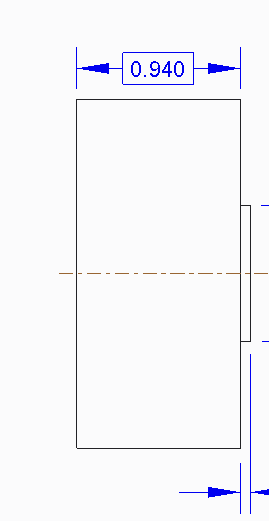
dimension line offset good.png

Then I drag it to the other side to fit into the overall dimensioning plan better and the witness lines don't snap to offset properly to the new side. They remain connected to the first side and I need to drag them individually.
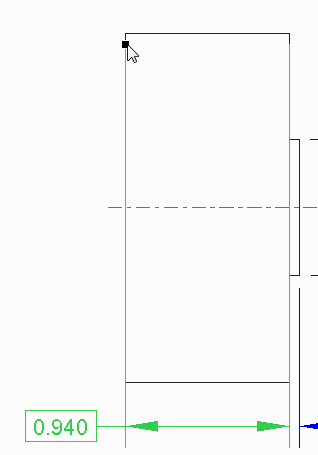
dimension line offset bad.png

Is there any way to change how this works? If not, does anyone know if there is already a PI created to change this or if this will be fixed in 3.0?


This thread is inactive and closed by the PTC Community Management Team. If you would like to provide a reply and re-open this thread, please notify the moderator and reference the thread. You may also use "Start a topic" button to ask a new question. Please be sure to include what version of the PTC product you are using so another community member knowledgeable about your version may be able to assist.
Best answer by dschenken

The gap is not automatically fixed for shown dimensions.

It is fixed in the output when the drawing is plotted/printed if the interface_quality config setting is set to 3.

1 reply

23-Emerald III
November 24, 2014

Reassociate the dimension to the other end points of the vertical lines. All you have dragged is the dimension text, the extension line associativity is still to the original end points of the vertical lines.

lroose1-VisitorAuthor
1-Visitor
November 24, 2014

I'm not sure what you mean by reassociate. I haven't seen that command/action listed anywhere. Do you mean Edit Attachment or delete/recreate it on the other side?

I just discovered that when I create the dimension using the Dimension command, it behaves the way I'd like it to, i.e. it automatically maintains the proper gap as I drag and place the dimension on the other side.

I was hoping that a dimension brought in using Show Model Annotations would do this as well but it seems that it doesn't.

dschenken1-VisitorAnswer
1-Visitor
November 24, 2014

The gap is not automatically fixed for shown dimensions.

It is fixed in the output when the drawing is plotted/printed if the interface_quality config setting is set to 3.