
17-Peridot
August 11, 2013
Question

Family Table and Parameter Column

  • August 11, 2013
  • 2 replies
  • 6028 views

This question is to confirm something with regard to Connection Parameters used in Family Tables.


When you you use mechanism connections, in my case the General Constraint set, I found an odd behavior.

I have a part in an assembly with X-Y translations limits. I also enabled the zero position.


In Family Tables, you can access connection parameters and I set TRANSLATIONn_ZERO_POSITION in the table for X and Y.


What is weird, and what I want to confirm, why is the value set in the Family Table additive rather than value used in the position?


Here is a better explanation: I have a range from -5 to .5 assigned to my X position. My zero position is .5. But when I assign -.5 in the table, it becomes additive and offsets the mating planes in the instance. In fact, the only way to make this work correctly is to use 0 and 1 for the range I have specified.


Is this normal or have others found issues with this?


Here the 1st image is the generic: Notice how the ,measurement comes from the center of the lower hole. The regen value is .5
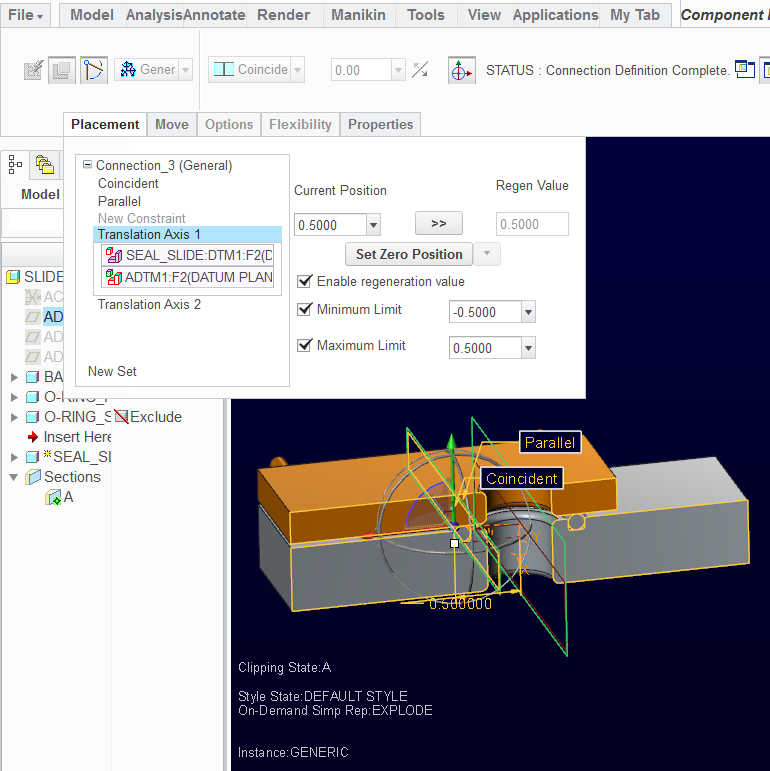
 

zero_generic.PNG


...Now the instance with the value set at 0.5
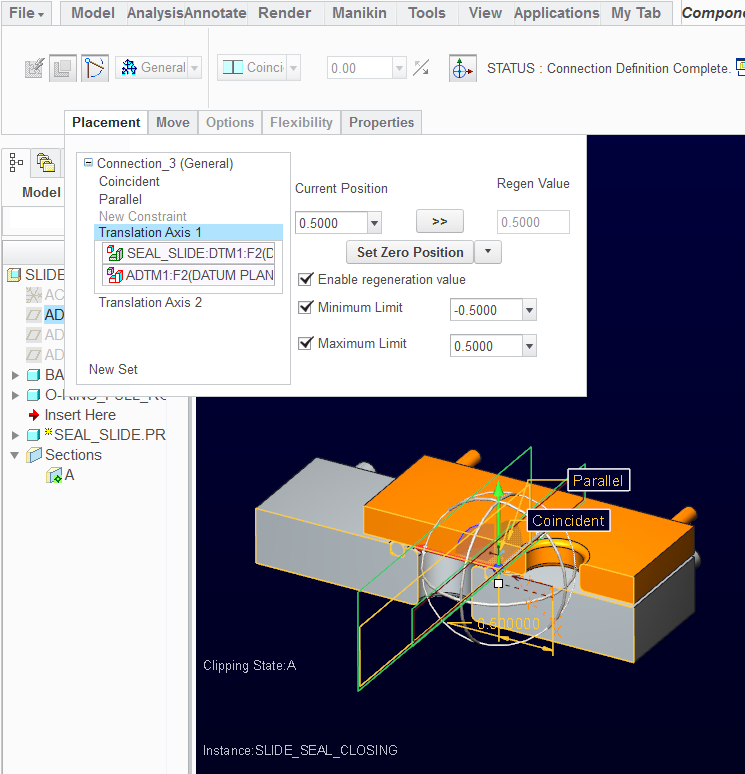
 

zero_instance.PNG

...notice how the start of the offset moved 1" and then the -.5 from the family table is applied.


Is this expected behavior or a bug?


Creo 2.0 M040

I was hoping to test this on M070 but it is late in releasing.


I have attached the file for testing.


This thread is inactive and closed by the PTC Community Management Team. If you would like to provide a reply and re-open this thread, please notify the moderator and reference the thread. You may also use "Start a topic" button to ask a new question. Please be sure to include what version of the PTC product you are using so another community member knowledgeable about your version may be able to assist.

2 replies

12-Amethyst
August 11, 2013

Hi Tom,

Have not read this in much detail but the negative value in a family table is something that caught my eye. I have had difficulties with this before (way back) and like you have moved to an "always positive" way of dealing with it.

From memory I made a Relation with a Variable that gave a range that could be used in Family tables as always positive. e.g. ROTATION_ANGLE = d1+90 for an angle (d1) that varied between +/-90. You have to mess around with the syntax to get everything working correctly but this is the general thrust of it.

Sounds like this is simply confirming what you experienced.

Regards, Brent

17-Peridot
August 11, 2013

Thanks Brent. Very good input. I guess I'm missing the logic of how Creo is dealing with these variables.

12-Amethyst
August 12, 2013

Hi Tom,

I think the logic is that PTC dropped the ball in the FT functionality to be able to handle variables that could be come negative. Pity as the models can deal with it and I ended up simply adding this extra layer of stuff on top to deal with the shortcoming. Maybe somebody figured out something else but seems like it is still working just like it always did so I would not expect any change in behavior in any upcoming release.

I did sometimes think about the way in which I dimensioned something in a model to overcome this issue and that was an alternative to making a relation though I usually ended up making a relation to more sensibly control the working size/dimension. For example instead of dimensioning an angle so that it can go between -90 and +90 through zero I dimensioned it another 90degrees further around so that it went between zero and 180 however these types of dimensions are always unintuitive later on even when I went back into my own model and this is what I would usually write a relation and control with a parameter so at least it was documented.

Now I just have to get my Creo 2 working again as something has changed that has stopped it. Not enjoying Windoze 8.

Regards, Brent

1-Visitor
August 12, 2013

Have you played with the 'Tools > Absolute / Relative Dimension Values' inside the Family Table? (highlight dimension in family table column header first) A dollar sign will be added to show that the values are to be absolute

I have not used it for connection parameters but it works with 'normal' dimensions when we want to use a negative value.

17-Peridot
August 12, 2013

That's a great tip, Charlotte! I just tested this with my selections but it is not adding a $.

This option must be very selective on what dimensions this applies to.