
1-Visitor
February 24, 2015
Solved

Importing step files and .IGS files in Creo

  • February 24, 2015
  • 1 reply
  • 9193 views

Hi Good Morning,

Can anyone explain me the procedure to import .IGS extension type parts/assembly in Creo 2.0 ?

Thanks & Regards,

Yogesh


This thread is inactive and closed by the PTC Community Management Team. If you would like to provide a reply and re-open this thread, please notify the moderator and reference the thread. You may also use "Start a topic" button to ask a new question. Please be sure to include what version of the PTC product you are using so another community member knowledgeable about your version may be able to assist.
Best answer by dnordin

Yogesh,

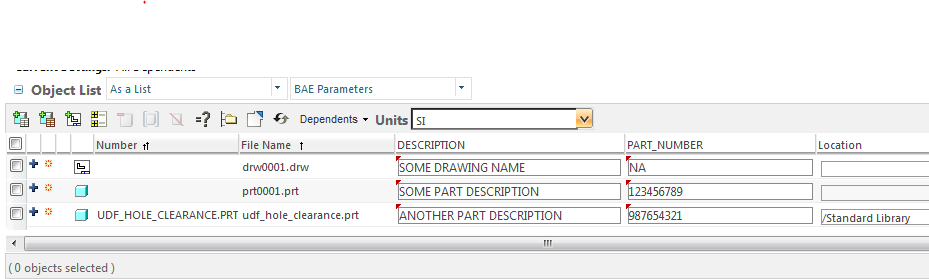
Use your Windchill WorkSpace (WS) to add the parameters to the models instead of entering them within Creo Parametric.

Once you've imported the models and saved them in Creo Parametric so they're in your WS, you can erase the models from Creo Parametric.

In your WS, check off the objects to which you need to add the parameters.

Select EDIT > ATTRIBUTES

Create and save a new table display that lists the parameters you need to enter (see attached image).

Enter the values in the table for each object.

Select OK to save the data.

This will create the designated parameters in all the models you listed in the table.

You should be able to checkin all your models.

Regards,

Dan Nordin

BAE Systems

edit_attributes.PNG

1 reply

24-Ruby III
February 24, 2015

Yogesh,

File > Open > set filter All files(*) > browse to IGES file and open it.

Martin Hanak

ygupta1-VisitorAuthor
1-Visitor
February 24, 2015

Thanks MartinHanak !!


After adding them into Workspace, Do you know how to set top level parameters in assembly and it's associated parts in same time ? Actually I am adding some parameters in .IGS files basically this is an assembly now what I want to do is to adding parameters in assembly and same parameters value shall be replicated in parts (associated parts)

So just I want to know how can I do that quickly rather than adding one by one in every parts.

Thanks & Regards,

Yogesh

24-Ruby III
February 24, 2015

Yogesh,

I don't know any quick and simple solution.

I guess ... You can open TOP assembly and and create the requested parameter in it. Then you can add this parameter in the model tree column. If you click in the component cell in the parameter column then Creo enables you to create the parameter in it and enter its value.

Martin Hanak