
1-Visitor
May 12, 2014
Question

part note in assembly drawing

  • May 12, 2014
  • 1 reply
  • 3196 views

Hello,


I have a question regarding showing positions of particular parts in assembly drawing. Is there some way to show the "Pos 5" on the drawing below automatically?

So far i always make notes but i hope there is a better way to get position notes on the drawing.
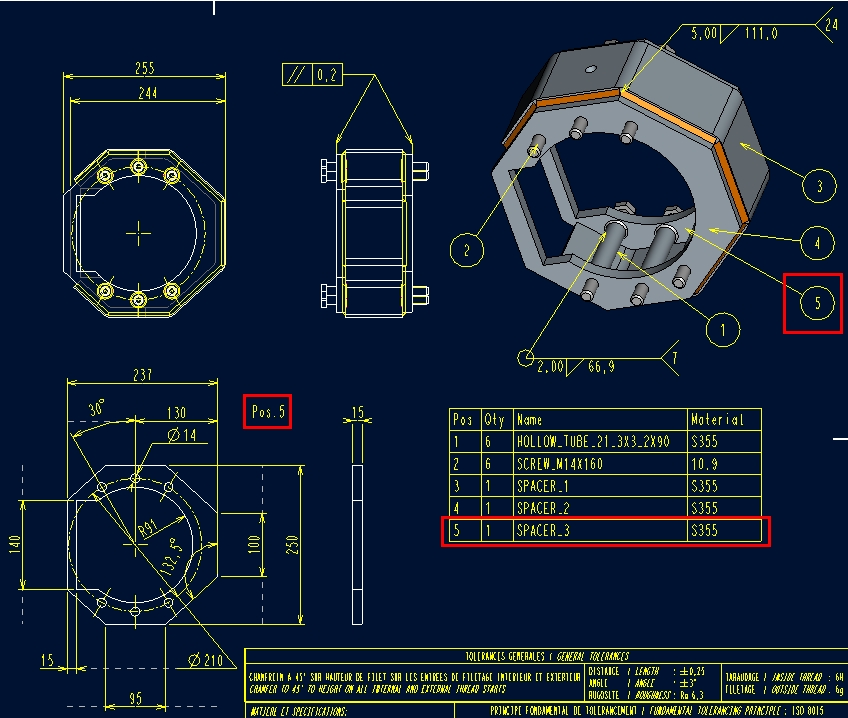
2014-05-12_112036.jpg


Thnx


This thread is inactive and closed by the PTC Community Management Team. If you would like to provide a reply and re-open this thread, please notify the moderator and reference the thread. You may also use "Start a topic" button to ask a new question. Please be sure to include what version of the PTC product you are using so another community member knowledgeable about your version may be able to assist.

1 reply

2-Explorer
May 12, 2014

Hello Tomas,

see attached picture.

position.JPG

&parameter_name:component_#

Dale_Rosema
23-Emerald III
23-Emerald III
February 26, 2015

Trying to do this in a note - the label on a carton needs to have the part number of the part on the label. The part number is a parameter of the model of the component in the carton assembly. The parameter is PN for all part and assembly models. I tried &pn:10 and the note kept dropping the &. The 10 is the feature number of the subcomponent in the assembly. Just playing around, it does get the assembly part number but not the subcomponent.

Below is a test:

Thanks, Dale

Dale_Rosema
23-Emerald III
23-Emerald III
February 26, 2015

Base on this product suggestion is this feature not available?

Allow a note with components name in drawing (rel_model_name)

This say component name, but is that true for a component parameter also?

Thanks, Dale