

1-Visitor
November 5, 2014
Solved

Problems blending a curve edge?
  • November 5, 2014
  • 1 reply
  • 2543 views

creohelp.jpg

Hi, new to Creo, trying out creo elements direct express.

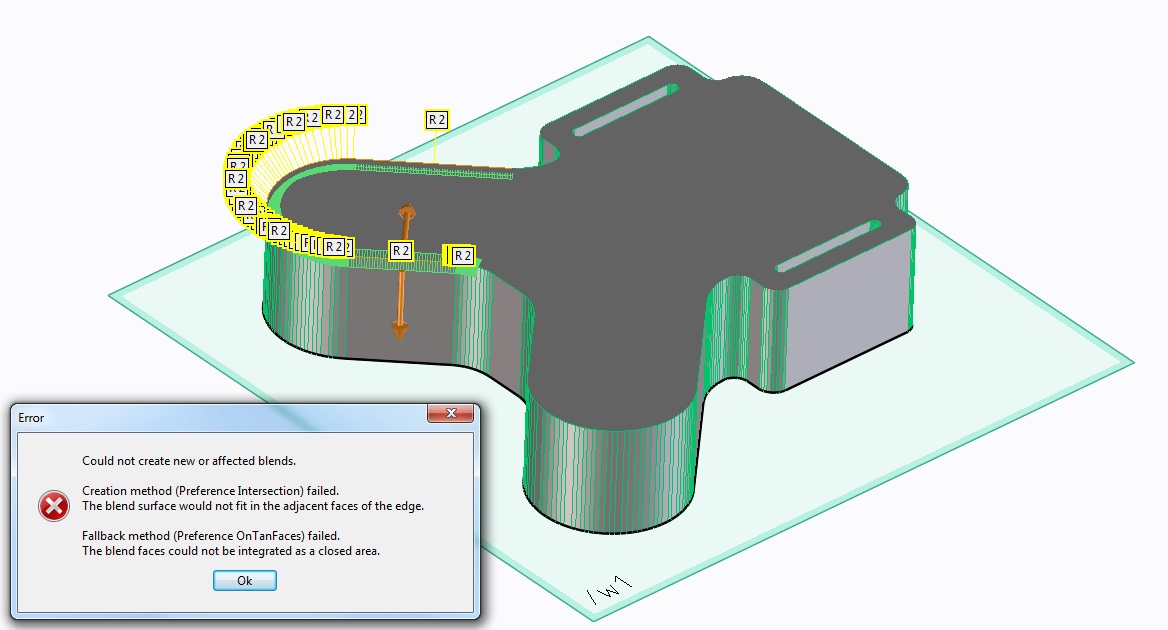
Whenever I try to apply a blend to the above edge I get this error:

"Could not create new or effected blends

Creation method (preference intersection) failed

The blend surface would not fit in the adjacent faces of the edge

Fallback method (preference ontanfaces failed)

The blend could not be integrated as a closed area"

any suggestions for a solution? Thanks

Best answer by TomD.inPDX

A rebuilt step file is attached.

Mind you, I made the best of what I saw in the file. Nothing was balanced but they overlay pretty well.

This is what a STEP file -should- look line when you import it

1 reply

17-Peridot
November 5, 2014

Welcome to the forum, Crans.

What is the source of the original model? It looks like an imported facet model.

1-Visitor
November 5, 2014

The model you see was created by first importing a .step file into creo (a circuit board model exported from Diptrace) then a workplane was created on the PCB surface and the outline of the PCB projected onto the workplane, from there the outline of the surface was pulled to create a solid part. Then i tried to apply the blend tool to the edge and had problems. I am trying to create a 3d model of an enclosure for a PCB, which i will then 3d print. Thanks

the original PCB model file is eldis.step which i have posted with this message

17-Peridot
November 5, 2014

Yes, I can see that. This is a very poor import file. Even though it is STEP, it is actually a very crude DXF using polylines that is masquerading as a STEP. Even DXF should have created arcs but this one didn't. The only actual arcs in the file are the 4 small holes.

Can you get a more native version of the circuit board file? I'll see if I can recreate it with a little more intelligence.