
15-Moonstone
May 19, 2016
Question

Unable to place center of gravity point

  • May 19, 2016
  • 5 replies
  • 7061 views

What I need is a centroid point to a closed area in a sketch.  It doesn't appear this is possibly directly.

If you build a solid feature off of the sketch you can visualize the center of gravity through choosing X section Mass Properties.
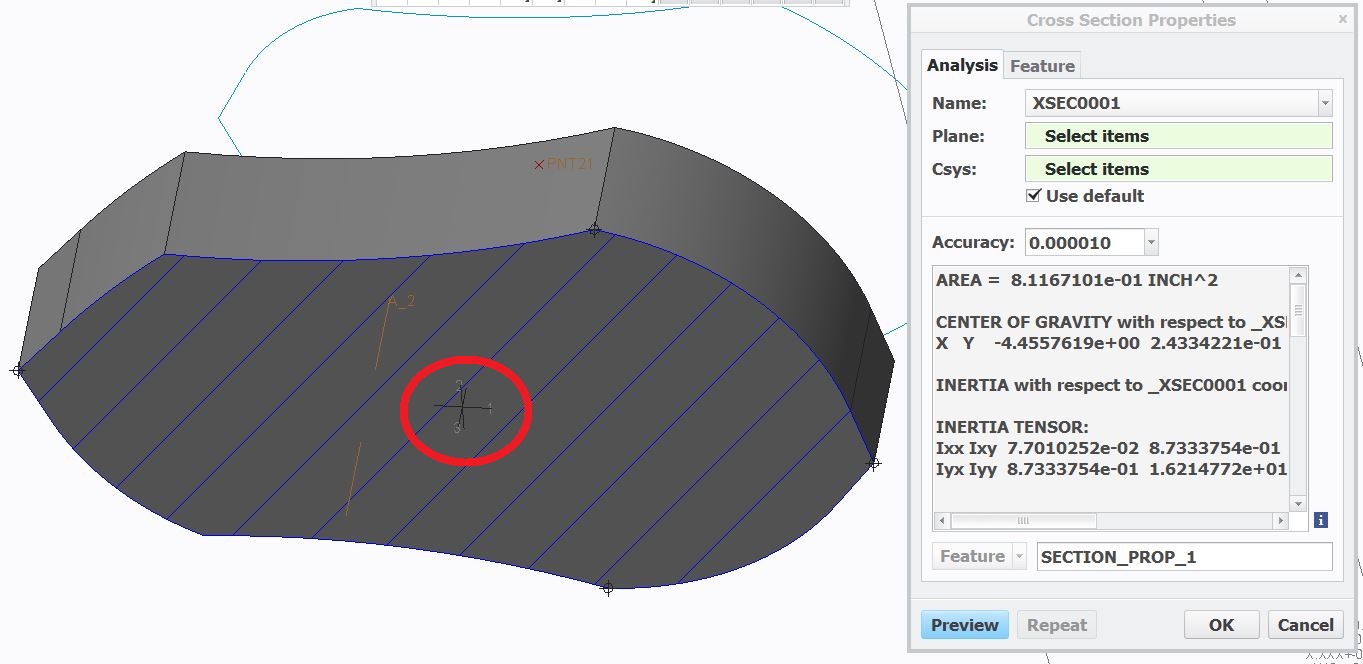
COG.JPG

Unfortunately I can't appear to save the result.

If I go the Feature tab the option to save the result is not available (it is greyed out).

COG NO.JPG

Would anyone have an idea of how to get this to work properly?


This thread is inactive and closed by the PTC Community Management Team. If you would like to provide a reply and re-open this thread, please notify the moderator and reference the thread. You may also use "Start a topic" button to ask a new question. Please be sure to include what version of the PTC product you are using so another community member knowledgeable about your version may be able to assist.

5 replies

23-Emerald III
May 19, 2016

To use analysis features, you need an "advanced" license (can't remember the names right off hand). Then you can create a feature.  COG coordinate system

There is another method that takes just a little more work.  Center of Gravity in Drawings

kdirth
21-Topaz I
21-Topaz I
May 19, 2016

If you click on the "i" button you will get something that you can save.  However, you can leave that window open to cut and past the numbers into your Point - Offset Coordinate System.

There is always more to learn.
pimm15-MoonstoneAuthor
15-Moonstone
May 19, 2016

As Stephen alluded to up above to be able to actually drop points from the analysis you have to have the BMX license.

This seems insane that you have to use this crazy work around to actually place a centroid point in a sketch.  Oh, and by the way you need to purchase an otherwise un-needed software add on to do the crazy work around.

There is absolutely no reason this shouldn't be in the product's base functionality.

pimm15-MoonstoneAuthor
15-Moonstone
May 26, 2016

By any chance would there be a way to get a centroid point in a sketch by using relations or even a UDF?

5-Regular Member
June 20, 2016

Hi Paul,

to obtain a point automatically placed at COG you have to create an offset datum point starting from the default coordinate system and then add theese simple strings to the relations:

$d1 = mp_cg_x("","DEF_CSYS","")

$d2 = mp_cg_y("","DEF_CSYS","")

$d3 = mp_cg_z("","DEF_CSYS","")

where d1, d2 and d3 are the names for the point offset dimensions and DEF_CSYS is the name of the default coordinate system.

Note: you need some geometry and mass property to validate the relations.

Video Link : 6953

Ciao Gabriele

1-Visitor
June 21, 2016

Hi, It's not so difficult to generate the COG. Create a new Csys from the part or Assembly origin Csys in the X value you simply type pro_mp_cogx in the Y you put in the value pro_mp_cogy and in the Z you type in pro_mp_cogz. These come from your reported mass properties in Tools/Parameters.

CaptureCOG.PNG

15-Moonstone
June 21, 2016

Hello

This question is posed for decades (I started with the)

version Proe 13) and there is still not a direct function to ask a

Center of gravity directly.

Kind regards.

Denis.