4-Participant
August 7, 2025
Solved

Define countersink note in .hol files

  • August 7, 2025
  • 2 replies
  • 1423 views

I can define the thread hole format in the .hol file after  edit CALLOUT_FORMAT line.

but i can't define the countersink hole format based on this way, anyone can tell me how to define that?


another problem is how to hide the zero after the decimal point?

11.png

Best answer by TrainStopper

Ah OK, that is a counterbore, not a countersink.

Try this for counterbored holes:

CALLOUT_FORMAT <CTRL-a>n<CTRL-b>&Diameter / <CTRL-a>v<CTRL-b> <CTRL-a>n<CTRL-b>&CBORE_DIAMETER <CTRL-a>x<CTRL-b> &CBORE_DEPTH

What I did was to create multiple .hol files so I could setup the callout format once and just invoke the hole type that used the callout format I wanted when creating the hole.

PTC has some documentation on .hol files, you need to track down a few separate documents to get all of the syntax, its just old school weird stuff.

A little patience and you should be able to get the note pretty close to what you need.

2 replies

12-Amethyst
August 7, 2025

This is mine-

CALLOUT_FORMAT &Screw_Size &Thread_Series-&Thread_Class <CTRL-a>x<CTRL-b> &Thread_Depth /<CTRL-a>w<CTRL-b> <CTRL-a>n<CTRL-b>&CSINK_DIAMETER[.2] X &CSINK_ANGLE[.0]<CTRL-a>$<CTRL-b>

Foggy4-ParticipantAuthor
4-Participant
August 8, 2025

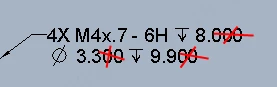
Thanks for your reply,I tried your code but it didn't work as I wanted;

The display result I'm expecting is like in the image below:

For thread holes:

Foggy_1-1754615948139.png

For countersink holes:

Foggy_0-1754615438993.png


12-Amethyst
August 8, 2025

Ah OK, that is a counterbore, not a countersink.

Try this for counterbored holes:

CALLOUT_FORMAT <CTRL-a>n<CTRL-b>&Diameter / <CTRL-a>v<CTRL-b> <CTRL-a>n<CTRL-b>&CBORE_DIAMETER <CTRL-a>x<CTRL-b> &CBORE_DEPTH

What I did was to create multiple .hol files so I could setup the callout format once and just invoke the hole type that used the callout format I wanted when creating the hole.

PTC has some documentation on .hol files, you need to track down a few separate documents to get all of the syntax, its just old school weird stuff.

A little patience and you should be able to get the note pretty close to what you need.

12-Amethyst
August 11, 2025

Some good points so far.

I setup my .hol files a long time ago, there may be better ways to approach all of this as the software has evolved.

Is there a way to have one .hol file that does everything? I don't see how.

How in a single .hol file do you standardize on a countersink diameter that is appropriate for a clearance vs. tapped vs. flat head screw?

While I agree it takes some time to setup specific .hol files, I value the simplicity where I ensure all users execute consistently & don't need to edit dimensions while modeling or modify hole callouts in drawings.

19-Tanzanite
August 11, 2025

Yes, @TrainStopper , I agree that one .HOL file cannot accommodate everything.  However, @Foggy , if your holes are defined by the same THREAD_DATA table, then the "variable" callouts - i.e., depending on whether there is a countersink or whether it is a blind hole or if it is threaded, etc... - they can all be defined at the DEFAULT_CALLOUT_FORMAT_DATA section:

pausob_1-1754921451314.png


Foggy4-ParticipantAuthor
4-Participant
August 12, 2025

Oh, thanks for explaining, you're right-- I am using the same THREAD_DATA table, I finally understand how to configure the .hole file exactly,