


Question
Replace Component
Hi all,
I am having issue with this not working. What am I missing?
I would expect it to replace PHILLIPS7_8 with SLOT7_8
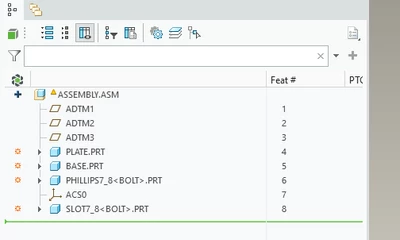
It looks like it runs but nothing gets replaced

This is taken from the example code.
public static void replaceBolts(com.ptc.pfc.pfcAssembly.Assembly assembly)
{
 // Current Creo session
 Session session = null;

 // The base bolt part model
 Solid bolt = null;

 // Family table row used to create the new instance
 FamilyTableRow row = null;

 // The newly created bolt instance
 Solid newBolt;

 // List of all components inside the assembly
 Features components;

 // Single component feature from the assembly
 ComponentFeat component;

 // Descriptor used to identify component model & instance name
 ModelDescriptor desc;

 // Replace operation object
 CompModelReplace replace;

 // Collection of replacement feature operations
 FeatureOperations replaceOps;

 // Instance name of the existing bolt to be replaced
 String oldInstance = "PHILLIPS7_8";

 // Instance name of the new bolt to insert
 String newInstance = "SLOT7_8";

 try {
 // Get the active Creo session with C4 compatibility
 session = pfcSession.GetCurrentSessionWithCompatibility(CreoCompatibility.C4Compatible);

 // Load the base bolt part model
 bolt = (Solid) session.GetModel("BOLT", ModelType.MDL_PART);
 }
 catch (jxthrowable x)
 {
 // Handle error when loading session or model
 System.out.println("Caught exception: " + x);
 x.printStackTrace();
 return;
 }

 try {
 // Retrieve the family table row for the new bolt instance
 row = bolt.GetRow(newInstance);

 // Create a new instance of the bolt from the family table
 newBolt = (Solid) row.CreateInstance();

 // Initialize the feature replacement operations list
 replaceOps = FeatureOperations.create();

 // Get all component features in the assembly
 components = assembly.ListFeaturesByType(
 Boolean.FALSE,
 FeatureType.FEATTYPE_COMPONENT);

 // Loop through all components in the assembly
 for (int ii = 0; ii < components.getarraysize(); ii++)
 {
 component = (ComponentFeat) components.get(ii);

 // Get the model descriptor of this component
 desc = component.GetModelDescr();

 // Check if this component matches the old bolt instance
 if (desc.GetInstanceName().equals(oldInstance))
 {
 // Create a replace operation to swap with the new bolt
 replace = component.CreateReplaceOp(newBolt);

 // Insert the replace operation at the beginning of the list
 replaceOps.insert(0, replace);
 }
 }

 // Regeneration instructions (used to refresh model)
 RegenInstructions regenInstrs = null;

 // Window reference for repainting
 Window window = null;

 // Get the currently active model
 Model currentModel = session.GetCurrentModel();

 // If the active model is the same as our target assembly
 if (currentModel != null &&
 currentModel.GetFileName().equalsIgnoreCase(assembly.GetFileName()))
 {
 // Get the display window for that model
 window = session.GetModelWindow(currentModel);

 // Create regeneration instructions
 regenInstrs =
 pfcSolid.RegenInstructions_Create(
 null,
 null,
 null);

 // Force the model tree to refresh
 regenInstrs.SetRefreshModelTree(true);
 }

 // Execute all replacement operations and regenerate the assembly
 assembly.ExecuteFeatureOps(replaceOps, regenInstrs);

 // Repaint the graphics window to show updates
 if (window != null)
 {
 window.Repaint();
 }
 }
 catch (jxthrowable x)
 {
 // Handle all replacement/regeneration errors
 System.out.println("Caught exception: " + x);
 x.printStackTrace();
 return;
 }

 // Exit method
 return;
}