


Example: Downsampling timeseries data for mashups using LTTB
In this post, I show how you can downsample time-series data on server side using the LTTB algorithm.
The export comes with a service to setup sample data and a mashup which shows the data with weak to strong downsampling.
Motivation:
- Users displaying time series data on mashups and dashboards (usually by a service using a QueryPropertyHistory-flavor in the background) might request large amounts of data by selecting large date ranges to be visualized, or data being recorded in high resolution.
- The newer chart widgets in Thingworx can work much better with a higher number of data points to display. Some also provide their own downsampling so only the „necessary“ points are drawn (e.g. no need to paint beyond the screen‘s resolution). See discussion here.
- However, as this is done in the widgets, this means the data reduction happens on client site, so data is sent over the network only to be discarded.
- It would be beneficial to reduce the number of points delivered to the client beforehand. This would also improve the behavior of older widgets which don’t have support for downsampling.
- Many methods for downsampling are available. One option is partitioning the data and averaging out each partition, as described here. A disadvantage is that this creates and displays points which are not in the original data. This approach here uses Largest-Triangle-Three-Buckets (LTTB) for two reasons: resulting data points exist in the original data set and the algorithm preserves the shape of the original curve very well, i.e. outliers are displayed and not averaged out. It also seems computationally not too hard on the server.
Setting it up:
- Import Entities from LTTB_Entities.xml
- Navigate to thing LTTB.TestThing in project LTTB, run service downsampleSetup to setup some sample data
- Open mashup LTTB.Sampling_MU:
- Initially, there are 8000 rows sent back. The chart widget decides how many of them are displayed. You can see the rowcount in the debug info.
- Using the button bar, you determine to how many points the result will be downsampled and sent to the client. Notice how the curve get rougher, but the shape is preserved.
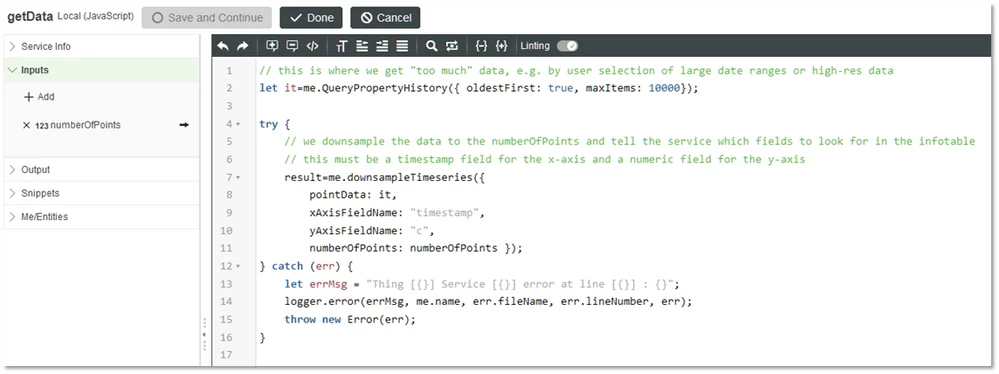
- How it works: The potentially large result of QueryPropertyHistory is downsampled by running it through LTTB. The resulting Infotable is sent to the widget (see service LTTB.TestThing.getData). LTTB implementation itself is in service downsampleTimeseries
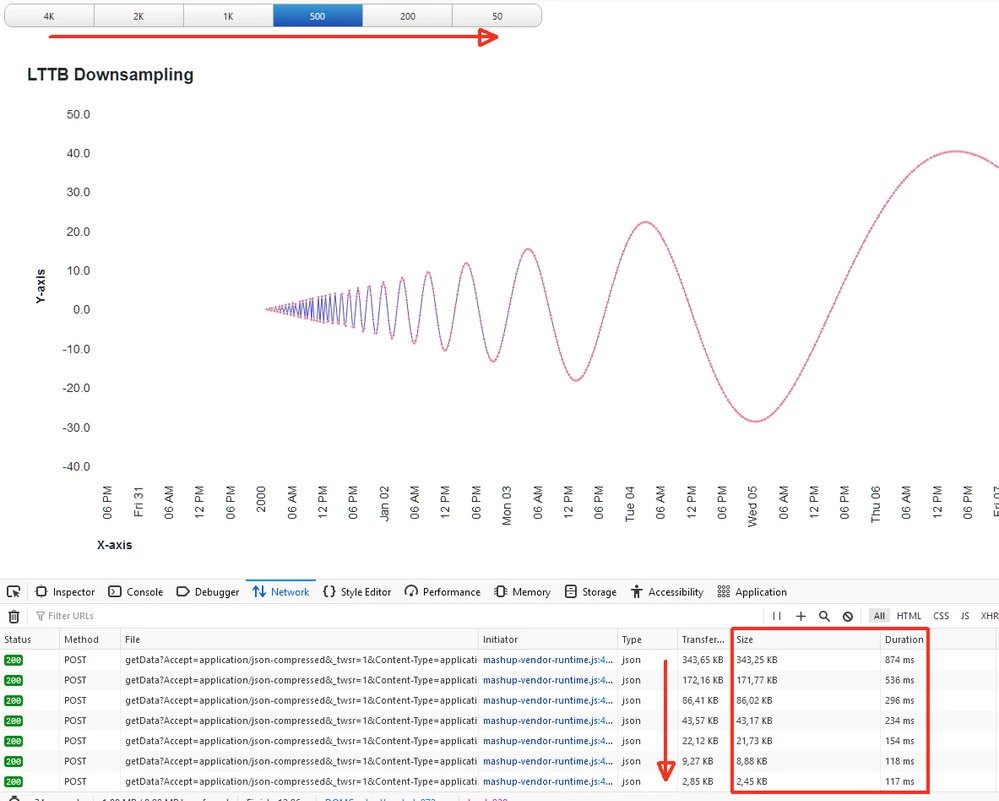
Debug mode allows you to see how much data is sent over the network, and how much the number decreases proportionally with the downsampling.
LTTB.TestThing.getData;
The export and the widget is done with TWX 9 but it's only the widget that really needs TWX 9. I guess the code would need some more error-checking for robustness, but it's a good starting point.