

Send request to InfluxDB
- 0 replies
- 14244 views
- Translate All
Hello everyone,
Following a recent experience, I felt it was important to share my insights with you. The core of this article is to demonstrate how you can format a Flux request in ThingWorx and post it to InfluxDB, with the aim of reporting the need for performance in calculations to InfluxDB. The following context is renewable energy.
This article is not about Kepware neither about connecting to InfluxDB. As a prerequisite, you may like to read this article: Using Influx to store Value Stream properties from... - PTC Community
Introduction
The following InfluxDB usage has been developed for an electricity energy provider.
Technical Context
Kepware is used as a source of data. A simulation for Wind assets based on excel file is configured, delivering data in realtime.
SQL Database also gather the same data than the simulation in Kepware. It is used to load historical data into InfluxDB, addressing cases of temporary data loss. Once back online, SQL help to records the lost data in InfluxDB and computes the KPIs.
InfluxDB is used to store data overtime as well as calculated KPIs.
Invoicing third party system is simulated to get electricity price according time of the day.
Orchestration of InfluxDB operations with ThingWorx
ThingWorx v9.4.4
- Set the numeric property to log
- Maintain control over execution logic
- Format Flux request with dynamic inputs to send to Influx DB
InfluxDB Cloud v2
- Store logged property
- Enable quick data read
- Execute calculation
Note: Free InfluxDB version is slower in write and read, and only 30 days data retention max.
ThingWorx model and services
ThingWorx context
Due to the fact relevant numeric properties are logged overtime, new KPIs are calculated based on the logged data. In the following example, each Wind asset triggered each minute a calculation to get the monetary gain based on current power produced and current electricity price.
The request is formated in ThingWorx, pushed and executed in InfluxDB. Thus, ThingWorx server memory is not used for this calculation.
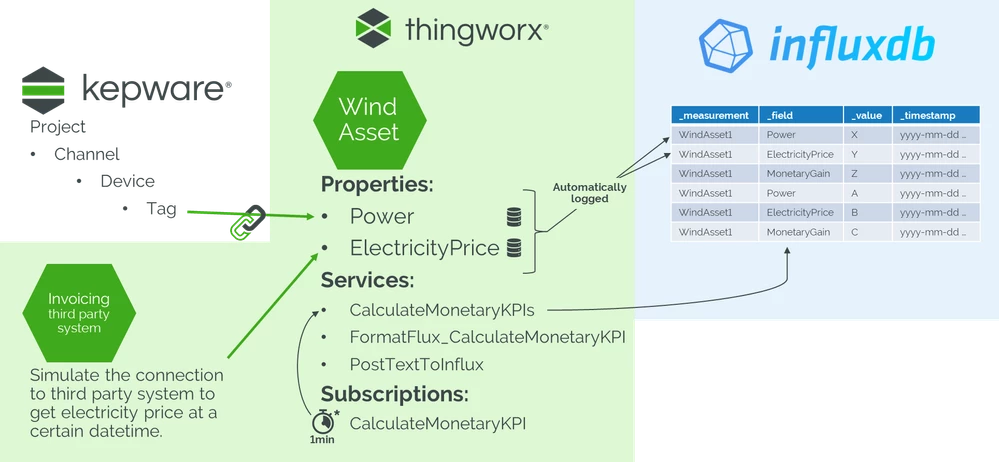
Services breakdown
CalculateMonetaryKPIs
- Entry point service to calculate monetary KPIs. Use the two following services: Trigger the FormatFlux service then inject it in Post service.
- Inputs:
- No input
- Output:
- NOTHING
FormatFlux _CalculateMonetaryKPI
- Format the request in Flux format for monetary KPI calculation. Respect the Flux synthax used by InfluxDB.
- Inputs:
- bucketName (STRING)
- thingName (STRING)
- Output:
- TEXT
PostTextToInflux
- Generic service to post the request to InfluxDB, whatever the request is
- Inputs:
- FluxQuery (TEXT)
- influxToken (STRING)
- influxUrl (STRING)
- influxOrgName (STRING)
- influxBucket (STRING)
- thingName (STRING)
- Output:
- INFOTABLE
Highlights - CalculateMonetaryKPIs
Find in attachments the full script in "CalculateMonetaryKPIs script.docx".
Url, token, organization and bucket are configured in the Persitence Provider used by the ValueStream. We dynamically get it from the ValueStream attached to this thing.

From here, we can reuse it to set the inputs of two other services using “MyConfig”.
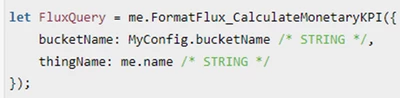
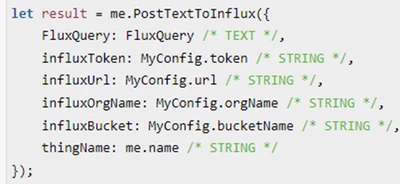
Highlights - FormatFlux_CalculateMonetaryKPI
Find in attachments the full script in "FormatFlux_CalculateMonetaryKPI script.docx".
The major part of this script is a text, in Flux synthax, where we inject dynamic values. The service get the last values of ElectricityPrice, Power and Capacity to calculate ImmediateMonetaryGain, PotentialMaxMonetaryGain and PotentialMonetaryLoss.
Flux logic might not be easy for beginners, so let's break down the intermediate variables created on the fly in the Flux request. Let’s take the example of the existing data in the bucket (with only two minutes of values):
_time | _measurement | _field | _value |
2024-07-03T14:00:00Z | WindAsset1 | ElectricityPrice | 0.12 |
2024-07-03T14:00:00Z | WindAsset1 | Power | 100 |
2024-07-03T14:00:00Z | WindAsset1 | Capacity | 150 |
2024-07-03T15:00:00Z | WindAsset1 | ElectricityPrice | 0.15 |
2024-07-03T15:00:00Z | WindAsset1 | Power | 120 |
2024-07-03T15:00:00Z | WindAsset1 | Capacity | 160 |
The request articulates with the following steps:
- Get source value
- Get last price, store it in priceData
_time
ElectricityPrice
2024-07-03T15:00:00Z
0,15
- Get last power, store it in powerData
_time
Power
2024-07-03T15:00:00Z
120
- Get last capacity, store it in capacityData
_time
Capacity
2024-07-03T15:00:00Z
160
- Get last price, store it in priceData
- Join the three tables *Data on the same time. Last values of price, power and capacity maybe not set at the same time, so final joinedData may be empty.
_time
ElectricityPrice
Power
Capacity
2024-07-03T14:00:00Z
0,15
120
160
- Perform calculations
- gainData store the result: ElectricityPrice * Power
_time
_measurement
_field
_value
2024-07-03T15:00:00Z
WindAsset1
ImmediateMonetaryGain
18
- maxGainData store the result: ElectricityPrice * Capacity
- lossData store the result: ElectricityPrice * (Capacity – Power)
- gainData store the result: ElectricityPrice * Power
- Add the result to original bucket
Highlights - PostTextToInflux
Find in attachments the full script in "PostTextToInflux script.docx".
Pretty straightforward script, the idea is to have a generic script to post a request. The header is quite original with the vnd.flux content type
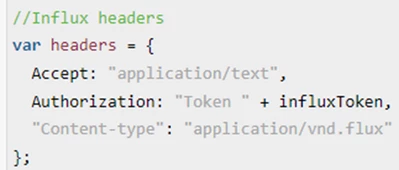
Url needs to be formatted according InfluxDB API

As a last resort, I turned to ChatGPT. Through a few interactions, I quickly obtained convincing results. Within a day, I had a satisfactory outcome, which I fine-tuned for relevant use.
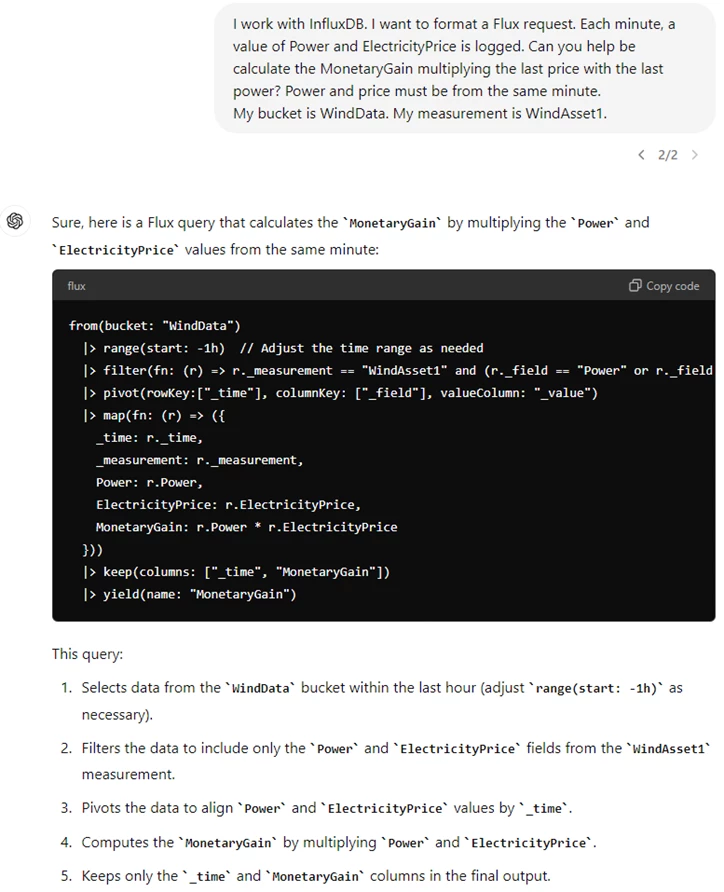
Right after, I asked to convert it to a ThingWorx script format:
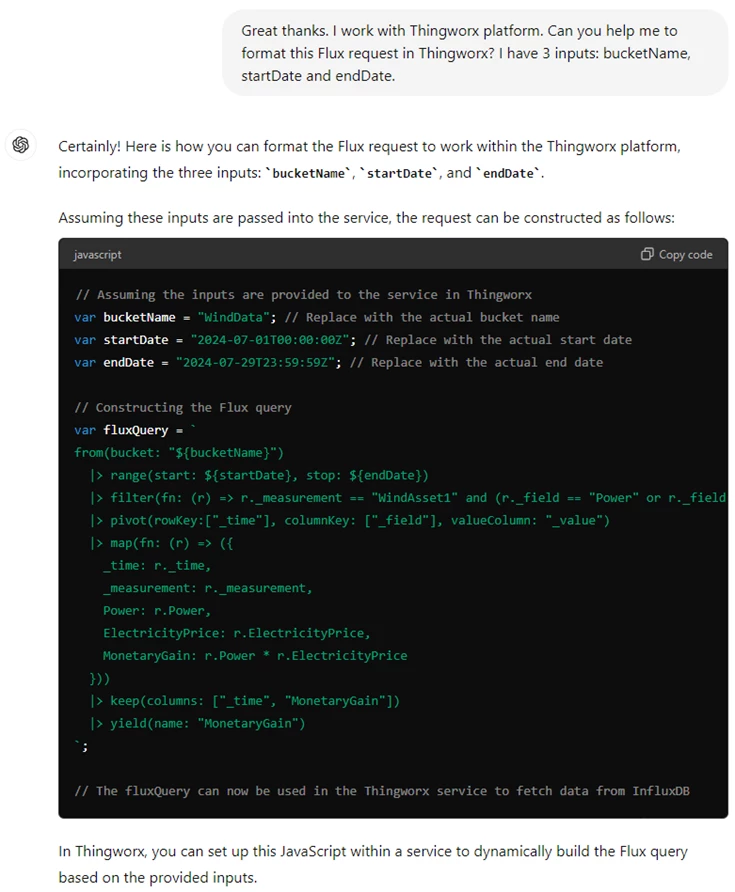
In this last picture, the script won’t work. The fluxQuery is not well formatted for TWX. Please, refer to the provided script "FormatFlux_CalculateMonetaryKPI script.docx" to see how to format the Flux query and insert variables inside.
Despite mistakes, ChatGPT still mainly provides relevant code structure for beginners in Flux and is an undeniable boost for writing code.