1-Visitor
October 16, 2023
Solved

Calculating the intersection point on a graph

  • October 16, 2023
  • 1 reply
  • 1600 views

I need to plot the intersection and return it as a value.

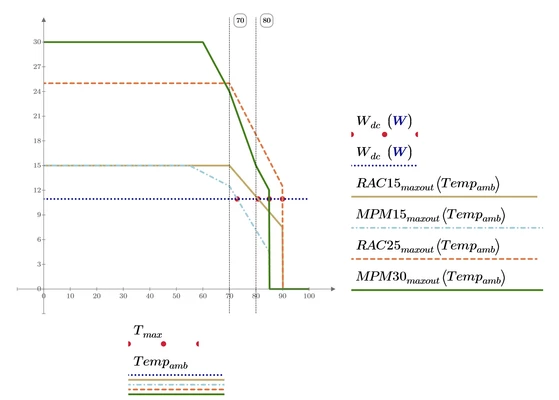
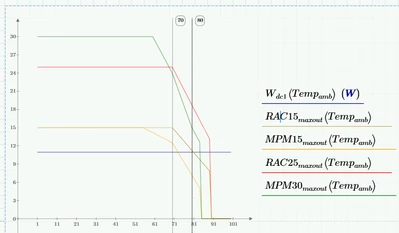
I have lines to show minimum and ideal operating temperatures but I would like to find the cut-off temps for each of the proposed AC-DCs.


I have a graph that has the output derating so the line isn't a simple ab2+c so I have to use a function.
AL_10444700_0-1697455321724.png


I would like to know the maximum operating temperature of the multiple power supplies. Based on a Wdc1(Tempamb). 


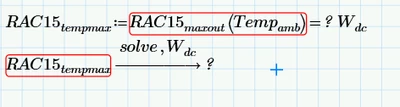
I tried using solve but this doesn't appear to work on functions. as the derating is not constant across the full operation range.
AL_10444700_2-1697455931054.png


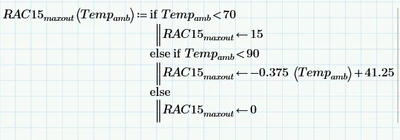
see the example of the function I am using below.
AL_10444700_3-1697455959655.png


What is the best operation to achieve this? I have attached the worksheet for reference

I'm using MathCAD Prime 8



Best answer by Werner_E

One possible way to get the desired result is to use the numeric "root" function.

Werner_E_0-1697461510878.png

It was necessary to make W.dc dimensionless by dividing by its unit watt because you had set up your function without using proper units and so they return dimensionless values. I would suggest using proper units throughout (which could be demanding, especially when it comes to temperatures 😉 )

Another option would be the usage of a numeric solve block, but I avoid it (unless you have additional constraints)  because its ugly looking and too much space consuming.

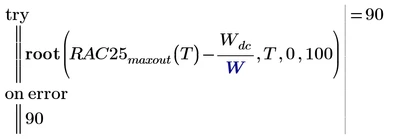
The method shown will of course fail for RAC25 and MPM30, because the desired value never is returned by those function.

Werner_E_2-1697462391600.png

Here you could use  try&catch and return the max value (90 resp. 85) in case the root-function fails.

Werner_E_1-1697461980351.png

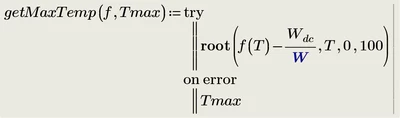
You could turn this into a utility function

Werner_E_3-1697462464410.png

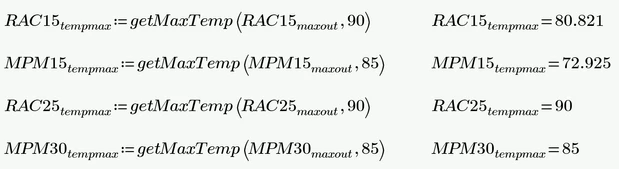
and use this function for all four values you are looking for

Werner_E_4-1697462521777.png

Werner_E_1-1697486277377.png


1 reply

Werner_E25-Diamond IAnswer
25-Diamond I
October 16, 2023

One possible way to get the desired result is to use the numeric "root" function.

Werner_E_0-1697461510878.png

It was necessary to make W.dc dimensionless by dividing by its unit watt because you had set up your function without using proper units and so they return dimensionless values. I would suggest using proper units throughout (which could be demanding, especially when it comes to temperatures 😉 )

Another option would be the usage of a numeric solve block, but I avoid it (unless you have additional constraints)  because its ugly looking and too much space consuming.

The method shown will of course fail for RAC25 and MPM30, because the desired value never is returned by those function.

Werner_E_2-1697462391600.png

Here you could use  try&catch and return the max value (90 resp. 85) in case the root-function fails.

Werner_E_1-1697461980351.png

You could turn this into a utility function

Werner_E_3-1697462464410.png

and use this function for all four values you are looking for

Werner_E_4-1697462521777.png

Werner_E_1-1697486277377.png