
1-Visitor
January 6, 2014
Question

Choppy operator symbol rendering- why?

  • January 6, 2014
  • 3 replies
  • 3767 views

Is there a way to make MCAD Prime render mathematical symbols as continuous, professional looking entities, or does it really chop things up like it seems to do all the time? All non PTC versions of mathcad had no issues with this seemingly basic degree of showmanship. It is independent of zoom level, font, and it reders this way for print handlers too.
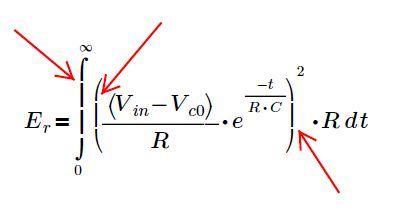
choppy+symbols.jpg

I've seen some images from their tutorials and screenshots and they either don't have the issue of they cleverly choose only items that do not result in this issue- or maybe they doctor them up to hide it. Since I rarely use MCAD Prime due to it's other major shortcomings relative to V15, I didn't really care so much- it just made sense since the rest of the tool was also dissapointing. But from time to time I try to use it anyway since I know someday I'll need to use it or just leave the prodcut altogether, and this kind of thing is just a neon sign flashing "this prodcut is rediculous".

thanks,

Brian

3 replies

24-Ruby III
January 6, 2014

Hi,

Can you provide worksheet with this issue and what version of Prime are you using?

25-Diamond I
January 6, 2014

You will see this problem with many screenshots posted in this forum (e.g. those by Valery). Its not worksheet dependend.

1-Visitor
January 6, 2014

I have this same problem. Someone suggested that I install some hotfixes mentioned in the RTF. Look in the installation directory under .\Doc\en-US. See if that helps.

25-Diamond I
January 6, 2014

Did installing the hotfixes helped for you?

BrianP1-VisitorAuthor
1-Visitor
January 7, 2014

I'd love to try this but I'm runnig windows 8.1 and these hotfixes won't install. the message I get is that they are not applicable and so they get blocked. Any suggestions?

25-Diamond I
January 6, 2014

What do you expect of a program which does copy and paste on the bitmap level only?

I usually experience those artefacts not that bad and onscreen it depends on the zoom level. Printouts and pdf-printouts are not or only very slightly (bad enough) affected. Don't know what it depends on.

I have redone your expression and this is what I see with zoom 115%

temp.png

and this is 120%

temp.png

its gets worse with 170%

temp.png

The pdf printout may look like this

temp.png

but depending on the program/printer driver used it may also look like this

temp.png

No idea why, I never had problems with that pdf printer before, only in conjunction with Prime. On the other hand, other pdf printers work fine with Prime.