I am not sure what your question is.
You may clarify and also attach your new worksheet.
Some remarks about what I notice in your pictures:
The many arguments for your function "fuerzas" do not make any sense because they are not used in any way in the function.
The only argument uses is M and so it should be the only argument of that function. The other arguments have no effect whatsoever!
Furthermore I see no reason for assigning the result of "lsolve" to a local variable "z" as this variable is not used anymore. Furthermore the command "augment(z)" has no effect.
You must be aware that the variables you define and change inside a program are not connected to worksheet variables with the same name. The only way to change a worksheet variable is via the return value(s) of the function when you assign the function result to worksheet variables when calling the function.
The result of a function is either the value(s) used in an explicit "return" statement or the result of the last command executed in the program.
In case of M <> 0 the last command executed is "augment(z)" which should be replaced simply by the "lsolve" command (without z and augment) and so the result of your function is the vector returned by the "lsolve command". When you call the function you have to save this result vector to worksheet variable(s). You can do as you did with your position, velocity and acceleration function by first assigning the result vector to one variable and then in a second step extract and assign the variables Ax, etc from this. But as already written I think its much easier to directly assign the function result to a vector with the desired variables as shown in the pics.
In case of M=0 the last command executed in the program is F <- "no ..." so the function result is this string. There is no need to assign it the local variable F - this assignment has no effect at all.
But if you do so and call the function in the way I suggested
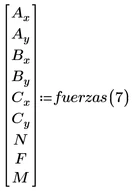
you would get an error message because you can't store a single string text to a vector with nine variables.


