10-Marble
October 13, 2023
Solved

This value must be a vector

  • October 13, 2023
  • 1 reply
  • 3006 views

Hi,


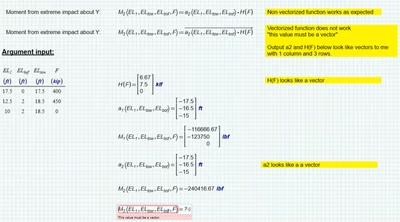
Could someone explain why I can't vectorize method 2 in the attached work sheet? It returns error message "this value must be a vector". The output of both functions being multiplied seem to be vectors, so I don't understand why I can't use the vectorize function to do an element per element multiplication.


Hans_Westerweel_0-1697204079564.png

Thank you,


Best answer by Werner_E

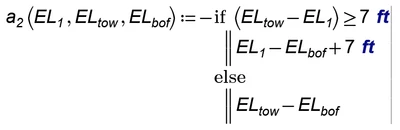
Your function a2 was already written with vectors in mind. Its assumes that e.g. EL1 ist a vector. When you call M3 this fuction calls a2 vectorized which means that its first argument EL.1 (and the others as well) is a scalar, not a vector and therefore "last(EL.1)" finally throws the error because the function "last" needs a vector as its argument.


Basically you should write every function so that it works just with scalars and then just later use vectorization when you call them with vector arguments.


So you function a2 may simply look that way:
Werner_E_0-1697206771811.png

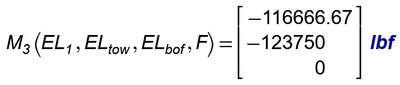
and so your function M3 works as expected
Werner_E_1-1697206826838.png


P.S.: You can use the "Error Tracing" facility on the "Calculation" Ribbon to find out where the error actually stems from

 

1 reply

Werner_E25-Diamond IAnswer
25-Diamond I
October 13, 2023

Your function a2 was already written with vectors in mind. Its assumes that e.g. EL1 ist a vector. When you call M3 this fuction calls a2 vectorized which means that its first argument EL.1 (and the others as well) is a scalar, not a vector and therefore "last(EL.1)" finally throws the error because the function "last" needs a vector as its argument.


Basically you should write every function so that it works just with scalars and then just later use vectorization when you call them with vector arguments.


So you function a2 may simply look that way:

Werner_E_0-1697206771811.png

and so your function M3 works as expected

Werner_E_1-1697206826838.png


P.S.: You can use the "Error Tracing" facility on the "Calculation" Ribbon to find out where the error actually stems from
 

10-Marble
October 13, 2023

Very helpful, thank you!
