
4-Participant
June 27, 2023
Solved

Part's datum cannot be shown in the assembly

  • June 27, 2023
  • 1 reply
  • 6065 views

Hi, I am using Creo 9 and got this problem in an assembly environment.

When I assembled a part to a sub-assembly and I encountered this problem that all the datum of the part cannot be seen. From the model tree, I could see the datum (layers, axis and DTM_csys) are grayed. But when I  chose a grayed datum (such a plane) and checked its information and found its status is "shown". 

Similar problem occurred to another part created in the assembly environment, I could not see its "Axis". Though its planes are shown.


Appreciate it if anyone can help me.
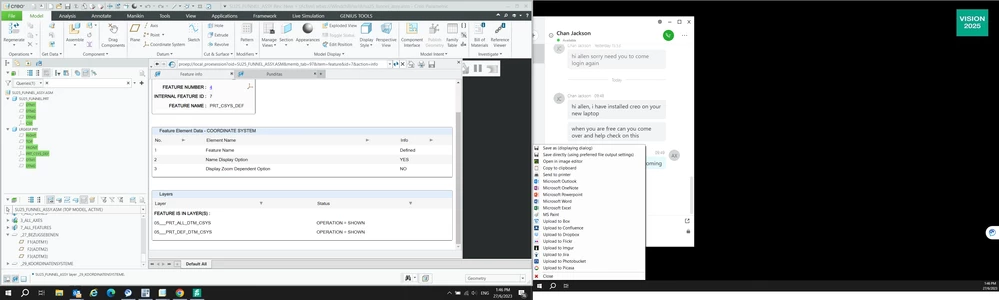
2023_06_27_13_46_47_Greenshot.png

Allen 

Best answer by MartinHanak

@AX_4606432 wrote:

Hi,


Please see the attachment.


I can see and manipulate the datum planes of LRG6SP.PRT in ASM0001 (main assembly) but not in ASM0002 (sub-assembly). LRG6SP.PRT is created separately and assembled into ASM0002. Axis of revolving features cannot be seen in both assembly. PRT0001 & PRT0002 are created in the ASM0001 and ASM0002 respectively.


Regards


Hi,

please play attached video and read https://www.ptc.com/en/support/article/CS291373 article.

1 reply

24-Ruby III
June 27, 2023

Hi,

open part in separate window, select item greyed in model tree and apply Show command from minitoolbar.

4-Participant
June 27, 2023

Thank you for the help. Actually all the datum are shown in a part environment. I can hide/unhide with the plane display. but in the assembly, the datum are grayed.

 below is the part model tree. you can see all the plane are shown and have no problem.

2023_06_27_16_12_57_LRG6SP_Rev_New_Active_wtws_Windchill_su18_lrg6sp.prt_Creo_Parametric.png

24-Ruby III
July 10, 2023

@AX_4606432 wrote:

Hi,


Please see the attachment.


I can see and manipulate the datum planes of LRG6SP.PRT in ASM0001 (main assembly) but not in ASM0002 (sub-assembly). LRG6SP.PRT is created separately and assembled into ASM0002. Axis of revolving features cannot be seen in both assembly. PRT0001 & PRT0002 are created in the ASM0001 and ASM0002 respectively.


Regards


Hi,

please play attached video and read https://www.ptc.com/en/support/article/CS291373 article.