13-Aquamarine
May 9, 2025
Solved

Pattern along curve and include linear dimension

  • May 9, 2025
  • 3 replies
  • 824 views

Hello,


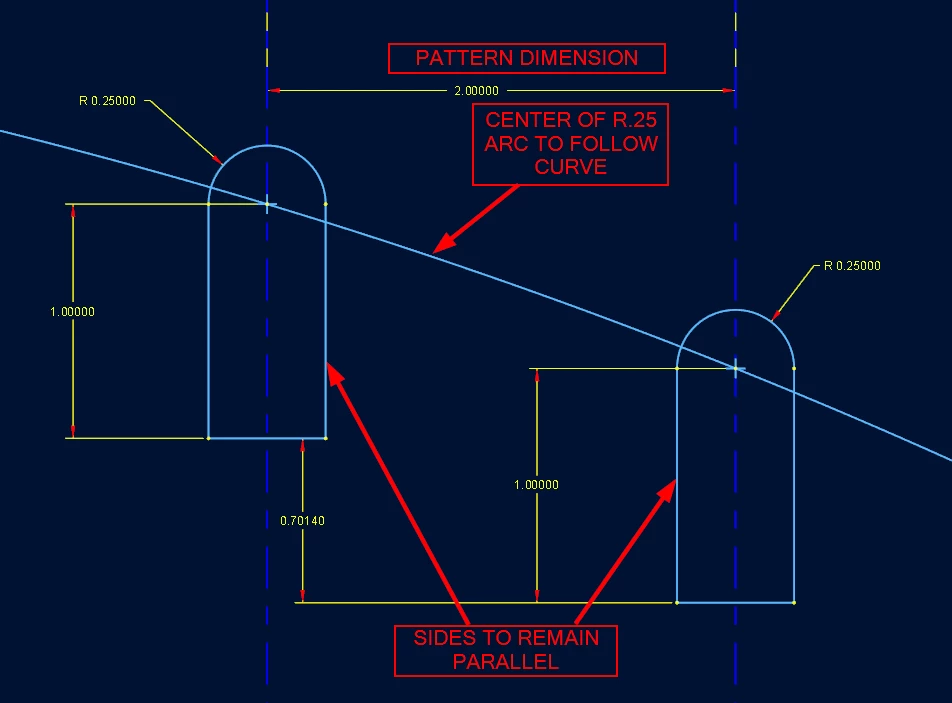
I'm trying to create a pattern of slots where the center of the radius of the slot follows a curve but the spacing is driven by a linear dimension. Using Creo 10. Tried using pattern along a curve but the spacing distance is along the curve not linear. Unchecking the "Follow Curve Direction" allows the slots to remain parallel. Any suggestions?


Thank you,

Shane
 

Pattern_along_cure.png

Best answer by pausob

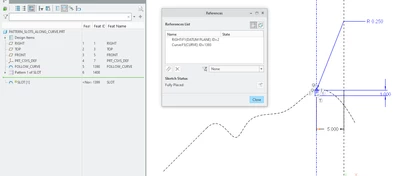
Define your slot so that its centre is to follow a curve, and its centre-line location is controlled by a linear dimension:

pausob_3-1747000369078.png


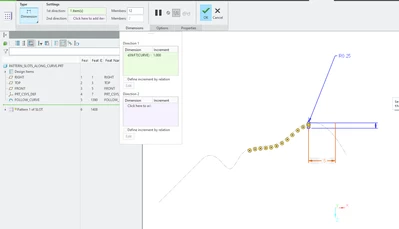
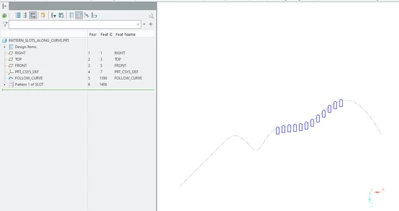
Then use the dimension pattern to vary this dimension and generate the instances; 

pausob_1-1747000296878.png

-->

pausob_2-1747000316216.png


3 replies

tbraxton
22-Sapphire II
22-Sapphire II
May 10, 2025

This is one way to do it. I modified an existing test model so there are some extra features. The linear dimension is defined in the point pattern; the slots are reference patterned. Creo 9 model enclosed for reference.


tbraxton_0-1746836695537.png


pausob19-TanzaniteAnswer
19-Tanzanite
May 11, 2025

Define your slot so that its centre is to follow a curve, and its centre-line location is controlled by a linear dimension:

pausob_3-1747000369078.png


Then use the dimension pattern to vary this dimension and generate the instances; 

pausob_1-1747000296878.png

-->

pausob_2-1747000316216.png


ShaneV13-AquamarineAuthor
13-Aquamarine
May 13, 2025

Thank you both, @tbraxton  and @pausob, for your solutions.