cancel
Showing results for 
Search instead for 
Did you mean: 
cancel
Showing results for 
Search instead for 
Did you mean: 

Intelligent fasteners and repeat regions

SOLVED
Level 8

Intelligent fasteners and repeat regions

We use a hardware library in Windchill with Creo 3. It works, but I started playing with the Intelligent Fastener tool and really like it. It's much faster/easier than using hardware libraries.

Therefore, I'm trying to get our BOM to work with it.

Here's my stupid part:
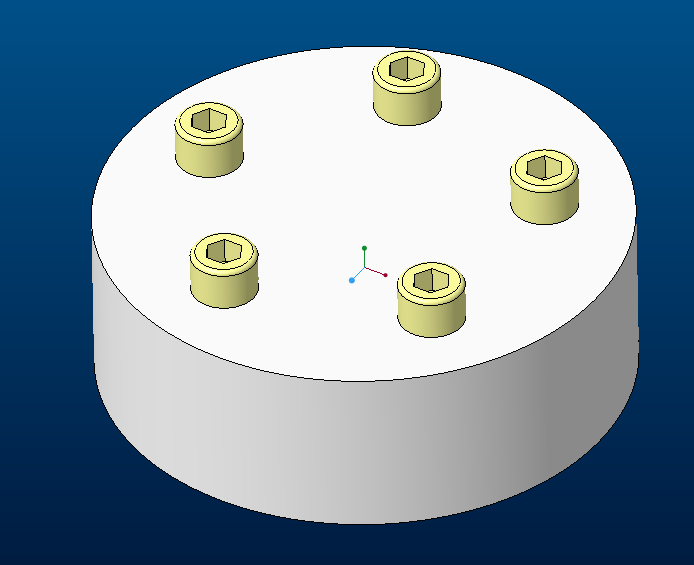

And here's my current BOM:


With the current relations:


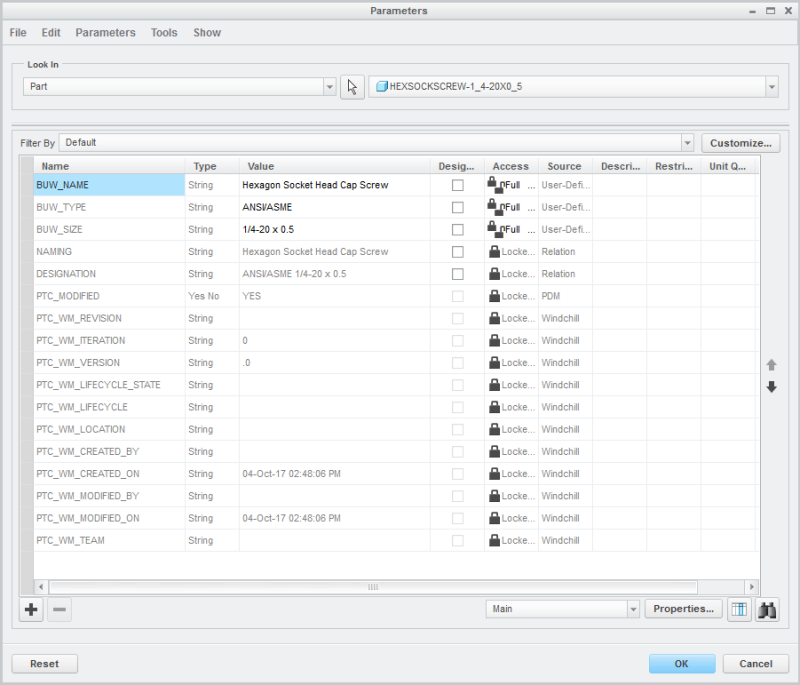
Here are the screw parameters:

So I wrote this relation in an attempt to select either the screw parameters (naming, designation) for item and description or our standard model parameters (drawing_num, description), and then to tie that to the repeat region using the new parameters (item_name, item_description). The new repeat region parameters are (asm.mbr.item_name, asm.mbr.item_description). Ignore the first block, that's to list bulk items with an "AR" for quantity.
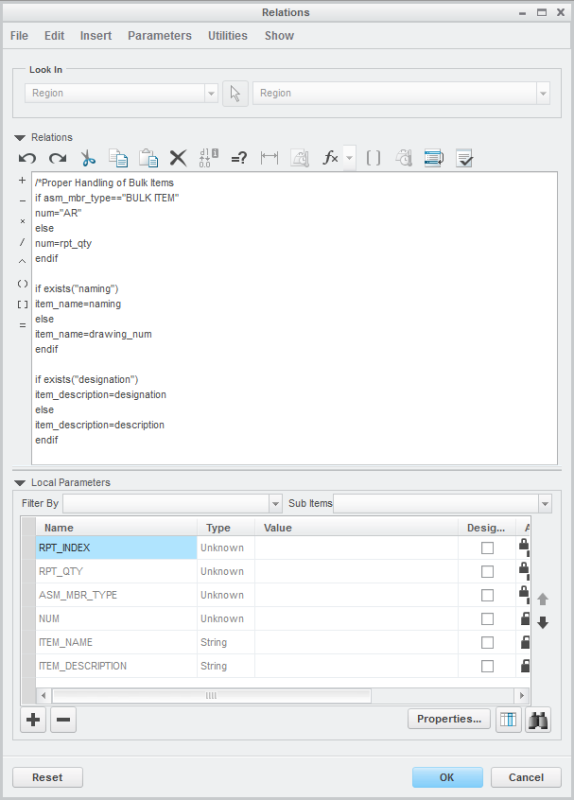

But I get an empty BOM with this relation. Using "naming" and "designation" for my repeat regions, I can get the screws to show up, but not my created hardware:




So. Any idea what I'm doing wrong? I've spent several hours trying different combinations but can't seem to get it to work.


Also, is there a way to make all text uppercase? I don't see a "toupper()" function, like some programming languages have. My guess is you'd have to write additional relations for this capability.

Wondering if I should just give up and stick with our hardware libraries...
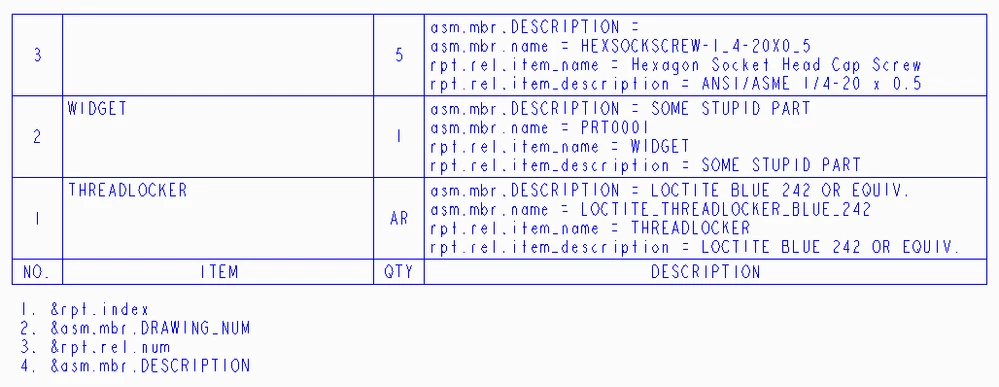
1 ACCEPTED SOLUTION

Accepted Solutions
Level 17

Re: Intelligent fasteners and repeat regions

Hi,


I am sending modified drawing. It contains following repeat reqion.

repert_region_modified.png

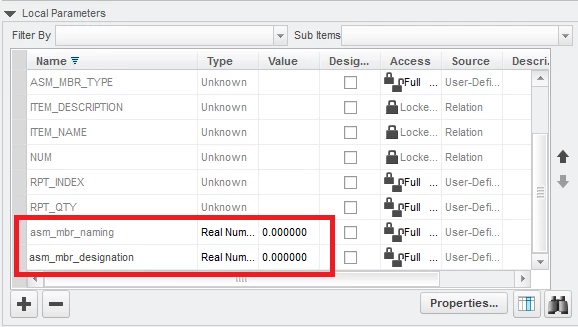
The most important change was made in Local Parameters section of Relations dialog box. I added two parameters - see red rectangle.

added_params01.png

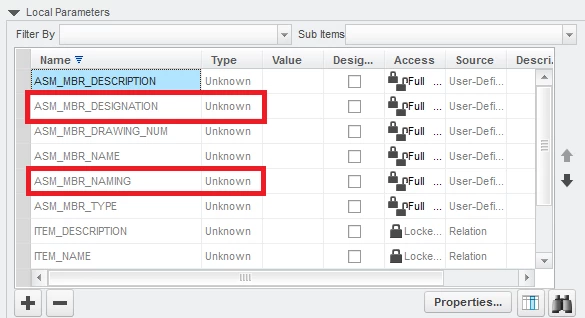
I clicked OK button and the Relations command again. Now new parameters were displayed as shown below.

added_params02.png

So ... basic rule, which must be fulfiled is ... every parameter mentioned in relations must be present in Local Parameters section. Unfortunatelly parameters, which are not displayed in repeat region cells must be added manually.


Martin Hanák
23 REPLIES
Level 15

Re: Intelligent fasteners and repeat regions

Your repeat region should use "item_description" not "description" and it will be rpt.rel.item_description in the region.


I don't recall useful string manipulation functions being available. PTC supplies just below the bare minimum.

Level 8

Re: Intelligent fasteners and repeat regions

Thanks for the quick response!


"description" is the current part parameter we use. My newly created parameter is "item_description" which does not work. I have tried both:

asm.mbr.item_description

rpt.rel.item_description

and neither one works - the field ends up blank.


I figured there wouldn't be a method of converting to uppercase easily. Figured I'd ask though.

Level 8

Re: Intelligent fasteners and repeat regions

Here is my repeat region:


And the result:

Level 15

Re: Intelligent fasteners and repeat regions

You could make things easier and make the columns wide enough to read the contents so the entries don't overlap.


Anyway, I recall that using underscores is something to be avoided for repeat region relations. Feel free to shorten the names to IN and ID, at least for a trial.

Level 11

Re: Intelligent fasteners and repeat regions

Underscores are indeed a problem if you are working in Repeat Region Relations(*)


Try this:

if exists("ASM_MBR_ITEMNAME")
   my_name=asm_mbr_itemname
else
   my_name=asm_mbr_name
endif


ITEMNAME is the User Parameter defined in your part, MY_NAME is the value you want to show in your Repeat Region, which you define as "rpt.rel.MY_NAME"


(*) I believe that Creo will replace any underscore with a dot, then evaluate that parameter.

ASM_MBR_ITEMNAME will translate to asm.mbr.itemname (which exists)

ASM_MBR_ITEM_NAME will translate to asm.mbr.item.name (which does not exist), not to asm.mbr.item_name

Level 17

Re: Intelligent fasteners and repeat regions

Hi,


repeat region relations are not correct. You cannot use if exists("naming") !


You have to:

  1. add ASM_MBR_NAMING parameter in Local Parameters area in Relations dialog box
  2. use if exists("ASM_MBR_NAMING") command


Martin Hanák
Level 8

Re: Intelligent fasteners and repeat regions

So, trying "ID" and "IN" instead didn't work.


I tried hamster's method and it worked using "my_name". So the underscore works in that string parameter.


I think my issue was not using "asm_mbr" prior to calling a parameter within the part. Here is what I have now:


if exists("ASM_MBR_DESCRIPTION"

item_description=asm_mbr_description

else

item_description=asm_mbr_designation

endif


So now the table will show the description for my created parts, but is blank for the screw file. I've tried several of the parameters listed, as well as making my own parameters (BUWSIZE and NICKG). I can't get anything other than "asm_mbr_name" to display in my table. Here is the parameters shown on the hardware:

3.PNG

I appreciate the help you've given. Hoepfully it's something simple I"m overlooking.

Level 17

Re: Intelligent fasteners and repeat regions

Hi,


I guess you are right ... the problem is hidden in your files. Therefore you have to zip them (drawing, assembly, parts) and upload them. When I have your data, I can find the root of the problem.


Martin Hanák
Level 15

Re: Intelligent fasteners and repeat regions

use asm.mbr.Item_name and asm.mbr.item_description in your repeat region.