
1-Visitor
April 16, 2014
Solved

Simple Riemann sum

  • April 16, 2014
  • 3 replies
  • 11254 views

I was wondering if anyone can help me out. I am 65 and having difficulty with where to start in mathcad. I am taking an online course in Calculus and they brought up the concept of rieman sums between two functions. I bought prime 3 student edition but I am lost. I am interested in a worksheet that will allow a person to enter two functions, the bounderies, and the amount of subdivisions. and get an output as close to the integrals as one would like. Also if anyone can direct me to a place that I can learn how to use mathcad to make my own worksheets that would be appreciated. If you are willing to show me how, please send the worksheet as an attachment to
-

Best answer by Werner_E

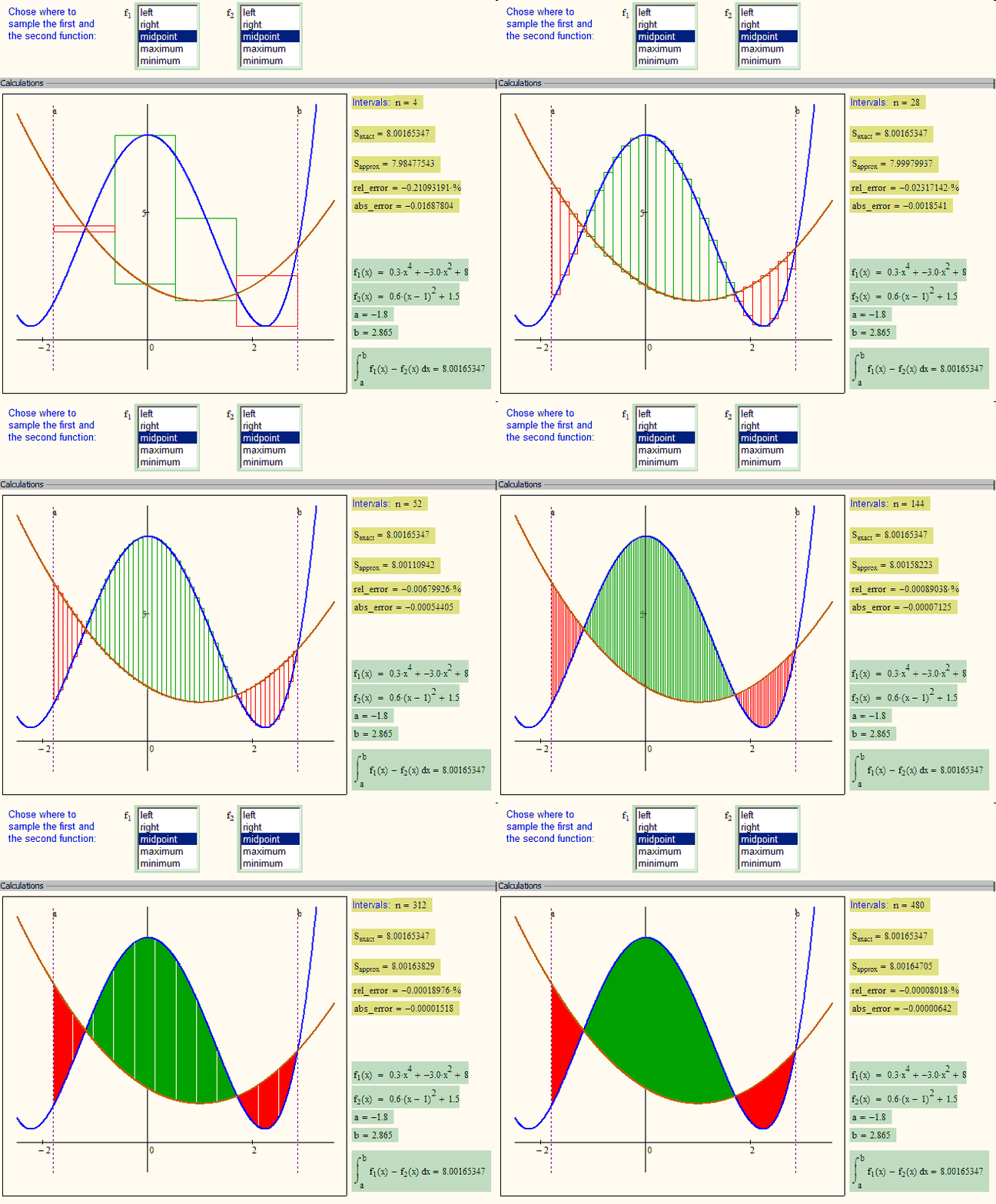
Would something like this be what you are searching for? (Click the pic to see the short animation)

Riemann_WE_2_ani3.gif

3 replies

25-Diamond I
April 16, 2014

What would be the purpose of that sheet you demand?

And we can create those approximating rectangles in different ways, depending on how we would determine their height. It could be the left or the right boundary, the midpoint or the maximum or minumum of left and right. And we can chose that for the first and the second function individually, getting up to 25 different approximations.

See her an applet for just one function (you can type in f1(x)-f2(x) to use it for the area between two curves) http://mathworld.wolfram.com/RiemannSum.html

EDIT: Added the missing link 😉

lorth-21-VisitorAuthor
1-Visitor
April 16, 2014

I have used many applets and I didn't mean to sound like I was demanding anything. I would just like to learn how to program mathcad to be able to sum between two curves. When I had mathcad 7 I thought I new how to do it by I do not understand how to do the iterations. I do know that using nurmerical methods you can get as close to the true intervel as you like. If you can show me the way to do this that would be great.

Sincerely,

Larry Orth

25-Diamond I
April 16, 2014

If you search the net for "Mathcad Riemann sum" you will find some sites you might find interesting. Most (if not all of them) would contain files for older Mathcad versions, which can be opened by Mathcad 15 but not with Prime. Given that, it might be a good idea to install MC15 in parallel with Prime. In the opinion of many people (including myself) MC15 still is the more powerful version (by far), Prime lacks a lot of features which we are used from MC15 for years. Given that you bought Prime you also are entitled to install and use MC15. In fact you will need a full installation of the current MC15 to be able to convert older sheets to Prime format (no guarantee they will work as expected afer conversion, though).

While you may use a programming appraoch with a loop to sum up the areas of the rectangles as you wrote, its also possible to use Mathcads summation along with a range variable to do the job.

Find attached a Prime3 sheet which uses this approach and implemented all five methods to determine the rectangle height. Same method is used on upper and lower end but it should be obvious how to mix to get all 25 variations.

1-Visitor
April 18, 2014

Larry, let me suggest my free e-course on calculus with Mathcad Prime labs.Rieman sum coming soon.

In spite of MOOC is in Russian, i am doing english labs both in Prime 3 and XPS format.

Program is based on well-known MIT open course: http://math.mit.edu/classes/18.01/Spring2013/1801_Syllabus.html

1.Intro (slope, secant, tangent line)

2.derivatives

3.limits

4. continuity

5.differentiation rules

6. implicit, inverses

7. exponential, log, hyperbolic

8. linear and quadratic approximations

9. mean value theorem, curve sketching

10. Midterm I

PART II Integration

11. antiderivatives

12. differentials and differential equations (04/14)

13. definite integrals (04/14)

14. fundamental theorems of calculus (05/14)


Link to MOOC: http://tsuefa.ru/eng/
videos in Russian (free, registration on INTUIT required): http://www.intuit.ru/studies/educational_groups/1054/info

Werner_E25-Diamond IAnswer
25-Diamond I
April 19, 2014

Would something like this be what you are searching for? (Click the pic to see the short animation)

Riemann_WE_2_ani3.gif

lorth-21-VisitorAuthor
1-Visitor
April 20, 2014

Hello, yes this is exactly what I have been looking for. You know everytime I see this in action I am amazed. It is so wonderful. When only a few rectangles one cannot see much at all, however, as the number of rectangles approach a large number calculus comes together and with rectanges or squares we can square the circle or curve. And no matter how sharp the turn, with a powerful microscope, one can turn that curve into a straight line. Anyway, it is great.

You would not happen to have a copy of this mathcad file you could share and if it comes with explanation of how it works that would be great. I just bought mathcad student prime 3 and downloaded 15 so I can open xmcd and mcdx.

Thanks either way.

Larry

My email is -

25-Diamond I
April 20, 2014

OK, here are the sheets in MC15 and Prime3 format, but the sheet was created by me in MC15 (easier to use and more powerful) and so the converted file would need quite some formatting. Furthermore we don't have components in Prime, so theay way the functions are sampled would have to be assigned manually. And of course Prime has no ability to create animations.

Attached find the two worksheets along with an animation and a pdf of how the MC15 version looks like.