

Dale_Rosema
23-Emerald III
23-Emerald III
January 29, 2019
Solved

Regenerating Family Table Instances

  • January 29, 2019
  • 6 replies
  • 8719 views

Using Creo 4.0 (no Windchill)


I find that if I have the drawings open for (4) parts: A.drw, B.drw, C.drw, & D.drw and that these for parts are contained as instances in a family table of Generic - ABCD.prt, that when I verify the family table (and I get "Success" on all for instances A, B, C, & D) that when I go to any of the drawings, I need to regenerate the drawing to get rid of the little yellow dot.


If I just verified the family table, why is the model in the drawing wanting to be regenerated? I am not doing this in the proper order in order? Sometime I regenerate the instance and save the drawing is says that the other instances have not been regenerated.
Best answer by Dale_Rosema

I think I found the issue causing the regeneration issue.

First: Thanks to @BenLoosli  & @Patriot_1776  for their help and getting me on the right track.


I had a couple of relations in the part file:


/*creates MASS and VOLUME using MASS_PROP_1 feature
MASS=MASS:FID_MASS_PROP_1
VOLUME=VOLUME:FID_MASS_PROP_1


Two different solutions worked and I tested both.

-The first was to comment these two relations out by adding "/*" in front of both lines. After doing this, when I verified the family table (FT) the drawings stayed "green" dot status. If I changed the FT (without verifying) and went to the drawings, they were all "yellow" status. Go back to the model and verify the FT and they were all "green" again.

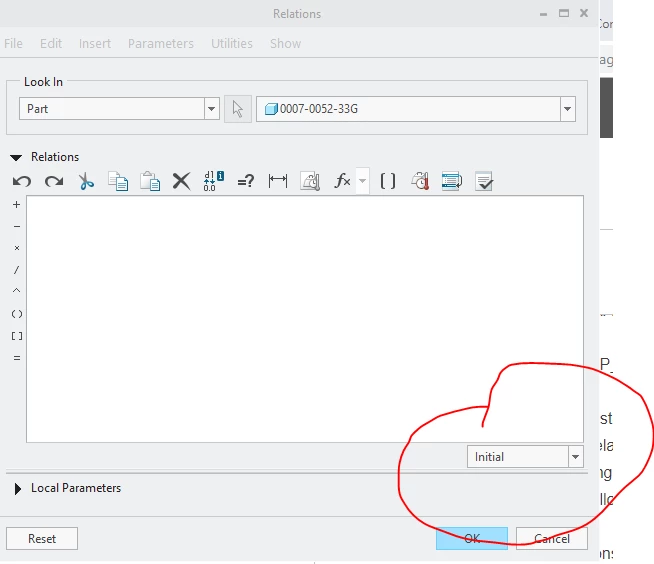
-The second was to move these relations from the "Initial" to "Post Regeneration" tab.


relations_initial.PNG


Then after verifying the FT, the drawings remained "green" dot.


Hope this helps someone else too.

6 replies

23-Emerald III
January 29, 2019

Do you have post-regeneration relations in your FT generic?

The drawing may just be flagging that the FT has been regenerated and so the drawings needs to be also?

If you verify and save the FT, then open the drawings, do they show the yellow dot for regeneration?


Dale_Rosema
23-Emerald III
23-Emerald III
January 29, 2019

What are post-regeneration relations?


I will check about the regen if the drawing has been opened after the family table (FT) regeneration.

Dale_Rosema
23-Emerald III
23-Emerald III
January 29, 2019

When I added a dimension to the family table (didn't change the values of the dim, it just wasn't in the family table) and then verified the family table (all instances were Success"ful") and then opened up one of the drawings from the family table, the little yellow dot was there "begging" for regeneration.

Dale_Rosema
23-Emerald III
23-Emerald III
January 29, 2019

A new twist tested.


I regenerate the drawing. Save the drawing. Erase all not displayed. Reopen the drawing and the little yellow dot is asking for a regeneration? Why? Nothing has changed other that I removed the model from the memory and it has to recall it.

23-Emerald III
January 29, 2019

Do like I do, ignore the little yellow light and all your problems go away!

Seriously, do you use Windchill PDMLink? I lock my files in PDMLink so they don't regenerate and that solves some of these issues.

Dale_Rosema
23-Emerald III
23-Emerald III
January 29, 2019

As stated in the first line of the post: No Windchill.


Thanks for the thought.

15-Moonstone
January 29, 2019

I'm guessing that it may be related to the fact that the completed geometry for the instances is not stored. Verifying simply ensures that the instance WILL regenerate properly. Instance accelerators might help.

24-Ruby III
January 30, 2019

@Dale_Rosema wrote:

Using Creo 4.0 (no Windchill)


I find that if I have the drawings open for (4) parts: A.drw, B.drw, C.drw, & D.drw and that these for parts are contained as instances in a family table of Generic - ABCD.prt, that when I verify the family table (and I get "Success" on all for instances A, B, C, & D) that when I go to any of the drawings, I need to regenerate the drawing to get rid of the little yellow dot.


If I just verified the family table, why is the model in the drawing wanting to be regenerated? I am not doing this in the proper order in order? Sometime I regenerate the instance and save the drawing is says that the other instances have not been regenerated.


Hi,

I tested the problem in CR4 M060 (see attached zip file). My config.pro is almost empty.

1.]

I created ft.prt.1 and 3 drawings. Drawings are saved without display.

When I open drawing I can see green light.

2.]

I modified ft.prt ... I added d1 into FT, set values, verified and saved.

When I open drawing I can see green light.


Patriot_1776
22-Sapphire II
January 30, 2019

'Morning Dale!


I think there may be a regeneration issue in creo.  I've noticed that even with non family table parts, if I try and do a save, it ALWAYS states that the model hasn't been regenerated.  Sometimes in an assembly, I do it, and it STILL tells me to regenerate it.  If I regen twice, and that still doesn't clear it, I simply proceed with the save.


Granted, our start parts in my new job have an absurd amount of parameters and bunch of relations in them, but I've never seen this behavior before.


Long story short, 2 regens should fix any relations issues.

Dale_Rosema
23-Emerald III
Dale_Rosema23-Emerald IIIAuthorAnswer
23-Emerald III
January 30, 2019

I think I found the issue causing the regeneration issue.

First: Thanks to @BenLoosli  & @Patriot_1776  for their help and getting me on the right track.


I had a couple of relations in the part file:


/*creates MASS and VOLUME using MASS_PROP_1 feature
MASS=MASS:FID_MASS_PROP_1
VOLUME=VOLUME:FID_MASS_PROP_1


Two different solutions worked and I tested both.

-The first was to comment these two relations out by adding "/*" in front of both lines. After doing this, when I verified the family table (FT) the drawings stayed "green" dot status. If I changed the FT (without verifying) and went to the drawings, they were all "yellow" status. Go back to the model and verify the FT and they were all "green" again.

-The second was to move these relations from the "Initial" to "Post Regeneration" tab.


relations_initial.PNG


Then after verifying the FT, the drawings remained "green" dot.


Hope this helps someone else too.

HamsterNL
18-Opal
December 14, 2019

@Dale_Rosema,


I am just adding my 2 cents here, but here's an overview of the main components of a PRO/Program:


INPUT

RELATIONS

EXECUTE STATEMENTS (only with assemblies)

MODEL TREE

POSTRELATIONS

MASSPROP


As you can see, the POSTRELATIONS are after the Model Tree.


HTH!