
1-Visitor
April 21, 2016
Question

Persistent Infotable of type DataTable gets deleted upon server restart

  • April 21, 2016
  • 3 replies
  • 6108 views

Hello,

I have an infotable that I set to be of type DataTable and I made it persistent. Despite this it gets emptied when the server is restarted.
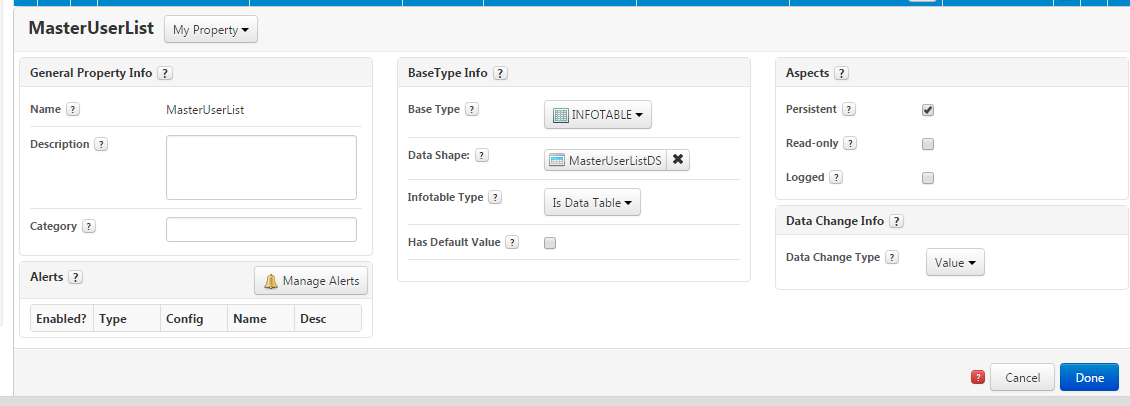
It doesn't have a default value assigned to it.

I was expecting the data from it to be stored across server restarts.  Is this behavior normal or is some sort of bug ?

Thank you,

Veronica

    3 replies

    1-Visitor
    April 21, 2016

    I also have this situation with persistent properties, even for simple type properties such as Numbers and Strings, at each tomcat restart their values do not persist.. I am wondering, if I am missing something or like you said, it is just a bug.

    5-Regular Member
    April 21, 2016

    Veronica, is this a neo install?

    vmihai1-VisitorAuthor
    1-Visitor
    April 21, 2016

    Hi Aanjan,

    This happens on a ThingWorx 6.6 with H2 and also  a ThingWorx 7.0 with Postgress.

    It doesn't happen on a ThingWorx 5.4 with Neo... with the same entities. I have imported them in the exact form.

    Thank you,

    Veronica

    5-Regular Member
    April 21, 2016

    I've seen this happen with neo; especially when data locks or thread locks happen. The change would commit to memory, but won't commit to disk. With a Tomcat restart, they essentially get wiped out as they don't get written to disk. I'll test this out on 7.0 postgres.

    1-Visitor
    January 20, 2017

    Hi Richard / Aanjan,

    Make sure to set it explicitely when modifying an Infotable Property. What does it means?

    When modifying a Infotable Property never ever do:

    me.myInfotableProperty.AddRow(whatever);

    me.myInfotableProperty.Delete(whatever);

    me.myInfotableProperty.rows.value = whatever;

    me.myInfotableProperty."WhateverModifierAction"

    Always ( repeat with me this mantra and burn in fire on your mind 😞

    1. Clone Infotable Property
    2. Modify the Cloned Infotable Property Variable
    3. Set the Infotable Property with the Cloned Instance

    Sample:

    var tempInfotable = Resources["InfoTableFunctions"].Clone({ t1: me.myInfotableProperty }); // -- 1

    tempInfotable.AddRow(whatever); // -- 2 ( or any other kind of modification on the Infotable

    me.myInfotableProperty = tempInfotable; // -- 3

    1-Visitor
    January 20, 2017

    Thanks Carles.

    Just to make sure I understand, you're saying that it's not safe (or at least not reliable) to modify an Infotable that's a property?

    Is this the official ThingWorx line, or just something you've found to be true?

    Either way, if I need to add a row to a large Infotable, it seems very inefficient way of having to do it!!

    It sounds like a useful workaround, though, so I'm grateful for that!

    Thanks again,

    Richard

    1-Visitor
    January 20, 2017

    Hi Richard,

    Yes it's the official way, at least for Persistent Infotable Properties, for non persistent you can go and modify directly the property.

    Yes it's inefficient, and yes you can have concurrency problems..., but anyway you are not dealing with a Database rows here it's just a property of type infotable which it's persisted ( I think ) as a JSON object no real tables are here.

    Carles.