Hi @vivekse ,
yes, this this is correct. I checked it in a mobile project but it was not working stable.
So,I tested somethings furter and have now a mobile project where it seems to work now - means you will received the coordinates of the eye positon , gaze vector and the up vector.
I tested in preview (this is only simulation for mobile device- so that the results/values are not relevant) but I tested it also on IOS Ipad6 and was working with the current Vuforia Viewver version:
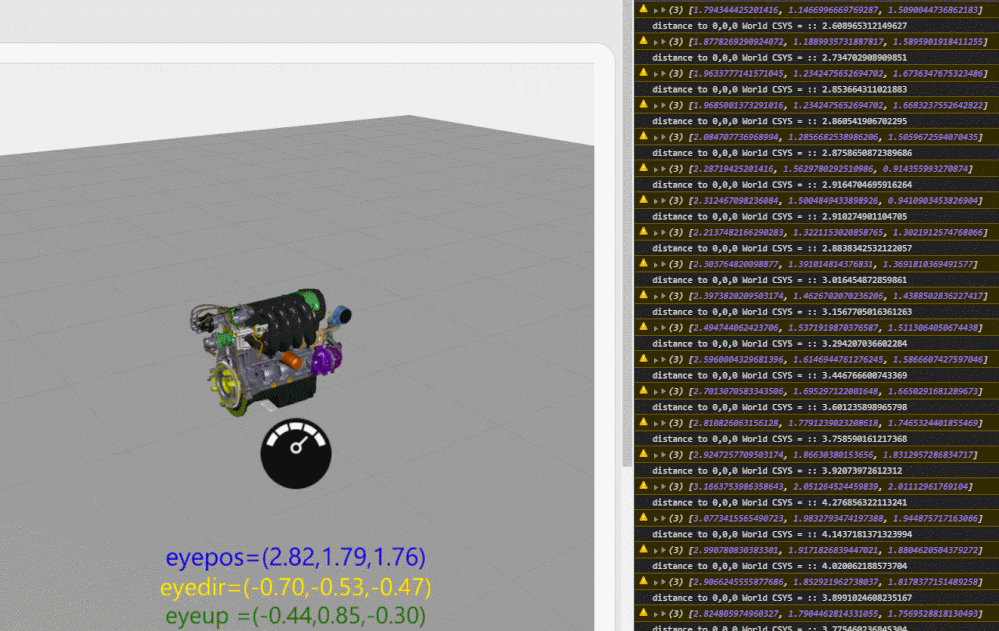
the code :
function magnitute(a1,a2,a3)
{

return Math.sqrt( Math.pow(a1, 2) + Math.pow(a2, 2)+ Math.pow(a3, 2));
}

function cross(a1,a2,a3, b1,b2,b3)
{
 return [ a2 * b3 - a3 * b2, a3 * b1 - a1 * b3, a1 * b2 - a2 * b1 ];
}
function normalizeVector(a1,a2,a3) {
 var mag = magnitute(a1,a2,a3)
 return new Vector(a1/mag, a2/mag, a3/mag);
};

/////////////////////////////////////
$rootScope.$on('modelLoaded', function() {


 $scope.setWidgetProp('3DContainer-1','enabletrackingevents',true);
 console.log("now check again the setting of the envronment")
 console.warn($scope.app.view.Home.wdg['3DContainer-1'].enabletrackingevents)

 //// end of modelLoaded
});
//=============================================================
 $rootScope.$on('tracking', function( tracker,fargs ) {

 console.warn(fargs.position);

 $scope.app.params['eyepos'] ="eyepos=("+fargs.position[0].toFixed(2)+","+fargs.position[1].toFixed(2)+","+fargs.position[2].toFixed(2)+")";
 $scope.app.params['eyedir'] ="eyedir=("+fargs.gaze[0].toFixed(2)+","+fargs.gaze[1].toFixed(2)+","+fargs.gaze[2].toFixed(2)+")";
 $scope.app.params['eyeup' ] ="eyeup =("+fargs.up[0].toFixed(2)+","+ fargs.up[1].toFixed(2)+","+fargs.up[2].toFixed(2)+")";
 var scale=1.3;
 $scope.setWidgetProp('3DImage-1', 'x', ( fargs.position[0]+fargs.gaze[0]*scale));
 $scope.setWidgetProp('3DImage-1', 'y', ( fargs.position[1]+fargs.gaze[1]*scale));
 $scope.setWidgetProp('3DImage-1', 'z', ( fargs.position[2]+fargs.gaze[2]*scale));
 //3DLabel-1 no y
 $scope.setWidgetProp('label-distance-x', 'x', ( fargs.position[0]+fargs.gaze[0]*scale)+0.0);
 $scope.setWidgetProp('label-distance-x', 'y', ( fargs.position[1]+fargs.gaze[1]*scale) -0.08*5);
 $scope.setWidgetProp('label-distance-x', 'z', ( fargs.position[2]+fargs.gaze[2]*scale));
 $scope.setWidgetProp('label-distance-y', 'x', ( fargs.position[0]+fargs.gaze[0]*scale)+0.0);
 $scope.setWidgetProp('label-distance-y', 'y', ( fargs.position[1]+fargs.gaze[1]*scale)-0.08*4);
 $scope.setWidgetProp('label-distance-y', 'z', ( fargs.position[2]+fargs.gaze[2]*scale));
 $scope.setWidgetProp('label-distance-z', 'x', ( fargs.position[0]+fargs.gaze[0]*scale)+0.0);
 $scope.setWidgetProp('label-distance-z', 'y', ( fargs.position[1]+fargs.gaze[1]*scale)-0.08*3);
 $scope.setWidgetProp('label-distance-z', 'z', ( fargs.position[2]+fargs.gaze[2]*scale));


 console.info("distance to 0,0,0 World CSYS = :: "+magnitute(fargs.position[0].toFixed(2),fargs.position[1].toFixed(2),fargs.position[2].toFixed(2)) )

 $scope.$applyAsync();
});
In the parameter eyepos, eyedir and eyeup I created binding to the text property of the lables label-dinstance-x/y/z and are displayed there.
I attached the test project

