12-Amethyst
November 28, 2023
Solved

Drawings about tolerance table

  • November 28, 2023
  • 2 replies
  • 1141 views

hello everyone


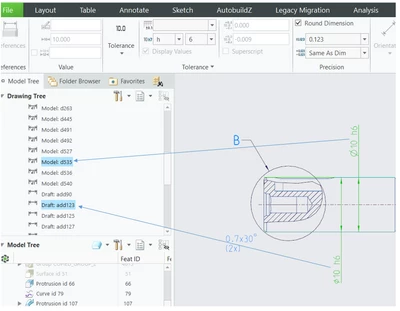
why I can't find the shaft and hole in the first drawing.what should I do to make the shaft or hole option apperance,like the second picture
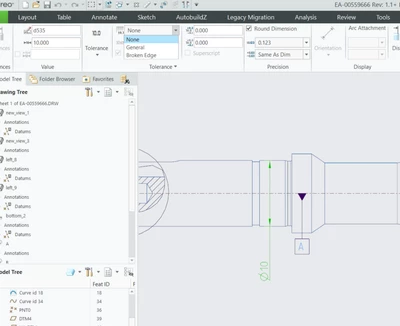
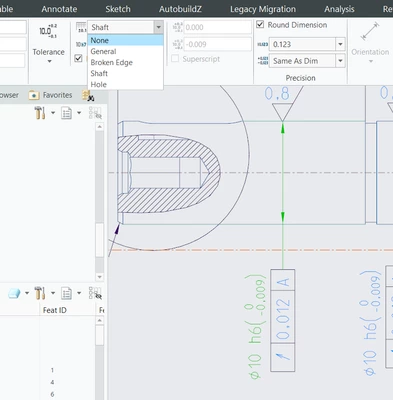
DY_10710783_0-1701161769025.png

DY_10710783_1-1701161787121.png

thanks in advance.


Best answer by Jacky.Dong

ok, thanks a lot. and here is my actual action. also for others who suffer from this question to refer.

right now I know there is two way to retrieve the tolerance table. one is in the drawing mode, the other is in the 3D mode

At first, I only retrieved the tolerance table in the 3D mode. that is why I can't find the "shaft" or"hole" when I want to mark a dimension on the draft, but it works with the dimension on the Molel.

DY_10710783_0-1701226076098.png

when I retrieved the torlance table in drawing mode, it works.

thanks again😊


2 replies

tbraxton
22-Sapphire II
November 28, 2023

Most likely you need to load the hole/shaft tolerance in your models. Follow the thread below and see if the steps outlined resolve the issue.


ISO Standard Fits and Tolerances - PTC Community

Jacky.Dong12-AmethystAuthorAnswer
12-Amethyst
November 29, 2023

ok, thanks a lot. and here is my actual action. also for others who suffer from this question to refer.

right now I know there is two way to retrieve the tolerance table. one is in the drawing mode, the other is in the 3D mode

At first, I only retrieved the tolerance table in the 3D mode. that is why I can't find the "shaft" or"hole" when I want to mark a dimension on the draft, but it works with the dimension on the Molel.

DY_10710783_0-1701226076098.png

when I retrieved the torlance table in drawing mode, it works.

thanks again😊