10-Marble
September 30, 2024
Solved

2 D Fabrication BOM table Sheet metal

  • September 30, 2024
  • 3 replies
  • 1238 views

On the Creo 2D drawing, For the Sheetmetal fabrication BOM table, is it possible to show weight of each component and total final weight?

Best answer by RaphMORIN

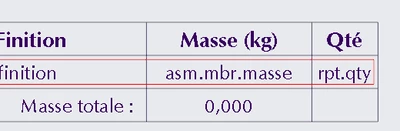
Yes you can, using a repeat region. In that region you can call the mass parameter of each part using asm.mbr.masse if your parameter is masse.

In the assembly I create a parameter adding all these weight and show it at the bottom of the table.


RaphMORIN_0-1727703299022.png


3 replies

Catalina
Community Moderator
September 30, 2024

Hi @AB_10736884,


Thank you for your question! 


I’d like to recommend to bring more details and context to your initial inquiry. 

It also helps to have screenshot(s) to better understand what you are trying to do in your process. 


Please refer to this guideline to make your questions more likely to receive a quick and useful answer. 

This will increase your chances to receive meaningful help from other Community members. 


Thank you for your participation and please let me know if you need further assistance! 


Best regards,

Catalina | PTC Community Moderator
RaphMORIN16-PearlAnswer
16-Pearl
September 30, 2024

Yes you can, using a repeat region. In that region you can call the mass parameter of each part using asm.mbr.masse if your parameter is masse.

In the assembly I create a parameter adding all these weight and show it at the bottom of the table.


RaphMORIN_0-1727703299022.png


10-Marble
October 1, 2024

The BOM table, does it allow to sum all mass at last column, like excel, do you suggest any formula 

24-Ruby III
October 1, 2024

Hi,

in assembly BOM user can use functionality described in https://support.ptc.com/help/creo/creo_pma/r9.0/usascii/index.html#page/detail/To_Get_a_Summation_of_Parameter_Values_of_a_Repe.html document.


Unfortunately I do not know how Sheetmetal fabrication BOM table is made.