
1-Visitor
July 12, 2016
Solved

Adding a right mouse button wheel

  • July 12, 2016
  • 4 replies
  • 2554 views

Hi, i'm learning to use creo direct for work and i come from solidworks.

On solidworks (and every 3D program) i use a lot the rapid views (front, side, rear, top etc...) by using this selection wheel that appears with a right mouse button click:

Gestures-Cursor.jpg

Can i add something similar to creo direct? with a plugin maybe?

Thanks.


This thread is inactive and closed by the PTC Community Management Team. If you would like to provide a reply and re-open this thread, please notify the moderator and reference the thread. You may also use "Start a topic" button to ask a new question. Please be sure to include what version of the PTC product you are using so another community member knowledgeable about your version may be able to assist.
Best answer by FriedhelmK

Hello,

such a function does not exist following my knowledge.

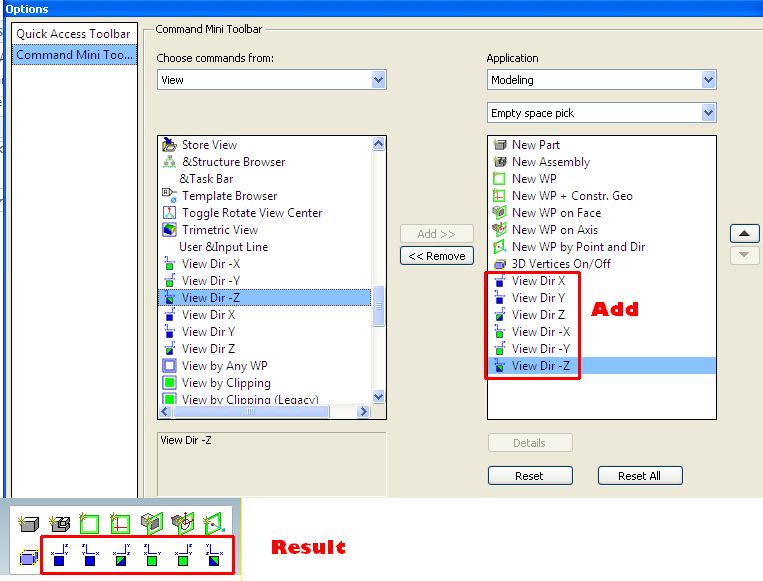
But you can use the "Command Mini toolbar" inplace.

That can you adjust in ->file ->options, see pictures.

There you can add every command that you want.

CommandMiniToolbar.jpg

Best regards

4 replies

2-Explorer
July 12, 2016

Hello Mattia Linetti

don´t know any "addon" like this.

l´m using 3Dconnexion mouse and there is something similar when press button on this mouse. But it´s only about model orientation.

3Dconnexion : Start

3dconnexion_space-addon.jpg

Regards

Milan

17-Peridot
July 12, 2016

Hello,

such a function does not exist following my knowledge.

But you can use the "Command Mini toolbar" inplace.

That can you adjust in ->file ->options, see pictures.

There you can add every command that you want.

CommandMiniToolbar.jpg

Best regards

2-Explorer
July 13, 2016

Something new for me...

Thanks for great question and useful answer...

mlinetti1-VisitorAuthor
1-Visitor
July 12, 2016

Thanks both guys.

I'm using a 3d connexion mouse too (space mouse wireless) but i prefer to use the 2 buttons on the mouse for blocking rotation axis.

The Command mini tollbar it's the best way to do it and it's similar to the solidworks wheel, i'm going to add the views and use it.