
10-Marble
January 2, 2024
Solved

Adding OR Deleting interpolation point from Spline

  • January 2, 2024
  • 1 reply
  • 1359 views

Hi, I am new to Creo. I have tried to use the Spline tool and I can't add another point OR delete an existing point upon creating a spline. I am usually forced to delete the spline and recreate it in case I want extra points or fewer points. Is there a way I can edit the spline i.e. adding another point or deleting an existing point?
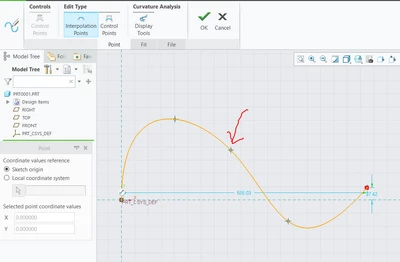

Lewis_Maina_0-1704188803942.png


Best answer by Lewis_Maina

I was able to figure out as per this step

  • Double-click the spline
  • Long press RMB on the spline and select Add a point 
    Hover on the point and RMB to delete a point

1 reply

14-Alexandrite
January 2, 2024

Hi


You need to go to modify the spline in the sketch mode 

pushkarkhanna_0-1704197823869.png


After that you can add or delete to interpolation points or control points


Pushkar


Lewis_Maina10-MarbleAuthorAnswer
10-Marble
January 2, 2024

I was able to figure out as per this step

  • Double-click the spline
  • Long press RMB on the spline and select Add a point 
    Hover on the point and RMB to delete a point