
11-Garnet
April 5, 2024
Solved

Advanced Framwork configuratione

  • April 5, 2024
  • 1 reply
  • 1202 views

I am trying to setup custom configurations and parts, different profiles in advance framework extension. I dont want to show any standard profiles available in default folder in PTC commen files. 


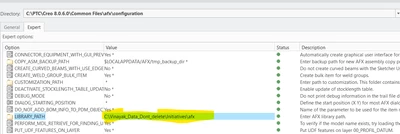
I added my local folder address in Library_path configuration setting as per image below.
VP_10265412_0-1712327961194.png

But , i still see all default profiles and connectors in AFX extension.


Is there any way to have custom library folder with all custom files only and nothing from default Creo installation folders ?


I am trying to set it up on some shared drive for my team and i am on Creo 8 and Creo 10 versions.

Best answer by SamuelBrantner

Hi @Vinayak_Patil,


that should work. Do you see any error message in the message window?


Maybe you point to the wrong directory? The directory that you select should contain the parts directory.


1 reply

SamuelBrantner
16-Pearl
April 8, 2024

Hi @Vinayak_Patil,


that should work. Do you see any error message in the message window?


Maybe you point to the wrong directory? The directory that you select should contain the parts directory.


Greetings Sam
11-Garnet
April 11, 2024

It works fine now. Thanks for your help. I was not able to set environment variable due to lack of administrator privilege.