
1-Visitor
November 4, 2022
Solved

AFX 8020 profile not displaying t slots

  • November 4, 2022
  • 1 reply
  • 2680 views

Hello,


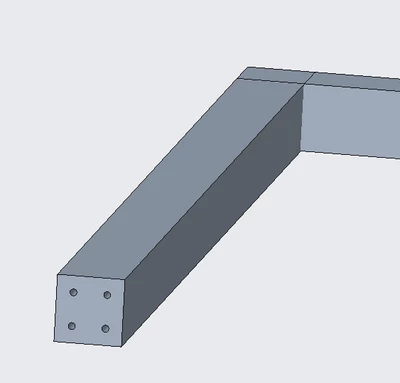
I'm using the AFX extension on Creo 4.0 and everytime I use any of the 8020 profiles, or any slotted profile, the slots never actually appear. Does anybody know why the slots never appear? Thanks!

RC_10200322_0-1667592698361.png


Best answer by SamuelBrantner

Hi @RC_10200322 ,


the reason for that is to increase performance in bigger assemblies. You can work with AFX with the profiles even if the slots are not displayed.


However you can also display the beams in full utilizing the simplified rep tool of AFX.

See here for a detailed description:

https://support.ptc.com/help/creo/creo_pma/r9.0/usascii/#page/advanced_framework/About_AFX_Simplified_Representations.html


Hope this helps.


1 reply

16-Pearl
November 7, 2022

Hi @RC_10200322 ,


the reason for that is to increase performance in bigger assemblies. You can work with AFX with the profiles even if the slots are not displayed.


However you can also display the beams in full utilizing the simplified rep tool of AFX.

See here for a detailed description:

https://support.ptc.com/help/creo/creo_pma/r9.0/usascii/#page/advanced_framework/About_AFX_Simplified_Representations.html


Hope this helps.


24-Ruby III
November 7, 2022

Hi,

it seems to me that 3rd row in table (on help page), i.e. Screw or dowel pin connections, is not correct.

16-Pearl
November 7, 2022

Hi @MartinHanak ,


what exactly is not working or seems wrong? 

BTW: The function covers only IFX screws and dowel pins. Maybe that was the issue.