AFX Profiles in WINDCHILL
Hello to all,
I'm trying to configure AFX to use profiles already uploaded to Windchill. I have created custome profiles that I can use if they are in my library folders, but once I upload them to Windchill, and delete the parts from my library folder, AFX can't find them in Windchill.
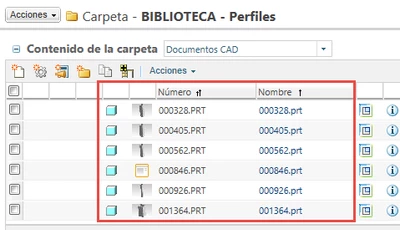
I have uploaded the profiles to Windchill:
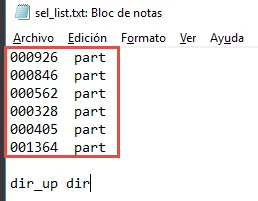
I have "sel_list..txt" pointing at them:
And when I try to assemble a profile instance in the project using these profiles, I get the error message "An error occurred while loading the model":

I have tried with the AFX "options.cfg" properties suggested in this article https://support.ptc.com/appserver/cs/view/solution.jsp?n=CS256023:
"FOR_INTRALINK_33 to YES"
"LOAD_COPY_COMPONENTS_FROM_INTRALINK to YES"
But it still doesn't work.
What am I doing wrong? Is is possible to use profiles from Windchill? Where can I find a guide to configure AFX to be used with profiles from Windchill?
Thank you for your help!