12-Amethyst
December 12, 2022
Solved

align table in drawings

  • December 12, 2022
  • 1 reply
  • 2396 views

Is it possible to align tables to another tables or to view or any entity in drawing sheet?

Best answer by kdirth

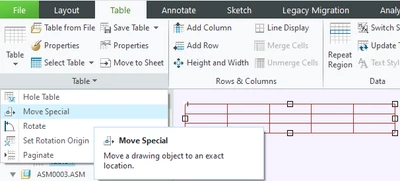
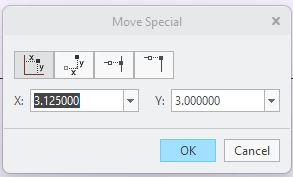
The only position control I know of, is to use Move Special.

  • Select the table
  • Select Move Special
  • Select handle on table for reference point
  • Type in coordinates to move to

kdirth_2-1670860063893.png

kdirth_1-1670860034359.png

1 reply

kdirth
21-Topaz I
kdirth21-Topaz IAnswer
21-Topaz I
December 12, 2022

The only position control I know of, is to use Move Special.

  • Select the table
  • Select Move Special
  • Select handle on table for reference point
  • Type in coordinates to move to

kdirth_2-1670860063893.png

kdirth_1-1670860034359.png

There is always more to learn.
1-Visitor
January 10, 2025

Hello, thanks for the tip about the coordinates, but it's not a solution. The first table could be tied to a sketch, but to align a table to another table, you have to have at least a working vertex or something. so The first can be alligned, but not the second, i can't measure it so i can't put coordinates. There is a way to manage the tables like sketches? they are made of lines after all...


 

Thanks!

kdirth
21-Topaz I
21-Topaz I
January 10, 2025

The first button is absolute measurement of the drawing (Our format has 0.0 at lower left corner).


Place the first table then use move special to determine location and adjust to an easy to remember number if desired.

Place second table in position and use move special to align as desired.


Another option is to turn on the sketching grid and snap to grid intersections.  The vertex you drag will snap to the grid.


There is always more to learn.