1-Visitor
April 7, 2022
Solved

Appearances in Multibody parts

  • April 7, 2022
  • 1 reply
  • 2270 views

Is it possible to propagate an appearance, defined in a multibody part, down to a dependent part defined by one of the bodies?  For example lets say you have a surface and you want to shade it with two different colors in order to communicate two different textures to a mold maker.  If this is done in the multibody part can it be propagated down to the dependent parts?

Best answer by tbraxton

I believe that you are referring to an appearance state. If you create an appearance state in your model and then use the create part from body option to make a derivative part then the newly created part should have the appearance state that was active on the body when you created the part.


Here is an example:

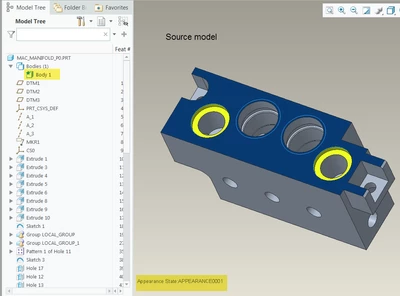
The blue and yellow surfaces are part of an appearance state created in the source part.
tbraxton_0-1649719225335.png


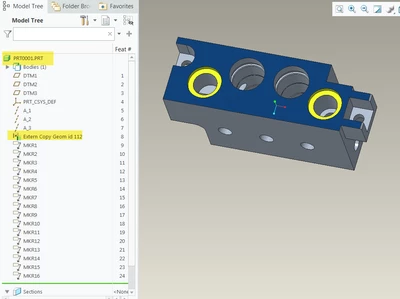
The derivative model created using Body 1 above created with the appearance state 1 active:

The blue and yellow surfaces are carried over as seen below.
tbraxton_1-1649719356134.png


I believe this appearance is persistent in the derivative model and is not parametric with the source part. If you are asking how to make the appearance of a part derived from a body then you will have to ask PTC support.  Appearance states are not copied over to a part derived from body as described above.



1 reply

tbraxton
22-Sapphire II
22-Sapphire II
April 7, 2022

Yes this is supported.

Set the appearance and assign material per body

https://support.ptc.com/help/creo/creo_pma/r7.0/usascii/index.html#page/whats_new_pma/multibody-injection_molded_material_parts.html# 


Support for Multibody Parts in Data Exchange:

Body characteristics, such as body name and body appearances, are transferred


Note that you will need the proper license for some features when using data exchange. 

1-Visitor
April 11, 2022

Hello tbraxton,


Thanks for the reply.  Can you elaborate a little on second statement above, "Body characteristics, such as body name and body appearances, are transferred".  The transferring of the body name is pretty straight forward but I do not see how to consistently transfer the body appearance.  I was kind of hoping that if a created a named appearance in the view manager that this same appearance would be available in the child part.


Thanks in advance.

tbraxton
22-Sapphire II
tbraxton22-Sapphire IIAnswer
22-Sapphire II
April 11, 2022

I believe that you are referring to an appearance state. If you create an appearance state in your model and then use the create part from body option to make a derivative part then the newly created part should have the appearance state that was active on the body when you created the part.


Here is an example:

The blue and yellow surfaces are part of an appearance state created in the source part.

tbraxton_0-1649719225335.png


The derivative model created using Body 1 above created with the appearance state 1 active:

The blue and yellow surfaces are carried over as seen below.

tbraxton_1-1649719356134.png


I believe this appearance is persistent in the derivative model and is not parametric with the source part. If you are asking how to make the appearance of a part derived from a body then you will have to ask PTC support.  Appearance states are not copied over to a part derived from body as described above.
