
6-Contributor
October 13, 2025
Solved

Applied Model Appearance Disappears When Modifying Object

  • October 13, 2025
  • 2 replies
  • 972 views

Hello,


I have applied an appearance to a model for carbon steel. I added the appearance by highlighting the whole part, then selecting the desired appearance. Where the issue comes into play is if you modify the part in any way, it will change the cut/intersected surfaces back to the default generic/grey appearance while it needs to be the new carbon steel appearance. Is there some sort of setting to fix this? Please see example below.
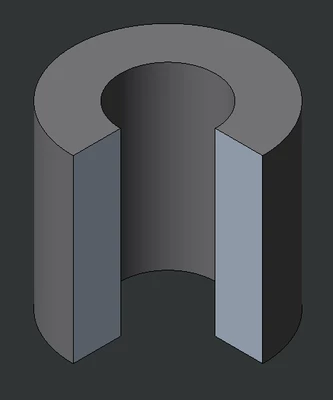
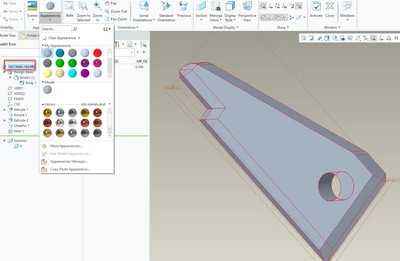
 

JS_12786992_0-1760365690997.png


Best answer by StephenW

The way I get the part appearance set so cuts don't affect it is I pre-select the part in the model tree and then select the appearance I want it to be set to.

StephenW_1-1760368051212.png


2 replies

23-Emerald III
October 13, 2025

I don't see this at all when I am assigning color to the part level.

I do utilize coloring all the surfaces to help sometimes show machining processes, for my own visualization.

From what I see of your color change it's like I would anticipate an "all surfaces" selection using the right mouse button, this would "reveal" the interior color as different if cuts were made after the color selection.


StephenW_0-1760367674580.png


StephenW23-Emerald IIIAnswer
23-Emerald III
October 13, 2025

The way I get the part appearance set so cuts don't affect it is I pre-select the part in the model tree and then select the appearance I want it to be set to.

StephenW_1-1760368051212.png


6-Contributor
October 13, 2025

@StephenW Thank you, this is exactly what I was looking for! It appears that before when I was clicking and dragging to highlight the model it was only grabbing the exterior surfaces and not the body itself.

23-Emerald III
October 13, 2025

What version of Creo are you using?

Did you select the individual surfaces or the part option by using the drop down menu in the lower right of the screen?

You need to use the body option to get the full solid to take on your new appearance.