

Solved
Arrow color - sketching
Is there a scheme to the arrow colors while sketching?
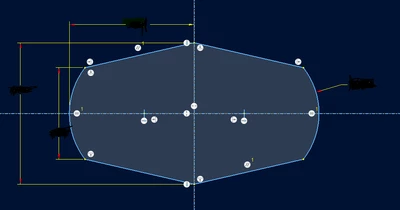
I am making a simple extrude and noticed that 6 arrows are red and 1 is yellow.
Is there any significance to this?
Thanks,
Dale
Creo 9.0.4.0

Is there a scheme to the arrow colors while sketching?
I am making a simple extrude and noticed that 6 arrows are red and 1 is yellow.
Is there any significance to this?
Thanks,
Dale
Creo 9.0.4.0
Hi,
This is an improvement from creo8, the color arrow means that you can drag from it, and not color arrow mean you can not drag from it.
You can see this improvement in this video https://www.youtube.com/watch?v=sxS5nlXGHEA&t=75s minute 1:12
best whishes
Enter your E-mail address. We'll send you an e-mail with instructions to reset your password.