
11-Garnet
February 25, 2025
Question

Asemblies Crash Creo

  • February 25, 2025
  • 1 reply
  • 581 views

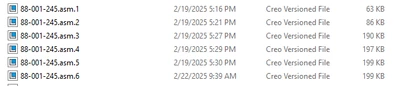
We use Creo 9.0.4.0. I have created a piano hinge from an imported STEP file. This involved cutting the fixed hinge and reassembling it so I can change the open angle of the two leaves of the hinge. The screenshot below shows the assembly list of the part.
 

JBB_2-1740505532827.png


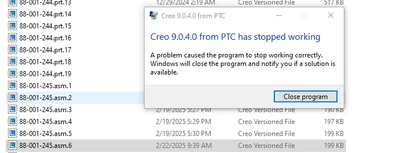
After closing out Creo for the day 0n 2/22 and attempting to work on the file today, Creo crashes and I get this error message:
JBB_1-1740504877967.png

I found that I can open asm.1 and asm.2 outside of the working directory, but the .asm more recent of .1 and .2 cause Creo to crash. 

Has anyone experienced this?

I developed a work-around by copying asm.2, renaming it. I can get the assembly to open. 

Why would the latest files crash?

Any insight would be appreciated. Thank you.

1 reply

16-Pearl
February 25, 2025

Hi @JBB76 


This looks like a crash from outside Creo rather than a Creo traceback.  Have you opened a case with PTC support?


It looks like there was a big jump in storage size between asm.2 and asm.3.  Perhaps something changed between these versions can be attributed to the cause but the community would need additional information about the changes to better understand.

Is it possible to upload the dataset?


Mike

JBB7611-GarnetAuthor
11-Garnet
March 5, 2025

Mike,

Sorry for the late reply.. I did open a support ticket.

It appears that the increase in file size from 2 to 3 is that somehow the file became corrupted, thereby causing the crash. We are working through that presently. 

Regards,

Jon