
1-Visitor
April 13, 2011
Solved

Assembly BOM List Help

  • April 13, 2011
  • 1 reply
  • 14629 views

I am using Creo Elements/Pro Release 5.0 Datecode M070

I am a new user and I am working on a assembly print and I am having some difficulty displaying (what I believe to be) the top level assembly.

My current BOM displays every component that is used in that final assembly. The final assembly is composed of individual components as well as a another assembly. There is an interesting note: my table does not display the name of my sub-assembly (only the components that used in that assembly). My current repeat region table attributes are: No Duplicates, Recursive, Bln by Part, No Cbl Info. This is how the table displays:
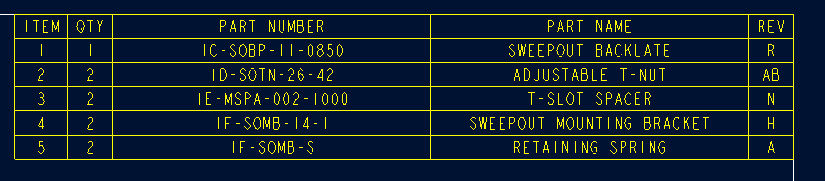
BOM table 1.bmp

Item number (4) and (5) belong to a sub-assembly named 1F-SOMB-14-1-S. On this BOM, the sub-assembly 1F-SOMB-14-1-S is not listed.

I have performed some searches on this website and on the PTC.com knowledge base and I changed my attributes from Recursive to Flat. The results were not what I expected. Items (4) and (5) were simply removed from my table even though I did not remove them from my assembly. My sub-assembly 1F-SOMB-14-1-S was not added. I am confused with this. Here is the new table with the following attributes: No Duplicates, Flat, Bln by Part, No Cbl Info.

BOM table 2.bmp

Here are the table report parameters for this 1-d repeat region table. (from left to right)

&rpt.index | &rpt.qty | &asm.mbr.name | &asm.mbr.DESCRIPTION1 | &asm.mbr.REVISION

Thank you in advance for the help!
Best answer by MikeMinsterkett

No problem. You don't have to put the type column in to get it to work. I just do this so I can make sure it makse sense to me. I think what you want is a nested repeat region. This is done by creating seperate repeat regions in the same table. The number of regions depends on how many levels you want.

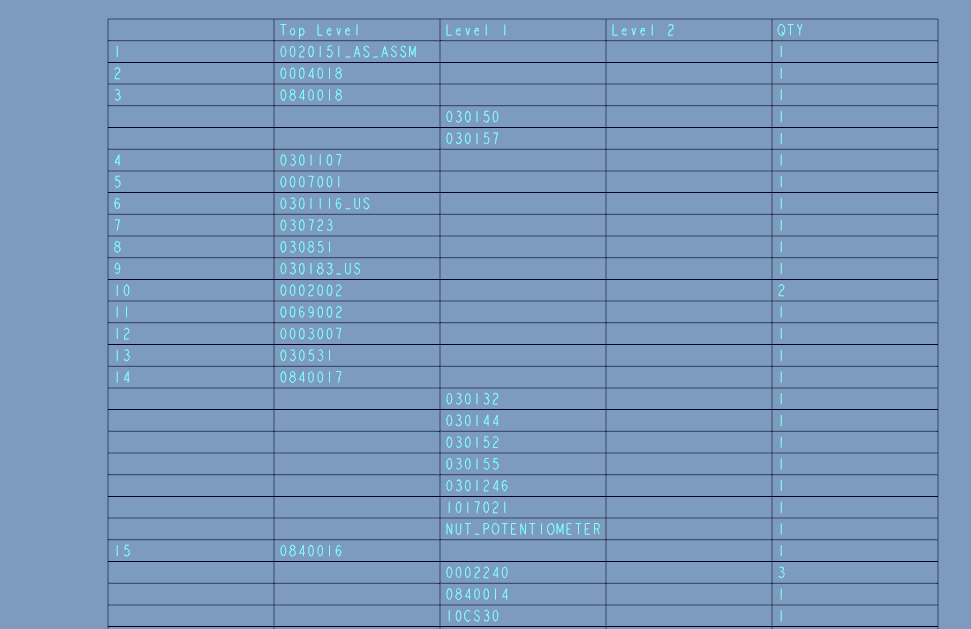
You can see below. You can see that 0840018, 0840017 & 0840016 are all top level subassemblies. The components in these subassemblies are listed in the Level 1 column. You have to tweak the attributes to get it displayed the way you want. If this is what you want I can send you the table file to try. Let me know.

ScreenHunter_03 Apr. 14 10.58.gif

1 reply

WesWeaver1-VisitorAuthor
1-Visitor
April 13, 2011

Here is an image of the expanded Model Tree for the assembly in question:

Expanded Model Tree.bmp

1-Visitor
April 14, 2011

Here is a picture of a flat BOM table.

ScreenHunter_02 Apr. 14 08.53.gif

Here is a picture of my recursive BOM table.

ScreenHunter_01 Apr. 14 08.52.gif

Is the recursive what you are trying to achieve?

WesWeaver1-VisitorAuthor
1-Visitor
April 14, 2011

Mike,

Thank you for the response. I would like to build a FLAT table for this situation. However, I would like to find information on how to build both a Recursive and a Flat BOM table. I noticed from the tables that you have shown - the 'type' is listed (assembly / part). Am I required to do the same with my BOM table in order for it to work correctly?