
10-Marble
January 25, 2021
Question

Assembly name in BOM table relation

  • January 25, 2021
  • 1 reply
  • 4227 views

I want to add portion of main assembly name into repeat region for each member:


FIXTURE=extract(asm_name,8,5)
DETAIL=FIXTURE + '-' + itos(rpt_index)


For parts it works as expected: 01-01-1, 01-01-2, etc

The problem is that "asm_name" in repeat region relations returns value for sub-assembly name which exists in main assembly: S_160-5, S_160-6.
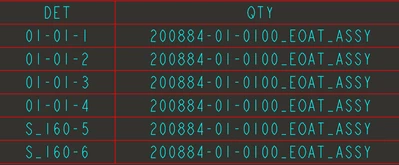
dveljkovic_1-1611598345497.png

If I place "asm.name" under QTY column everything is as expected.

DET column gets values from relation: rpt.rel.DETAIL

What am I doing wrong?

1 reply

24-Ruby III
January 26, 2021

@dveljkovic wrote:

I want to add portion of main assembly name into repeat region for each member:


FIXTURE=extract(asm_name,8,5)
DETAIL=FIXTURE + '-' + itos(rpt_index)


For parts it works as expected: 01-01-1, 01-01-2, etc

The problem is that "asm_name" in repeat region relations returns value for sub-assembly name which exists in main assembly: S_160-5, S_160-6.

dveljkovic_1-1611598345497.png

If I place "asm.name" under QTY column everything is as expected.

DET column gets values from relation: rpt.rel.DETAIL

What am I doing wrong?


Hi,

please upload your data.

10-Marble
January 26, 2021

I have found a "workaround", as usual with Cre(p)o.

I made new column and placed asm.name in that column and then I called asm_name in relation for first column. I will "hide" asm column afterwards because its not needed to be seen on this table.

16-Pearl
January 26, 2021

Another way to accomplish this would be to add asm_name to the list of local parameters within the repeat region. It's a better way to calculate the value without having to deal with shown/hidden columns. When calculating values for BOM attributes within a repeat region, the relations need access to the thing they're trying to calculate. 


  1. Edit the relations of your repeat region
  2. Expand the list of local parameters
  3. Click the plus icon to add a new parameter to the repeat region


Ty