
23-Emerald III
February 22, 2023
Solved

Assigning color with a material file

  • February 22, 2023
  • 3 replies
  • 2187 views

Is it possible to define a color from appearance.dmt to a specific material in the .mtl file itself?

I want all parts made from SAE J995 Grade 5 to be a certain color. Is there an entry that can be put in the material file to change the color when the material is assigned?

 

Best answer by kdirth

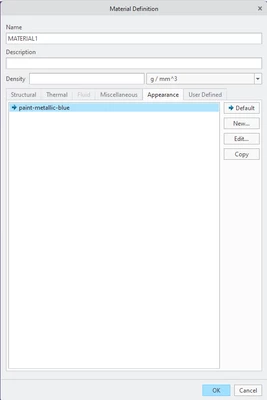
When defining (or redefining) the material, go to the appearance tab, select new, pick a color, and set the color as default.  Back in the Materials window select your material and save.

kdirth_0-1677092226425.png


3 replies

Chris3
21-Topaz I
February 22, 2023

Yes it is. See the article below:


https://www.ptc.com/en/support/article/CS50533 

Chris3
21-Topaz I
February 22, 2023

I linked to the wrong thing. Try this instead:

https://support.ptc.com/help/creo/creo_pma/r9.0/usascii/index.html#page/model-based_definition/to_edit_an_appearance_of_a_material.html 


In short you need this in your mtl file:

{
Name = PTC_DEFAULT_APPEARANCE
Type = String
Default = 'glass'
Access = Full
},


and you need a corresponding appearance in your global.dmt file

kdirth
21-Topaz I
kdirth21-Topaz IAnswer
21-Topaz I
February 22, 2023

When defining (or redefining) the material, go to the appearance tab, select new, pick a color, and set the color as default.  Back in the Materials window select your material and save.

kdirth_0-1677092226425.png


There is always more to learn.
24-Ruby III
February 22, 2023

Hi,

it seems to me that the appearance mentioned in material definition file must be included in global.dmt file.

Please read https://www.ptc.com/en/support/article/cs227662 article.