12-Amethyst
August 23, 2023
Solved

Balloon note in Creo 4

Hello,


When I'm writing balloon note with a multi-lines it makes them as a separate balloons aligned Horizontally.
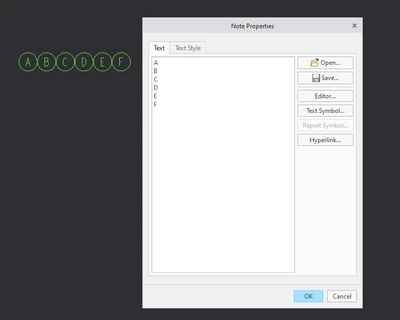
ELDAFRAWY_0-1692774197277.png


Is there any method to make them aligned Vertically like this in one note like the previous one
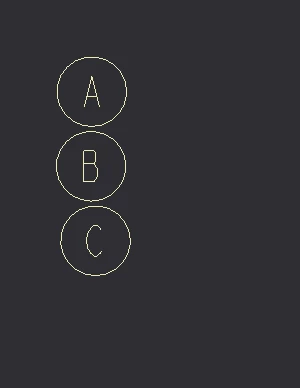
ELDAFRAWY_1-1692774252996.png


24-Ruby III
August 23, 2023

Hi,

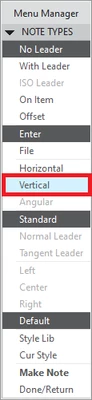
use Vertical option. In my test values were displayed from bottom to top, so you'll probably have to enter the values in reverse order.

MartinHanak_0-1692778713031.png


3 replies

24-Ruby III
August 23, 2023

Hi,

use Vertical option. In my test values were displayed from bottom to top, so you'll probably have to enter the values in reverse order.

MartinHanak_0-1692778713031.png


Translate
ELDAFRAWY12-AmethystAuthor
12-Amethyst
August 23, 2023

Hello Martin,


It works great.


Can I have both as a table distribution like this

ELDAFRAWY_0-1692781294108.png

(In a single note)

Translate
24-Ruby III
August 23, 2023

@ELDAFRAWY wrote:

Hello Martin,


It works great.


Can I have both as a table distribution like this

ELDAFRAWY_0-1692781294108.png

(In a single note)


Hi,

I do not think that both direction "table" can be created using Balloon Note command. I am sorry I cannot offer any other solution.

Translate