
2-Explorer
January 29, 2015
Solved

"Batch" distribution of rules driven layers

  • January 29, 2015
  • 2 replies
  • 3015 views

Hello all,

my problem is simply, but l don´t know fulfil solution. All my layers are rules based (see picture bellow) and l need to propagate/distrubuted it into all my parts and assemblies. l don´t want to copy layer manualy into each part. l think Modelcheck isn´t able to copy rules, just create a leayrs with desired name, but RULES are missing = functionality is lost...

Can trail file help me? Don´t have any expiriences with trail files...

Can some kind of external application help me? Which one?

Do you have any other idea how to copy/propagate them?

Thx all for responses...
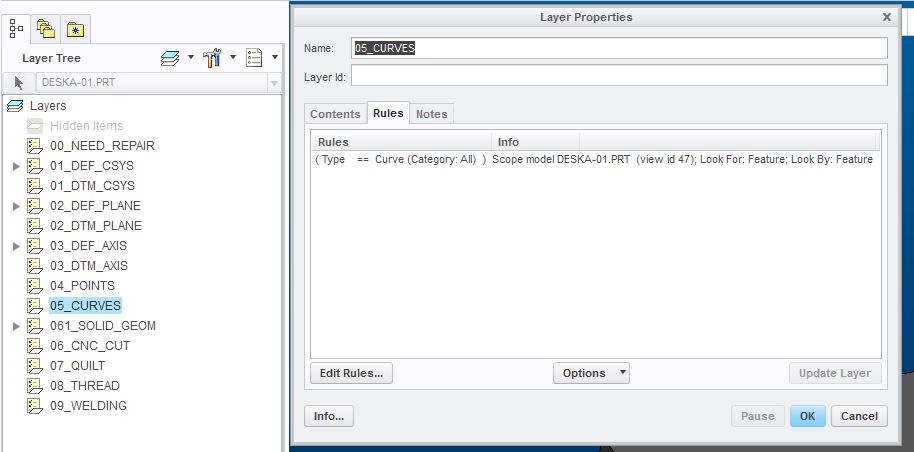
Layer_rules.JPG


This thread is inactive and closed by the PTC Community Management Team. If you would like to provide a reply and re-open this thread, please notify the moderator and reference the thread. You may also use "Start a topic" button to ask a new question. Please be sure to include what version of the PTC product you are using so another community member knowledgeable about your version may be able to assist.

Best answer by Patriot_1776

Put those rules-based layers in your start parts/assemblies, create a junk assembly, insert all the parts you want to change, delete all the existing layers from thos parts, then select all the layers you want at the assembly level, and "Extend rules", this propagates all the layers with rules down into any parts and/or assemblies in your junk assembly. Exit and make sure you save all the other parts/assemblies.

Here's where I first learned of them:

2 replies

24-Ruby III
January 29, 2015

Milan,

you can save rule definition to a Query file and later retrieve it.

rule_editor.png

Martin Hanak

mbonka2-ExplorerAuthor
2-Explorer
January 31, 2015

Thanks for answer,

l´ve never used Save/Retrieve Query To File, have to inspect these function.

Patriot_1776
22-Sapphire II
January 29, 2015

Put those rules-based layers in your start parts/assemblies, create a junk assembly, insert all the parts you want to change, delete all the existing layers from thos parts, then select all the layers you want at the assembly level, and "Extend rules", this propagates all the layers with rules down into any parts and/or assemblies in your junk assembly. Exit and make sure you save all the other parts/assemblies.

Here's where I first learned of them:

mbonka2-ExplorerAuthor
2-Explorer
January 31, 2015

Hello Frank,

thanks for answer and PPT presentation, It´s helpful.The way you described is exact the same like l usually do it. At least l know, that l´m doing it right way.

Layers can be deleted via ModelCheck, but what about passing them back?

The target of my question is AUTOMATION. l don´t want open each main assembly and past layers...

In generall l don´t have so much assemblies/parts, so the way you described isn´t so bad... (1-2 work days)

Thx

Patriot_1776
22-Sapphire II
February 2, 2015

If you do it at the TOP assembly, EVERYTHING below will be fixed.