
10-Marble
February 24, 2026
Question

Blue object lines in Assembly

  • February 24, 2026
  • 2 replies
  • 70 views

I have a small class project.  A number of students have bright blue lines shown on parts, but I do not.  We're all in Creo +.  The lines don't appear in the part view, just the assembly.  They aren't visible sketches, and I've tried hiding all the different layers and I can't make them go away.  

What am I missing? 
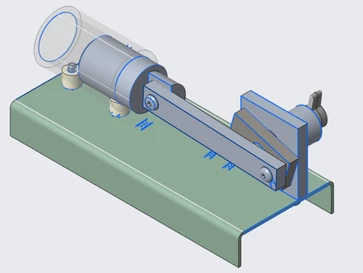
 

Screenshot 2026-02-24 153531.png

2 replies

21-Topaz I
February 25, 2026

Looks like copied edges.  Can you show the model tree so that we can see what types of objects there are.


I would ask for the model, but you are most likely using a student version which most of us can not open.

kleipold10-MarbleAuthor
10-Marble
February 27, 2026
 

Nothing really odd about it - but when I opened it today - everything looked normal. I'm not sure what changed.  I'll ask the class if they are still seeing similar issues. 

Screenshot 2026-02-27 155730.png

12-Amethyst
February 25, 2026

They could be from the internal sketches used in the part features. There may be a config option that isn't set to hide internal sketches. You could create a layer and add them to it.