
1-Visitor
November 18, 2020
Question

BOM Qty w/ Nested Repeat Region

  • November 18, 2020
  • 1 reply
  • 4756 views

Hopefully you guys can help, because I'm sure there is an easier way than we are doing this.

We have assemblies that ship along with bagged up extra hardware. In a lot of cases we also call out hardware that will be required but we are not providing. This has been an annoying task for us, but we have been successful in most regards. The main issue lies when the same hardware is used in the assembly and also is shipped loose.

Currently we create one BOM that lists the parts/hardware that is assembled in the shop. We then place a separate BOM for each ship loose pack on the next sheet, filter out all shop assembled items, and flatten this pack.

swood_0-1605737050020.png

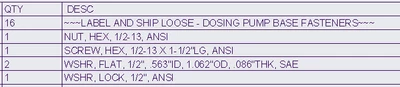
This works unless some of this hardware is also in the top level, because it then merges with it and will not appear in this BOM. The BOM above represents (16) assemblies of a nut, screw, lock, and (2) flat washers. These all get thrown in a bag with a label for shipping.


What I would like to do is created a Nested Repeat Region that filters the BOM for only items with "~~~" in the description (that's how we designate items that aren't assembled) and then be able to show the total quantity of items that are going in each bag.


I've accomplished all of this except the total quantity. What I have is the quantity of the assembly and then of each item in that assembly. Although it is technically right, it isn't what we need.
swood_1-1605737258868.png

Is there a Repeat Region relation that I can use to tell it to multiple all part quantities by the assembly quantity and list that in a new parameter that I will assign to that column? (part.qty * asm.qty = total.qty)

We've done this for multiplying an entire BOM's quantity by a set number, but not for multiplying a part by its parent's quantity.


Thanks.

1 reply

swood1-VisitorAuthor
1-Visitor
November 23, 2020

It looks like no one has any idea how to multiply the quantities based on parent quantities

Does anyone know of a better way to do this in general?

Is there not enough information or is my original post confusing?


I appreciate any feedback I can get.

1-Visitor
December 2, 2020

I personally didn't really understand what you meant, a dummy assembly & model tree might help.

If I understood that correctly you flag the components as:

-assembled in the shop

-shipped loose

-extra hardware


Do you flag them using parameters?

And what do you mean by "This works unless some of this hardware is also in the top level, because it then merges with it and will not appear in this BOM"?


swood1-VisitorAuthor
1-Visitor
December 4, 2020

Daniel,

Thank you for taking a look.

We don't flag anything with Parameters. I've seen this mentioned while researching this issue, but am still not sure how it works, or to use it. It certainly sounds like something that would be useful to us. My take is that you use a Parameter to mark something as "shipped loose" etc. but then I'm not sure how you use that to your benefit in the BOM. Do you have any links, etc. that further describe the process/implementation?

To better explain, let me use flange hardware as an example. We make an assy with one bolt, etc. in it and then put that in a flange however many times are necessary.

In a typical assembly we flatten this sub so the individual hardware shows up in the BOM.

In some cases though, we provide the hardware but it is field assembled instead of in the shop. In this cases we add another table with the repeat region, filter out all other items, and then flatten the hardware sub. This allows us to show the assembly (which is used to name the box of hardware being provided) and then the quantity of each piece of hardware that should be in the box. This process works perfectly fine in almost every case. Where we have issues is if there shop assembled hardware within the assembly and more of the same hardware being shipped in a box. If this is the case, even if we have filtered out all hardware in the region before flattening the hardware sub, the region combines these like items with the ones that were already filtered out (if 4 bolts are assembled and 8 were shipping loose, it combines them into a single line item with a qty of 12).


I hope that clarifies what we are doing.