
4-Participant
November 7, 2024
Solved

BOM Table Repeat Region not functioning

  • November 7, 2024
  • 2 replies
  • 4266 views

Hello, I would like to to override a few items in a BOM table and keep all the items programed. 


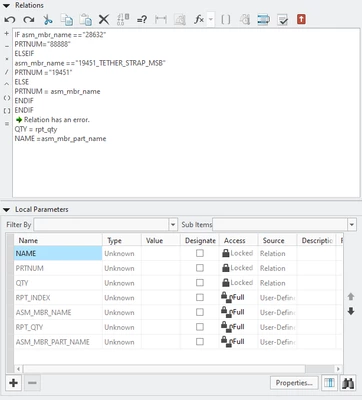
I have the following code entered but its not working, 

I would like "XX" to be renamed to the actual part name "HEX BOLT"


Are there any specific settings I need to review?

Does the type need to be defined, if so where do I do that? 

The view contains an assembly with a simplified rep. 

I'm using Creo 7.0
 

Best answer by MartinHanak

@RL_4555254 wrote:

Thank you!

That helps. I did not know I needed to add the original parameters


I can now get everything to load.

key point is defining the other items as well. 

The if statements will work by themselves, but I cannot get multiple to work. 

the syntax seams very specific with spaces and " 

right now it won't accept the second endif. 

it would not accept Elseif with a space "Else if" 

is there a syntax guide?


RL_4555254_0-1731089849731.png


Hi,

elseif is not implemented.


Use following code


if asm_mbr_name == "28632"
 PRTNUM="88888"
else
 if asm_mbr_name == "19451_TETHER_STRAP_MSB"
 PRTNUM="19541"
 else
 PRTNUM=asm_mbr_name
 endif
endif


2 replies

4-Participant
November 7, 2024

RL_4555254_0-1731014595435.png


kdirth
21-Topaz I
21-Topaz I
November 8, 2024

Here are my cheat sheet instructions:  Looks like you are missing the rename in the repeat region and the else statement.

CHANGING ITEM IN BOM TABLE 

  1. Select “Repeat Region” from “Table” tab 
  2. Select “Switch Syms” then “Done.” 
    1. If first item cell of column to be changed starts with “rpt.rel” go to 3. 
    2. Double click on first item cell 
    3. Select rpt… then rel… then User Defined. 
      1. Type in Relation name- PRTNUM for part number/QTY for quantity/NAME for Description 
  3. Select “Repeat Region” from “Table” tab 
  4. Select “Switch Syms” 
  5. Select “Relations” then select the table. 
  6. Enter text to make change required and select OK/Done. 
    1. Part Number change: 
      • IF asm_mbr_name =="S12345_XXX" 
      • PRTNUM="S12345" 
      • ELSE PRTNUM= asm_mbr_name 
      • ENDIF 
    2. Quantity change: 
      • IF asm_mbr_name ==”S12345” 
      • QTY="XXX" 
      • ELSE QTY=rpt_qty 
      • ENDIF 
    3. Name change: 
      • IF asm_mbr_name=="SA47662" 
      • NAME="XXX" 
      • ELSE NAME=asm_mbr_name 
      • ENDIF 
  7. Select OK 
  8. Select “Update Tables” from menu then Done.  
  9. Multiple changes in a column can be done by nesting IF statements: 
    • IF asm_mbr_name =="S12345_XXX" 
    • PRTNUM="S12345" 
    • ELSE IF asm_mbr_name =="S23456_XXX" 
    • PRTNUM="S23456" 
    • ELSE PRTNUM= asm_mbr_name 
    • ENDIF 
    • ENDIF 
      • One ENDIF for each IF statement 
There is always more to learn.
4-Participant
November 8, 2024

Thank you for the response, 

I still seem to be missing something. 

I left the index alone. 

The BOM is not populating after changing the parameter name, and relations won't recognize the old parameter name now.

I ensured the model/rep was selected and updated tables.  


RL_4555254_0-1731082219126.png

RL_4555254_1-1731082335202.png


24-Ruby III
November 8, 2024

@RL_4555254 wrote:

Thank you for the response, 

I still seem to be missing something. 

I left the index alone. 

The BOM is not populating after changing the parameter name, and relations won't recognize the old parameter name now.

I ensured the model/rep was selected and updated tables.  


RL_4555254_0-1731082219126.png

RL_4555254_1-1731082335202.png


Hi,

please replay uploaded video. It will help you to solve your problems.